


概述
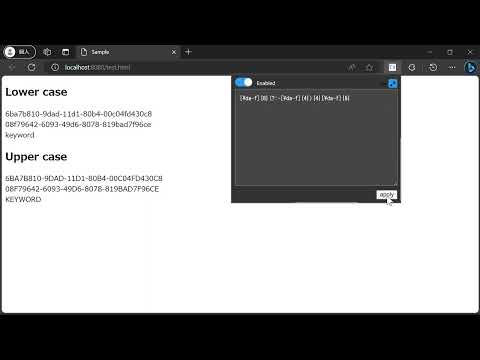
Blurring sensitive specified text/keyword.
Blur text/keywords you specified in web pages. When you need to stream or record using your web browser, you can hide your sensitive information i.e. email, account name, address etc by blurring. You can use regular expression to blur keywords by enabling `Use Regular Expression` button. And if you want to switch the blur mode between `case sensitive` and `case insensitive`, you can use `Match Case` button. If you face an issue with this extension, please provide information and reproducing steps on the following page. https://github.com/horihiro/TextBlurrer-ChromeExtension/issues/new?template=bug_report.md Change logs See https://github.com/horihiro/TextBlurrer-ChromeExtension/blob/main/CHANGELOG.md
4.6 星(5 星制)9 个评分
详情
- 版本0.2.6
- 上次更新日期2026年1月1日
- 提供方horihiro.dev
- 大小38.38KiB
- 语言English (United States)
- 开发者
邮箱
horihiro.dev@gmail.com - 非交易者该开发者尚未将自己标识为交易者。欧盟地区消费者须知:消费者权利可能不适用于您与该开发者达成的合约。
隐私权
该开发者已声明,您的数据:
- 不会因未获批准的用途出售给第三方
- 不会为实现与产品核心功能无关的目的而使用或转移
- 不会为确定信用度或放贷目的而使用或转移
支持
若有任何疑问、建议或问题,请访问开发者的支持网站