

TestMate — Test Execution & Evidence
3 ratings
)
Overview
Execute test cases beside the app under test: prepare the browser, capture provable evidence, and log bugs without leaving the tab.
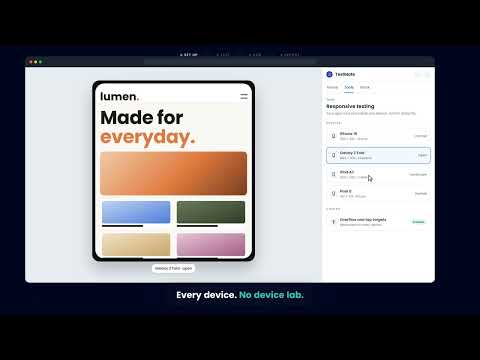
TestMate is a side panel for software testers. It sits next to the web application you are testing, so you can execute a test case, prepare the browser it runs in, capture evidence, and file the bug without leaving the tab. TestMate is the browser companion to Mozark TCM (Test Context Manager). It works with the test plans, test runs, test cases, bugs and requirements in your TCM workspace. WHY TESTMATE Most browser test tools change things you can't see. A tab throttled to 2G looks exactly like a slow application. A mocked payment endpoint looks exactly like a broken payment service. A tester who forgets an override will misdiagnose everything that follows. TestMate records what was actually applied, not just what was requested. It shows every active override on every screen, and removes the indicator as soon as the override stops being true. The result is evidence another person can trust and reproduce. EXECUTE TEST CASES • Pick a test plan, a test run and a test case, then work through the authored steps. • Mark each step Passed, Failed or Blocked, and add comments per step. • Attach screenshots and recordings to the exact step they belong to. • File a new bug, or link an existing one, straight from the step that failed. • Your progress is saved as a draft automatically, so closing the panel, restarting the browser or going offline doesn't lose your work. • Keyboard shortcuts: P to pass, F to fail, B to block, J and K to move between steps. • Open or hide the panel with Ctrl+Shift+E (Command+Shift+E on Mac). CAPTURE EVIDENCE • Screenshots of the tab under test, with an annotator to draw on them before attaching. • Screen recordings, uploaded to the run as video. • A session gallery that merges what you just captured with what is already on the run. • Optional network and console capture during a run. It is off by default, only reads the tab you are testing, and masks passwords, tokens and authorization headers before anything is stored. • Page-load performance audits, with and without network and CPU throttling. PREPARE THE BROWSER • Network conditions: throttle bandwidth and latency, or go fully offline. • API mocking: mock, block, delay or rewrite API responses without changing the backend. • Location: override geolocation by country and city, without the extension ever reading your real location. • Cookies: inspect, edit, save and re-apply sets of cookies, including HttpOnly ones. • Reset Environment: clear localStorage, sessionStorage, IndexedDB, caches and service workers for the site under test, to test a true first visit. • Site permissions: grant or deny camera, microphone, notifications, location, clipboard and pop-ups, so you can test both the allowed and the denied paths without clicking real prompts. • Environment profiles: save a whole setup under a name and switch back to it in one click. TEST AT ANY SCREEN SIZE • A device lab that mirrors your real tab at a real device's viewport: your own page, your own session, your own cookies. • Scroll, click, type, rotate and switch devices without restarting. • Phones, tablets, laptops, desktops, foldables (folded and unfolded) and custom viewports. • Responsive sweeps that capture the same page across several sizes in one go. FIND PROBLEMS • An accessibility scan that highlights the offending elements in the page, and says when it can't measure something (such as contrast over an image) instead of guessing. • A form filler that fills forms with valid, boundary and invalid values. • A workflow recorder that captures your clicks and inputs as a replayable sequence. It listens to nothing until you press Record, works on one site at a time, and never records password fields. UNDERSTAND FAILURES • Every tool run is recorded as an execution with its own environment snapshot and evidence. • A timeline of what happened, and in what order. • A reproduction ledger that states plainly what could and could not be re-applied on another machine. • Failure grouping, so five symptoms of one root cause read as one problem. MANAGE YOUR TEST WORK Bugs, test plans, test cases, test runs and requirements are full workflows in the panel: searchable lists, detail views, rich-text descriptions, priorities, assignees, labels, attachments, linked items, comments and history. Everything is saved to your TCM workspace, next to the run it came from. WHO IT'S FOR QA engineers, manual and exploratory testers, developers verifying a fix, and product teams accepting a release — anyone who tests web applications in Chrome and records results in TCM. WHAT YOU NEED • A Mozark TCM workspace account. Sign in on the TCM web app and the panel picks up your session automatically. • Teams running their own TCM deployment can point TestMate at it under Settings → Backend. PRIVACY • Nothing is captured in the background. Every capture starts with a button you press or a toggle you switch on. • Data goes only to your own TCM workspace. There is no advertising, no analytics service, and nothing is sold or shared with third parties. • Passwords, tokens, cookies and authorization headers are masked before anything is stored. • Full details: https://www.mozark.ai/extension-privacy-policy WHAT TESTMATE IS NOT It isn't a cloud device farm, a Safari or iOS test engine, or a penetration-testing tool. What it observes, it reports as observed; what it can't check, it says so.
5 out of 53 ratings
Details
- Version0.1.4
- UpdatedOctober 27, 2026
- Offered bysupport
- Size979KiB
- LanguagesEnglish
- DeveloperMozark
Email
support@mozark.aiPhone
+91 90821 34467 - TraderThis developer has identified itself as a trader per the definition from the European Union and committed to only offer products or services that comply with EU laws.
- D-U-N-S595322060
Privacy

TestMate — Test Execution & Evidence has disclosed the following information regarding the collection and usage of your data. More detailed information can be found in the developer's privacy policy.
TestMate — Test Execution & Evidence handles the following:
This developer declares that your data is
- Not being sold to third parties, outside of the approved use cases
- Not being used or transferred for purposes that are unrelated to the item's core functionality
- Not being used or transferred to determine creditworthiness or for lending purposes
Support
For help with questions, suggestions, or problems, visit the developer's support site