


Overview
Zero-knowledge password manager and authenticator, free across your devices, with a side panel for the Tesseract app's AI agent.
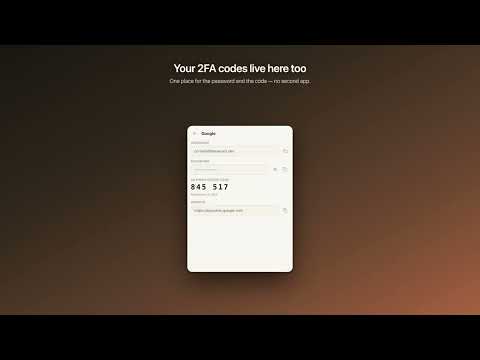
Tesseract Companion is the browser half of the Tesseract desktop app. If you use the desktop app, the extension can also open its assistant in a side panel; if you do not, the password manager works on its own and nothing about it depends on the desktop app being installed. Tesseract Companion keeps your passwords and two-factor codes in an encrypted vault. Your vault is encrypted on your device before it ever leaves it, and the server stores ciphertext. Set a master password and it becomes zero-knowledge in the strict sense: the key is derived from a password we never receive, so nobody at Tesseract can decrypt your vault — not by choice, but by construction. Without a master password, your key is kept for you so that a new device can unlock itself automatically. That is the trade: convenience, or a vault nobody but you can open. The extension tells you which one you are in, and you can set a master password at any time. • Autofill — offered on the site you are actually on, filled when you click, never silently in the background. • Authenticator — your TOTP codes sit beside the login they belong to, so there is no second app to reach for. • Generator — strong passwords or memorable passphrases, generated on your device and never transmitted. • Offline first — the vault is local. An account is entirely optional and is only ever used to sync the encrypted vault between your devices. • Free, synchronized, on every device. Sponsored messages: if your Tesseract account has no balance or paid plan, the side panel occasionally shows a sponsored message under an answer, clearly labelled “Sponsored”. It is never chosen from the pages you visit or from your conversations — the extension sends nothing from them to any ad network.
0 out of 5No ratings
Details
- Version0.11.35
- UpdatedOctober 14, 2026
- Size5.11MiB
- LanguagesEnglish
- DeveloperWebsite
Email
corneliu.maftuleac@gmail.com - Non-traderThis developer has not identified itself as a trader. For consumers in the European Union, please note that consumer rights do not apply to contracts between you and this developer.
Privacy

Tesseract Companion has disclosed the following information regarding the collection and usage of your data. More detailed information can be found in the developer's privacy policy.
Tesseract Companion handles the following:
This developer declares that your data is
- Not being sold to third parties, outside of the approved use cases
- Not being used or transferred for purposes that are unrelated to the item's core functionality
- Not being used or transferred to determine creditworthiness or for lending purposes
Support
For help with questions, suggestions, or problems, visit the developer's support site