

TempoPass

Overview
Delegate signing from your Tempo wallet. Auto-pay MPP content with time-limited, spending-capped access keys.
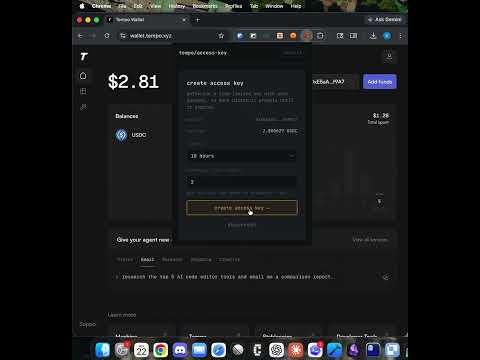
TempoPass lets you create time-limited, spending-capped signing keys for your existing Tempo wallet at wallet.tempo.xyz. Instead of authenticating with your passkey for every single transaction, you authorize an access key once — then it handles signing automatically until it expires or hits its spending limit. HOW IT WORKS 1. Connect your wallet — the extension briefly opens wallet.tempo.xyz to read your passkey credential. No private keys are ever displayed, exported, or stored in plain text. 2. Create an access key — choose an expiry (1 hour to 10 days) and a USDC spending cap. Your passkey (Touch ID / Face ID) signs the on-chain authorization. This is the only biometric prompt you'll see. 3. Transact freely — send USDC transfers directly from the extension popup, or browse the web and let the access key auto-pay MPP (Micropayment Protocol) content. The Tempo protocol enforces your expiry and spending limits on-chain. KEY FEATURES - Time-limited keys: Choose from 1 hour to 10 days. When the key expires, it can no longer sign anything. - Spending caps: Set a maximum USDC amount the key can spend. Enforced on-chain by the Tempo protocol, not just client-side. - MPP auto-payments: Websites using the Micropayment Protocol (HTTP 402 + WWW-Authenticate: Payment) are paid automatically — no popups, no confirmation dialogs. - Transaction history: View your recent transfers with links to the Tempo block explorer. - No new wallets: Uses your existing Tempo passkey. Nothing new to back up. - On-chain security: Access key limits are enforced by the Tempo smart contract, not by the extension. SECURITY MODEL Your passkey private key never leaves your device's secure enclave. The extension reads only your credential ID and public key from wallet.tempo.xyz (one-time setup). Access keys are P256 keypairs generated locally, authorized on-chain with your passkey, and stored in Chrome's session storage (cleared when Chrome closes). The spending limit and expiry are enforced by the Tempo protocol at the chain level. PERMISSIONS EXPLAINED - Storage: Saves your wallet credential reference and transaction history locally. - Alarms: Checks access key expiry every minute. - Scripting: Used once during wallet connection to read your credential from wallet.tempo.xyz. - Host permissions (tempo.xyz): Required for the one-time credential read during wallet connection. - Content scripts (all URLs): The MPP payment handler must run on every page to intercept HTTP 402 responses from any website that charges for content via the Micropayment Protocol. NETWORK - Chain: Tempo mainnet (Chain ID 4217) - RPC: https://rpc.presto.tempo.xyz - Explorer: https://explorer.tempo.xyz This extension is open source. Your wallet, your keys, your rules.
0 out of 5No ratings
Details
- Version2.0.0
- UpdatedMarch 31, 2026
- Offered byswairshah
- Size442KiB
- LanguagesEnglish (United States)
- DeveloperSwair Shah
1401 E Madison St 611 Seattle, WA 98122 USEmail
swairshah@gmail.com - Non-traderThis developer has not identified itself as a trader. For consumers in the European Union, please note that consumer rights do not apply to contracts between you and this developer.
Privacy

This developer declares that your data is
- Not being sold to third parties, outside of the approved use cases
- Not being used or transferred for purposes that are unrelated to the item's core functionality
- Not being used or transferred to determine creditworthiness or for lending purposes