

TemplateFlow — Notion Templates, One-Click Deploy

Overview
Find every template across your Notion workspace and deploy them to any page or database in one click.
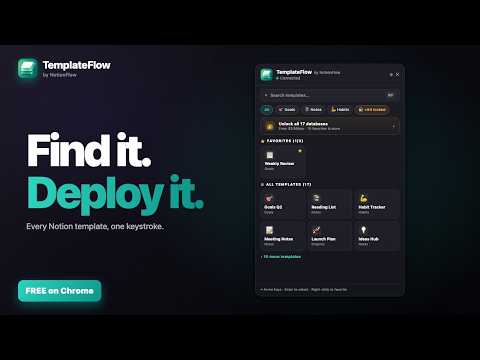
Every Notion template you've built — one keyboard shortcut, one click to deploy. TemplateFlow is the Notion template gallery Chrome extension for users who've spent months curating database templates and got tired of the "+ New" dropdown showing only the templates on the database they're currently inside. Press Ctrl+Shift+T (Cmd+Shift+T on Mac). Your entire template library opens. Pick one, hit Deploy. A fresh page lands in the right Notion database in seconds. Wherever your templates live across your workspace, TemplateFlow brings all of them into one searchable, keyboard-navigable surface. ━━━━━━━━━━━━━━━━━━━━━━ HOW IT WORKS ━━━━━━━━━━━━━━━━━━━━━━ 1. Connect your Notion workspace once via OAuth — 10 seconds. 2. TemplateFlow scans every database you've shared and indexes every template inside. 3. Press Ctrl+Shift+T (Cmd+Shift+T on Mac) from anywhere. 4. Search by name, filter by database, jump to favorites. 5. Click a template, optionally set the new page's title, hit Deploy. 6. Notion creates the page from your template — identical to the "+ New" template dropdown, but launchable from any tab. No copy-paste. No hunting through the "+ New" menu. No scrolling through unrelated databases. ━━━━━━━━━━━━━━━━━━━━━━ WHY TEMPLATEFLOW ━━━━━━━━━━━━━━━━━━━━━━ • One unified Notion template gallery across every connected database • Native Notion template API — pages deploy with property defaults intact (no orphaned blocks, no "Untitled (1)" mess) • Keyboard-first: ↑↓ to navigate, Enter to deploy, ⌘F to search inside the gallery • Right-click any template to star it — favorites pin to the top • Recent deployments — one-click reopen the page you just spun up in Notion • Custom Notion icons honored — emoji, uploaded image, or per-workspace custom emoji • Smart database filtering — hide databases you don't want in the gallery • Global hotkey: Ctrl+Shift+T / Cmd+Shift+T (customizable in chrome://extensions/shortcuts) ━━━━━━━━━━━━━━━━━━━━━━ WHO IT'S FOR ━━━━━━━━━━━━━━━━━━━━━━ TemplateFlow is for anyone who has built up a library of Notion database templates and deploys them often. A writer can start a new post in their content calendar without breaking flow. A project manager can spin up a sprint retro from any tab. A consultant can kick off client onboarding in one keystroke. If you maintain ten or more templates across your workspace, TemplateFlow makes them feel like a real product surface instead of a buried dropdown. ━━━━━━━━━━━━━━━━━━━━━━ 100% FREE — EVERYTHING INCLUDED ━━━━━━━━━━━━━━━━━━━━━━ • Connect unlimited Notion databases. • Up to 10 starred favorites. • Property pre-fill on deploy — set tags, status, owner, date before the page is created. • Grouped-by-database view + card-size options, light and dark themes. • No subscription, no license key, no catch. ━━━━━━━━━━━━━━━━━━━━━━ PRIVACY-FIRST DESIGN ━━━━━━━━━━━━━━━━━━━━━━ • Your templates and the pages you deploy are read directly from your browser to Notion. They never touch our servers. • Your Notion OAuth token is stored only in chrome.storage.local — never on our servers. • Anonymous device-scoped analytics (event names + extension version only). No template names, page titles, database names, or Notion identifiers leave your browser. • No browsing tracking. No ads. No data sales. Full policy: https://www.notionflow.io/templateflow/privacy ━━━━━━━━━━━━━━━━━━━━━━ WHY TEMPLATEFLOW vs. ━━━━━━━━━━━━━━━━━━━━━━ vs. Notion's "+ New" dropdown — TemplateFlow shows every template across every database in one gallery; Notion's dropdown shows only templates on the database you're already inside. vs. duplicating an existing page — TemplateFlow uses Notion's official template API, so the new page is created the way Notion intends. No orphan blocks. No "Untitled (1)" rename dance. vs. a Zapier / Make automation — no Zaps to maintain. Runs from your browser in milliseconds. ━━━━━━━━━━━━━━━━━━━━━━ SUPPORT ━━━━━━━━━━━━━━━━━━━━━━ Questions, feedback, bug reports: https://www.notionflow.io/templateflow/support Built by NotionFlow — sibling extensions for Notion: DeadlineFlow (every deadline in one calendar), DailyFlow (one-click daily Notion notes), Clipper (save anything from the web to Notion).
0 out of 5No ratings
Details
- Version0.1.4
- UpdatedOctober 9, 2026
- FeaturesOffers in-app purchases
- Size1.17MiB
- LanguagesEnglish (United States)
- DeveloperBeast Creative LLCWebsite
30 N Gould St Ste N Sheridan, WY 82801-6317 USEmail
treyinchina@gmail.comPhone
+1 503-308-8900 - TraderThis developer has identified itself as a trader per the definition from the European Union and committed to only offer products or services that comply with EU laws.
- D-U-N-S143977674
Privacy

TemplateFlow — Notion Templates, One-Click Deploy has disclosed the following information regarding the collection and usage of your data. More detailed information can be found in the developer's privacy policy.
TemplateFlow — Notion Templates, One-Click Deploy handles the following:
This developer declares that your data is
- Not being sold to third parties, outside of the approved use cases
- Not being used or transferred for purposes that are unrelated to the item's core functionality
- Not being used or transferred to determine creditworthiness or for lending purposes
Support
For help with questions, suggestions, or problems, visit the developer's support site