

TemplaGem

Overview
an extension to manage gemini prompts templates
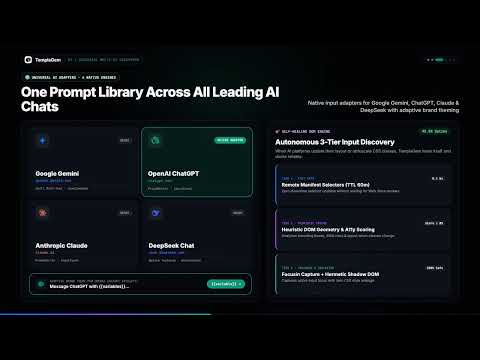
Supercharge your AI workflow with TemplaGem — the intelligent prompt manager designed to create, organize, and instantly inject reusable prompt templates directly into your favorite AI chat interfaces. Say goodbye to copying and pasting repetitive instructions from notes. With TemplaGem, your personal prompt library is always one click away, docking seamlessly above the input box and filling in customized parameters in seconds. 🚀 Key Features ⚡ Native In-Chat Popover Overlay No need to leave your chat window or switch tabs. As soon as you focus the chat input, TemplaGem docks seamlessly directly above the composer box. Browse, filter, and hit Enter or Tab to insert prompts instantly. 🧩 Dynamic In-Line Template Variables {{variable}} Build reusable, parametric prompts using double-bracket syntax like {{language}}, {{topic}}, or {{tone}}. When inserted into the composer, TemplaGem highlights variables interactively — jump between placeholders using Tab, replace values on the fly, and hit Enter to submit clean, brackets-free prompts. 🌐 Universal Multi-Platform Support One prompt manager for all top AI assistants. Built with an autonomous cascading input discovery engine, TemplaGem integrates out of the box with: Google Gemini (Full support for rich-textarea & Quill editors) ChatGPT (ProseMirror & standard composer support) Claude (ProseMirror input integration) DeepSeek (Composer card & textarea support) Built-in resilience against UI updates and layout shifts. 📴 Offline-First Architecture & Cloud Sync Never lose access to your prompts. TemplaGem stores your entire prompt library locally using indexed browser storage with background syncing. Create, edit, and organize prompts completely offline; changes sync automatically whenever you reconnect. 🏷️ Tags, Categories & Smart Sorting Keep hundreds of prompts tidy with hashtags, custom icons (from our built-in 40+ icon library across Tech, Writing, Productivity, and Media), instant full-text search, and multi-criteria sorting (by creation date, modification date, or title). 📦 Instant JSON Backup, Export & Import Full control over your data. Export your entire prompt collection to structured JSON with a single click, or restore/share prompt libraries across multiple devices effortlessly. 🎨 Adaptive Dark & Light Themes Features a clean Material 3 design system that automatically matches your platform’s native color palette and respects your system’s dark/light preference. 💡 How It Works Create a Prompt: Open the extension popup or click Create New Prompt. Write your template with variables (e.g., Review this {{language}} code for {{focus_area}}). Focus Any AI Input: Go to Google Gemini, ChatGPT, Claude, or DeepSeek and click inside the message box. Select & Fill: Use arrow keys or click to select your prompt. Press Tab to fill in each variable pill in real time. Send: Press Enter — your customized prompt is sent cleanly to the AI! 🔒 Privacy & Permissions Your Prompts Stay Yours: Prompts are stored locally on your device with optional encrypted synchronization. No Tracking or Keylogging: TemplaGem only interacts with chat composers to insert and highlight template variables when triggered by you. Zero Bloat: Lightweight, fast, and built using Manifest V3 standards.
0 out of 5No ratings
Details
- Version0.1.0
- UpdatedNovember 6, 2026
- Offered bylevkovskyi.vladymyr@gmail.com
- Size2.96MiB
- LanguagesEnglish
- DeveloperVolodymyr Levkovskyi
16 Rue des Remparts FABREGUES 34690 FREmail
levkovskyi.vladymyr@gmail.com - Non-traderThis developer has not identified itself as a trader. For consumers in the European Union, please note that consumer rights do not apply to contracts between you and this developer.
Privacy

TemplaGem has disclosed the following information regarding the collection and usage of your data. More detailed information can be found in the developer's privacy policy.
TemplaGem handles the following:
This developer declares that your data is
- Not being sold to third parties, outside of the approved use cases
- Not being used or transferred for purposes that are unrelated to the item's core functionality
- Not being used or transferred to determine creditworthiness or for lending purposes
Support
For help with questions, suggestions, or problems, please open this page on your desktop browser