


Overview
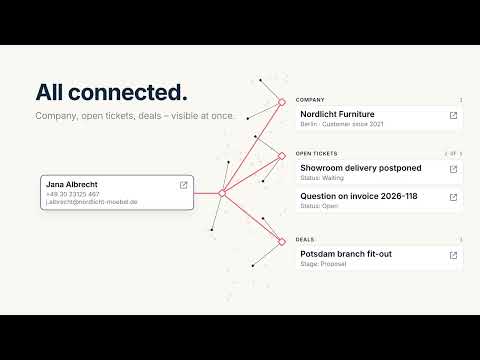
Who's calling, what's it about? Look up a contact in Tape and see the related companies, tickets and deals at a glance.
Find information in Tape in seconds – along with the linked records: the company, open tickets, current deals. Without opening Tape, without clicking through apps. How it works: type a few characters – a name, an email address or part of a phone number. Hits from your Tape app appear right away in the popup. Click a hit and its linked records show up directly below, each with a link to Tape. For example: a call comes in. You type three digits of the number and see who is calling, which company the contact belongs to and which tickets are still open – before you pick up. BENEFITS • Fast search: in the fields you choose (e.g. name, phone, email), or full text across all fields • Linked records at a glance: one block per linked app, always expanded • Only what matters: limit each block (e.g. the 3 most recent), sort it and filter by status (e.g. open tickets only) • Right-click selected text: “Look up in Tape” on any web page • Multiple sources, e.g. contacts, companies or projects – each with its own menu entry • One click opens the record in Tape; Ctrl/Cmd-click opens it in the background and keeps the popup open • Export sources as a file and share them with your team Quick to set up: you only enter your Tape API key. Then pick workspace, app, search fields and linked apps from lists – no field IDs, no copying. What you need: a Tape account and your API key. Tape itself offers a free plan; if you need more features, you can book more feature-rich plans. You can try Tape's Premium Edition free for 30 days: twzn.de/tapelink This extension is free and independent – it is not made by Tape. Good to know: phone numbers are matched as stored in Tape. Search without the leading 0 or country code – “351 123” finds both “0351 123…” and “+49 351 123…”. Privacy: your API key stays on this device and is never synced. Data goes only to the Tape API (api.tapeapp.com), there is no tracking. Search results are not stored. About temoki: temoki is a knowledge management system for companies. Our free browser extensions are small, practical tools that capture knowledge and information – so you can use it for processes, automation and AI. With Temoki Send to Tape you file knowledge in Tape via right-click – Temoki Context from Tape brings it back in a moment. Install it and try it with your next search. More temoki extensions: twzn.de/tmstore
5 out of 51 rating
Details
- Version0.1.4
- UpdatedOctober 12, 2026
- Size433KiB
- Languages2 languages
- DevelopertwentyZEN GmbHWebsite
Loschwitzer Straße 15A Dresden 01309 DEEmail
contact@twentyzen.comPhone
+49 1514 7347464 - TraderThis developer has identified itself as a trader per the definition from the European Union and committed to only offer products or services that comply with EU laws.
- D-U-N-S342667872
Privacy

This developer declares that your data is
- Not being sold to third parties, outside of the approved use cases
- Not being used or transferred for purposes that are unrelated to the item's core functionality
- Not being used or transferred to determine creditworthiness or for lending purposes