

Teleprompter for Loom

Overview
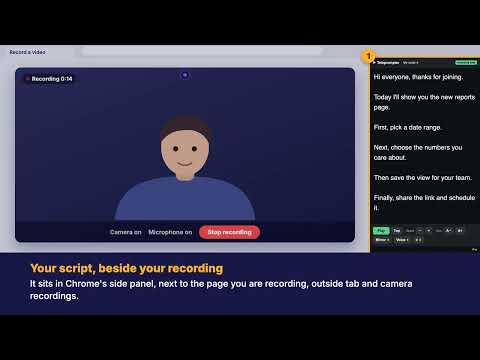
Teleprompter in your side panel for Loom. Free to use, with optional Pro voice-follow. Stays out of your tab and camera recording.
Read your script while you record, looking straight at the camera, not down at your notes. Teleprompter for Loom puts a scrolling teleprompter in Chrome's side panel, so you can read your script while looking straight at your camera. Because it lives in the side panel, it stays out of your tab and camera recordings. FEATURES (free) • Teleprompter in the side panel — read while you record • Smooth auto-scroll with adjustable speed • Adjustable text size • Play / pause / back-to-top controls • Your script is saved locally and stays private STAYS OUT OF YOUR TAB & CAMERA RECORDING The teleprompter sits in Chrome's side panel — outside the tab you're recording — so it won't appear when you record a browser tab or your camera. PRIVATE BY DESIGN Your script stays in your browser. No account, no sign-up, no data collection. Perfect for Loom videos, screen recordings, tutorials, talking-head content, webinars and demos.
0 out of 5No ratings
Details
- Version1.1.3
- UpdatedOctober 27, 2026
- Offered byluke.rallings
- Size48.82KiB
- LanguagesEnglish (United Kingdom)
- DeveloperLuke Rallings
44F Friarn Street Bridgwater TA6 3LJ GBEmail
luke.rallings@swiftresolve.co.ukPhone
+44 7787 403885 - TraderThis developer has identified itself as a trader per the definition from the European Union and committed to only offer products or services that comply with EU laws.
Privacy

This developer declares that your data is
- Not being sold to third parties, outside of the approved use cases
- Not being used or transferred for purposes that are unrelated to the item's core functionality
- Not being used or transferred to determine creditworthiness or for lending purposes