

Telegram Media Downloader

Overview
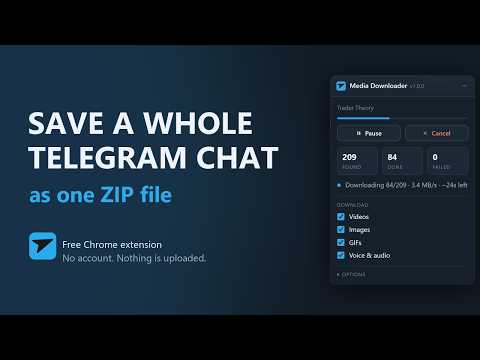
Save videos, images, GIFs and voice notes from an open Telegram Web K chat as one ZIP. Everything stays in your browser.
Saves all media from the channel or chat you currently have open in Telegram Web K (web.telegram.org/k/) and packs it into one ZIP file. You pick what goes in: videos, images, GIFs, and voice and audio messages (one combined option). Saving a big chat by hand means one right click per file, one file at a time. This does the whole chat in a single bulk download and hands you one archive, numbered in chronological order. This extension is an independent project and is not affiliated with, endorsed by or connected to the operators of Telegram. PRIVACY - No account, no server of ours, no sign-up. - Nothing leaves your browser. The files are collected in the tab you are looking at, zipped there, and handed to Chrome as an ordinary download. - No analytics, no tracking, no ads. - The extension does not log in to any Telegram API of its own and does not intercept network traffic. It runs in the page's main world and calls the app managers that Telegram Web K already runs there (appImManager, appMessagesManager, appDownloadManager), the same code the site uses when you save a single file by hand. No remotely hosted code is loaded; the ZIP library ships inside the package. - You can only download what your own account is allowed to see anyway. The extension gives you no access you do not already have. PERMISSIONS, EXPLAINED - Access to web.telegram.org: the panel is part of the Telegram Web page, so the extension has to run there. It runs on no other host. - scripting: the toolbar popup uses it for exactly one job, moving the panel back into the top right corner after you have dragged it off screen or left it collapsed. LIMITS, STATED UP FRONT - Telegram Web K only (web.telegram.org/k/). The A and Z versions of Telegram Web are not supported. - Media only. Text messages are deliberately not exported, and neither are stickers or ordinary file attachments. - The tab has to stay open and in the foreground during a run. - Switching to a different chat aborts a running download. HOW IT IS OPERATED A panel appears in the top right corner of the Telegram page. It can be dragged anywhere and collapsed. With no chat open it just shows a note. The toolbar button opens a small popup that does three things: it reports whether the current tab can carry the panel, it opens Telegram Web if it cannot, and it brings back a panel you have pushed off screen. All actual work happens in the panel. WHILE IT RUNS - The size is known before the first byte is fetched, and it is read rather than estimated: Telegram carries byte size, MIME type, duration and resolution in the message metadata, and the scan reads that metadata first. The counter already says "found 93 media (~5.8 MB)" while it is still scanning. - The download shows measured speed and remaining time: "Downloading 84/209 · 3.4 MB/s · ~24s left". - Pause, resume and cancel at any point. If at least one file has finished, a cancel still gives you a ZIP with those files, flagged as incomplete in the manifest. WHAT ENDS UP IN THE ZIP - media/001.ext through NNN.ext in chronological order, 1 being the oldest item. The number of leading zeros adapts to the total count. - The file extension comes from the real MIME type, not from guessing. - Images are taken in the largest size variant Telegram offers. - _manifest.json with chat name, date, extension version, count per media type, total bytes, number of failures, and whether the run was incomplete. - errors.txt, written only when something actually failed. CONTROL OVER THE RUN (kept between runs) - Parallel downloads: 1 to 4 - Delay between files: off, 250 ms, 500 ms or 1 s, with random jitter - Retries per file: 0 to 3 - Compression: Store (fast) or Deflate (smaller) Switching chats resets the panel cleanly. A run that is still going is stopped with a clear message instead of mixing files from two chats.
0 out of 5No ratings
Details
- Version1.0.0
- UpdatedAugust 15, 2026
- Offered byandresolbach
- Size55.61KiB
- LanguagesEnglish
- Developer
Email
andresolbach@gmail.com - Non-traderThis developer has not identified itself as a trader. For consumers in the European Union, please note that consumer rights do not apply to contracts between you and this developer.
Privacy

Telegram Media Downloader has disclosed the following information regarding the collection and usage of your data. More detailed information can be found in the developer's privacy policy.
Telegram Media Downloader handles the following:
This developer declares that your data is
- Not being sold to third parties, outside of the approved use cases
- Not being used or transferred for purposes that are unrelated to the item's core functionality
- Not being used or transferred to determine creditworthiness or for lending purposes
Support
For help with questions, suggestions, or problems, please open this page on your desktop browser