

TechnoJudge AI – Technovation Judging Assistant

Overview
AI assistant for Technovation judges – analyzes the judging page and helps generate rubric-based scores and feedback.
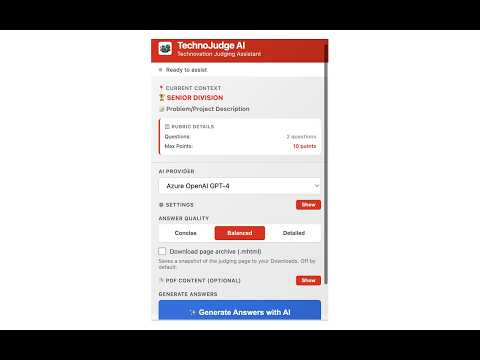
TechnoJudge AI is a focused, judge-facing assistant for the Technovation Girls competition. It runs only on the official judging page (my.technovationchallenge.org/judge/scores) and helps you score submissions faster, more consistently, and with kinder, more useful feedback for the students. WHAT IT DOES • Reads the current judging form and detects the division automatically (Beginner, Junior, or Senior). • Applies the official 2025–2026 Technovation rubric (1–5 scale) — only the questions that belong to the current page are scored. • Pulls transcripts from the embedded Pitch and Technical YouTube videos, so the AI scores what was actually said and shown — not just the written description. • Generates warm, mentor-style feedback (20–150 words per question) in simple, age-appropriate language for students aged 10–18. • Auto-fills the rating selectors and feedback textareas on the page so you can review and submit, instead of typing from scratch. • Saves a complete MHTML snapshot of the judging page to your Downloads for your own records. WHY YOU SHOULD INSTALL IT • Save time: get a first-pass score and feedback for every rubric question in seconds, then edit to your taste. • Stay consistent: the same rubric criteria are applied to every team you judge, every round. • Be a better mentor: the AI is tuned for warm, constructive, kid-friendly tone — no harsh language, always actionable suggestions. • Score what students actually built: video transcripts and the project description are sent together, so feedback isn’t generic. • Stay in control: nothing is auto-submitted. Every score and every word of feedback is editable before you click submit. PRIVACY & SECURITY • Works only on https://my.technovationchallenge.org/judge/scores. The extension shows a clear blocked screen on every other site. • You bring your own AI key (Azure OpenAI GPT-4 or Google Gemini). Keys are stored locally in chrome.storage.local and never sent anywhere except to the provider you selected. • No analytics, no tracking, no third-party servers operated by us. • Optional PDF text (Business Canvas / User Adoption Plan) is cleared after each generation so it never leaks between sessions. WHO IT’S FOR Volunteer judges, coaches, and mentors evaluating Technovation Girls submissions who want a faster, more consistent, and more compassionate scoring workflow. REQUIREMENTS • An Azure OpenAI deployment key OR a Google Gemini API key. • Chrome 114+ (Manifest V3). This extension is an independent tool to assist judges. It is not affiliated with or endorsed by Technovation.
0 out of 5No ratings
Details
- Version1.0.0
- UpdatedMay 19, 2026
- Offered byRaghunandan
- Size761KiB
- LanguagesEnglish
- Developer
Email
raghunitb@gmail.com - Non-traderThis developer has not identified itself as a trader. For consumers in the European Union, please note that consumer rights do not apply to contracts between you and this developer.
Privacy

This developer declares that your data is
- Not being sold to third parties, outside of the approved use cases
- Not being used or transferred for purposes that are unrelated to the item's core functionality
- Not being used or transferred to determine creditworthiness or for lending purposes