

Teamenu

Overview
Access your personalized Teamenu - all your work apps, shared collections and links in one place. Requires a Teamenu subscription.
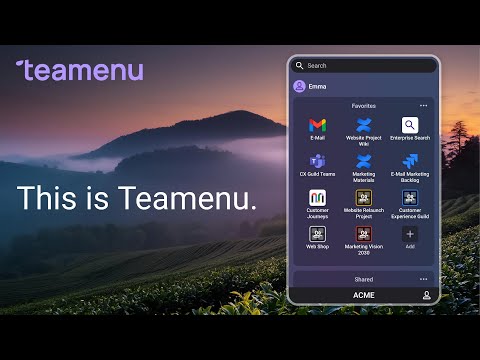
Teamenu – quick access to your work apps Teamenu puts all your business apps and resources in one menu. It opens with one click in your browser. No more searching through tabs, bookmarks, or old onboarding docs. You get the links you need. This includes deep links for tools like Teams, Google Workspace, SharePoint, SAP, and other enterprise apps. What it does - shows your app menu in the sidebar - opens apps and deep links right away - works with your existing Teamenu account - keeps the same menu on all your devices Key Features: 🚀 Quick Access: Open your Teamenu workspace in a convenient side panel. Set up a keyboard shortcut (Alt+Shift+T) for instant access. ➕ Easy Tab Management: Add the current tab to your Teamenu collections, save all open tabs as a new collection, or open and sync a collection as a tab group. 🔍 Smart Search: Search across all your Teamenu items from the address bar (Omnibox) by typing "t" followed by your query. 🎯 Seamless Integration: Auto-syncs with your Teamenu account and works with any Teamenu tenant subdomain. Why it helps - faster access to tools you use every day - less clutter - deep links to resources hidden inside apps - fewer outdated links Who it’s for Teams and organisations that use many apps and want a simple way to reach them. How It Works: 1. Install the extension and enter your Teamenu Tenant ID. 2. Log in to your Teamenu workspace (if not already logged in). 3. Open the side panel to access your links. 4. Use the "Add" buttons to save new content to your collections. Privacy & Security: Your data stays secure. The extension only communicates with official Teamenu servers and does not share data with third parties.
0 out of 5No ratings
Details
- Version1.0.1
- UpdatedDecember 16, 2025
- Offered byTeamenu
- Size84.12KiB
- LanguagesEnglish
- DeveloperEnterprise Design Associates SAS
44 avenue da Flandre Teamenu Paris 75019 FREmail
hello@teamenu.netPhone
+33 6 01 79 70 00 - TraderThis developer has identified itself as a trader per the definition from the European Union and committed to only offer products or services that comply with EU laws.
- D-U-N-S264974249
Privacy

Teamenu has disclosed the following information regarding the collection and usage of your data. More detailed information can be found in the developer's privacy policy.
Teamenu handles the following:
This developer declares that your data is
- Not being sold to third parties, outside of the approved use cases
- Not being used or transferred for purposes that are unrelated to the item's core functionality
- Not being used or transferred to determine creditworthiness or for lending purposes