

Tarjuman — Your translation over the video

Overview
Save subtitles as SRT to translate with any AI model, from any language to yours, then show them over the video to adjust and edit.
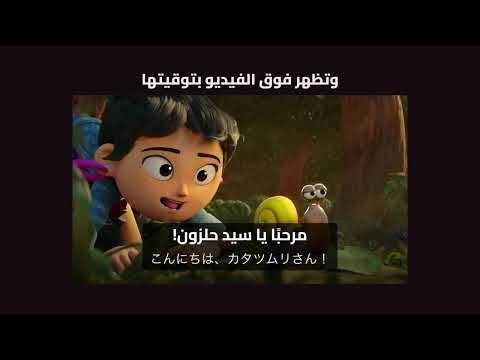
Tarjuman lets you watch a video with a translation you make yourself, from any language to yours. It saves the subtitles the player loaded for the video, manual or auto-generated and in any language, as an SRT file. You send that file to the AI model you choose to translate it, then upload the translated file, and Tarjuman shows it over the same video. You can adjust its timing, edit it, and find it saved whenever you return. How it works 1. Open a video, choose the subtitle language from CC in the player, then save its file with "Download original (SRT)" in Tarjuman's buttons on the player bar. 2. Open Tarjuman's popup from the browser toolbar. "From" is the language of the file as the player sent it. Choose "To", then press "Copy instructions". The instructions are copied in the interface language, Arabic or English. 3. Send the file and the instructions to the model you choose, and save its output as an SRT file. Tarjuman doesn't translate and doesn't contact any model. 4. Upload the file with the upload button on the player bar, and your translation appears over the video. Features - From any language to yours: accepts every subtitle track available for the video, the site's auto-translation labeled with its source language, and any SRT file in any language. The languages available for each video are set by the site alone; Tarjuman doesn't create or switch tracks. - Your translation over the video, in the direction of its language, alone or over the original, in default view, theater and fullscreen. Hidden during ads. - Timing from the player bar: the − and + buttons on the player bar, or inside the timing menu when the bar is narrow, move the translation earlier or later, and "Sync by sentence" sets it from a sentence you're hearing. Timing is saved with each translation. - Comparison with the original: when you upload your file, Tarjuman compares it with the original you downloaded and shows what's missing, what's extra, what drifted and what stayed untranslated. It never changes your file silently. - An editor for review: edit text and timing, merge and split segments, search and replace, and mark what you want to return to. It can also prepare a file with the missing segments so you can complete them. What you haven't saved is kept as a draft you can restore if the Editor closes before you save. - Synced transcript: a panel beside the video shows the whole translation with the current segment highlighted, and lets you fix a segment's text in place. Closed until you open it from its button. - Library: every video you translated with the languages of each translation, up to three translations per video, a previous version of what you replaced, and a backup you can move to another browser. - Export: your translation as SRT or WebVTT, alone or with the original on a line under each segment, to watch in another player. - Glossary: a general glossary and term lists for each language pair, attached to the translation instructions when you copy them. - Style it your way: display mode, font, size, background and position. - Interface in Arabic or English: choose it in Settings. Video languages and your translations aren't affected. - Optional shortcuts: five commands with no default keys (switch display mode, show the translation earlier or later, mark the line for review, and replay it) that you assign keys to on your browser's shortcuts page. What it doesn't do - It doesn't download video or audio, and doesn't request subtitle files itself: it reads a copy of the subtitles the player requested when you turned them on. - It doesn't create a translation in a language the site doesn't offer for the video, and doesn't switch tracks for you. - It doesn't translate by itself, and needs no account or API key. - It doesn't work on Shorts or players embedded in other sites. On live streams in progress, only subtitle extraction is blocked; uploading and showing an SRT file still work. It's for desktop only. Your data - Your translations and settings stay in the extension's storage on your device and aren't synced with any service. Removing the extension deletes them, so take a backup first. - Only one thing leaves the extension: video thumbnails in Library are requested from YouTube's servers by video ID, and stay off until you turn on their switch. Tarjuman has no server: you copy a problem report from Settings after seeing everything in it and send it from your own email, with no translation text or video ID attached automatically. - No usage tracking, no ads, and no selling of your data. - Privacy policy: https://bysltan.com/tarjuman/privacy YouTube is a trademark of Google LLC. Tarjuman is not affiliated with or endorsed by YouTube or Google.
0 out of 5No ratings
Details
- Version3.0.0
- UpdatedNovember 17, 2026
- Offered byBySultan
- Size1.63MiB
- Languages2 languages
- Developerسلطان
رفحاء الدرعية 13713 SAEmail
isultanby@gmail.com - Non-traderThis developer has not identified itself as a trader. For consumers in the European Union, please note that consumer rights do not apply to contracts between you and this developer.
Privacy

Tarjuman — Your translation over the video has disclosed the following information regarding the collection and usage of your data. More detailed information can be found in the developer's privacy policy.
Tarjuman — Your translation over the video handles the following:
This developer declares that your data is
- Not being sold to third parties, outside of the approved use cases
- Not being used or transferred for purposes that are unrelated to the item's core functionality
- Not being used or transferred to determine creditworthiness or for lending purposes
Support
For help with questions, suggestions, or problems, visit the developer's support site