

TapTap
4 ratings
)
Overview
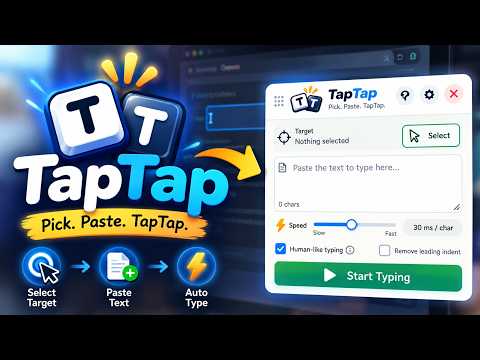
Paste blocked? TapTap types your text as real keystrokes with a human rhythm. Works in code editors, forms and rich text.
Website: https://samratsk.github.io/taptap-website/ TapTap: type text into any website when paste is blocked TapTap is a free Chrome extension that types your text into a page as real keystrokes, one key at a time, like you typed it yourself. Use it when a website blocks paste, breaks your formatting, or only reacts to real key presses. It works in code editors (Monaco/VS Code style, CodeMirror, Ace), online forms, text boxes and rich text editors, including fields inside frames. HOW TO USE IT 1. Press Alt+Shift+W (⌥⇧W on Mac), or click the TapTap icon. 2. Press Select and click the field you want to type into. 3. Paste your text into TapTap and press Start typing. Press Esc or Stop at any time. WHAT'S NEW IN 2.0 • Discreet mode: the panel fades almost invisible until you hover it, with a visibility slider • Keyboard shortcut: open or hide TapTap on any page with Alt+Shift+W • Guided tour that shows you around on first launch • "Human-like typing" now explains itself with a simple rhythm chart • The panel keeps every control visible at any size; only the text box shrinks • Library files now use a compact private format (older .ttlib files still work) • One-click update button when a new version is out • Mac fixes for clearing fields and code editor indentation DISCREET MODE Turn it on in Settings and the panel fades until you need it. Choose how visible it stays, from 8% to 40%. Hover it and it's back instantly, and it always shows clearly for a moment when you open it, so you never lose it. TYPES LIKE A PERSON TapTap doesn't hammer keys at a robotic, even pace. It varies the gap between keys and takes a short pause after commas, full stops and new lines. Pick the speed from slow to instant, and the variation from low to high. MADE FOR CODE Code editors add their own brackets and indentation as you type, which usually wrecks code typed in by a script. TapTap handles both, so your code comes out exactly as written. LIBRARY Import a .ttlib file with your saved texts. TapTap recognises the page you're on and loads the matching text for you, with several versions per page and a one-click revert. PRIVATE BY DESIGN • No servers, no accounts, no tracking. Your text never leaves your browser. • Free, with no ads and no paywall. FAQ Why use TapTap instead of pasting? Some sites disable paste, strip formatting, or only accept real typing. TapTap sends real key presses, so the page treats it like normal typing. Is TapTap an auto typer? Yes. It's a free auto-typing extension for Chrome and Edge that types any text you give it into the field you choose. What is Discreet mode? A setting that makes the TapTap panel nearly see-through until you hover it, so it stays out of the way and is easy to miss on your screen. Why does Chrome show a "debugging" bar? That bar is how Chrome lets an extension send real keystrokes. It only appears while TapTap is typing and disappears when it's done. Does it work on Mac? Yes. It works in Chrome and Edge on Windows, Mac, Linux and ChromeOS. Is my text safe? TapTap has no servers. Everything stays on your computer. Found a bug or have an idea? Use "Report a bug or send feedback" in the panel's Help. TapTap is built and maintained by one developer. If it helped you, consider donating any amount via UPI from the panel. ❤️ To everyone who's donated: Thank You CHANGELOG 2.0 — Discreet mode with visibility slider, keyboard shortcut (Alt+Shift+W), guided tour, human-like typing explainer, panel layout that keeps every control visible, compact private Library format, Mac fixes 1.5 — One-click update button, smoother panel resizing, donation page 1.4.1 — Built-in feedback form, small-panel layout fix, clearer Library page
5 out of 54 ratings
Details
- Version2.0
- UpdatedNovember 3, 2026
- Offered bySamrat S K
- Size235KiB
- LanguagesEnglish
- Developer
Email
samratskevents@gmail.com - Non-traderThis developer has not identified itself as a trader. For consumers in the European Union, please note that consumer rights do not apply to contracts between you and this developer.
Privacy

This developer declares that your data is
- Not being sold to third parties, outside of the approved use cases
- Not being used or transferred for purposes that are unrelated to the item's core functionality
- Not being used or transferred to determine creditworthiness or for lending purposes
Support
For help with questions, suggestions, or problems, visit the developer's support site