


Overview
Turn any browser workflow into a step-by-step guided tutorial. Record once, then guide your users through your site.
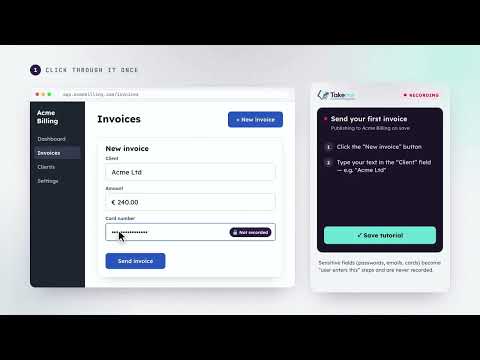
**Show people how, instead of telling them.** TakeMe turns any workflow in your browser into a guided tutorial. Click record, do the task once, and TakeMe captures every step — the buttons you press, the fields you fill, the pages you move through — with a screenshot of each one. Share it and your users get walked through the same flow on your live site: the next element is highlighted on the page, a short instruction sits beside it, and the tutorial advances by itself as they act. No videos to re-record when your UI changes. No screenshots to paste into a document. **What you can do** • Record any site — internal tools, SaaS apps, client dashboards, third-party portals • Guide users live on the page, with highlights and instructions that follow along as they work • Share a guide page — a clean, Scribe-style walkthrough with screenshots and numbered steps, at a link you can revoke • Add tutorials to your own site with a one-line snippet, so your visitors get the same guidance without installing anything • Edit anything after recording — reword steps, reorder, insert new ones, or record extra steps right into the middle of an existing tutorial • Group tutorials into projects, and choose which pages each tutorial appears on • See what works — views, plays, completions, and a per-step funnel that shows exactly where people drop off • Export any tutorial to PDF **Privacy is built in, not bolted on** Passwords, email fields, card numbers, one-time codes and similar sensitive inputs are detected automatically and never recorded — those steps become "enter your details here" prompts instead, with no value stored. People following your tutorials are never identified: playback analytics are anonymous counts only. **Getting started** 1. Install the extension and sign in (email or Google). 2. Open the site you want to document and press Record. 3. Do the task once, then save. 4. Share the guide link, or embed the snippet on your own site. Free accounts include 3 projects and 5 tutorials each. Paid plans remove the limits and keep your tutorials indefinitely — see take-me.app.
0 out of 5No ratings
Details
- Version1.0.1
- UpdatedSeptember 26, 2026
- Size140KiB
- LanguagesEnglish
- DeveloperCORS Services Sociedade Uni. LdaWebsite
Rua do Pocinho 21 Ferreira do Zezere 2240-300 PTEmail
contact@cors.digitalPhone
+351 915 542 330 - TraderThis developer has identified itself as a trader per the definition from the European Union and committed to only offer products or services that comply with EU laws.
- D-U-N-S449249756
Privacy

TakeMe has disclosed the following information regarding the collection and usage of your data. More detailed information can be found in the developer's privacy policy.
TakeMe handles the following:
This developer declares that your data is
- Not being sold to third parties, outside of the approved use cases
- Not being used or transferred for purposes that are unrelated to the item's core functionality
- Not being used or transferred to determine creditworthiness or for lending purposes
Support
For help with questions, suggestions, or problems, visit the developer's support site