

taigi-sandhi-visualization

Overview
Highlights tone sandhi changes in Taiwanese romanization on the MOE dictionary site.
# 台語變調視像化 taigi-sandhi-visualization A browser extension/userscript that highlights tone sandhi changes in Taiwanese Hokkien romanization on the [MOE Taiwanese Dictionary](https://sutian.moe.edu.tw/). 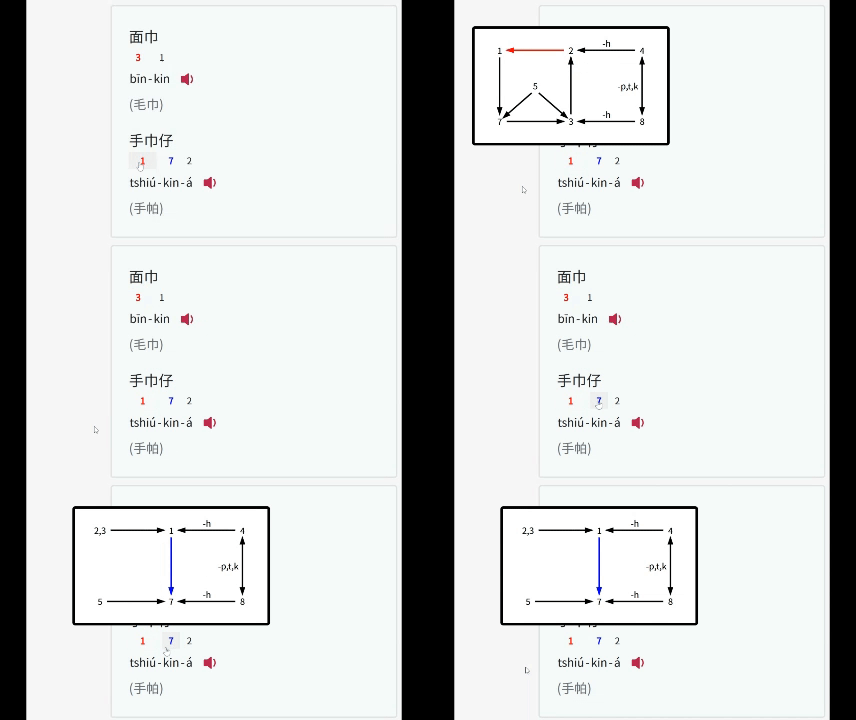 ## Features - **Tone Sandhi Highlighting**: - Automatically detects and highlights tone changes in Taiwanese romanization text on the MOE dictionary site. - Tone changes for every syllable except for the last one in a phrase. - Tone sandhi for three common accents (Referenced from [link1](https://zh.wikipedia.org/zh-tw/閩南語音系#一般聲調), [link2](https://zh.wikipedia.org/zh-tw/臺灣話#連讀變調)) - 南部腔 Southern (偏漳腔 Zhangzhou-leaning) - 北部腔 Northern (偏泉腔 Quanzhou-leaning) - 海口腔 Seaport / Coastal (泉州腔 Quanzhou) - **Color Coding**: - **Red**: Normal tone sandhi. - **Blue**: Tone sandhi before the `-á` suffix. - **Green**: Neutral tones. - **Tooltips**: Clicking a highlighted syllable to view the tone sandhi diagram. ## Installation ### Option 1: Browser Extension | Platform | Supported Browsers | Userscript Manager | |----------|--------------------|--------------------| | Desktop | Chrome, Brave, Safari, Firefox, Edge | Tampermonkey, Violentmonkey, Greasemonkey | | Android | Firefox, Edge | Tampermonkey, Violentmonkey | | iOS | Orion | Userscript (Free), Tampermonkey (USD 2.99) | - Install from the [Firefox Add-ons Store](https://addons.mozilla.org/en-US/firefox/addon/taigi-sandhi-visualization/) or [Chrome Web Store](https://chromewebstore.google.com/detail/ljkpjdedglglmhnggjhhapmdknjelppa). ### Option 2: Userscript Manager | Platform | Supported Browsers | Userscript Manager | |----------|--------------------|--------------------| | Desktop | Chrome, Brave, Safari, Firefox, Edge | Tampermonkey, Violentmonkey, Greasemonkey | | Android | Firefox, Edge | Tampermonkey, Violentmonkey | | iOS | Safari | Userscript (Free), Tampermonkey (USD 2.99) | 1. Add the Userscript: - **Greasy Fork (Recommended)**: Click [Here](https://greasyfork.org/en/scripts/545891-taigi-sandhi-visualization) and install the script directly by clicking **"Install this script"**. - Otherwise, copy the script directly from [`taigi-sandhi-visualization.user.js`](https://raw.githubusercontent.com/hey0wing/taigi-sandhi-visualization/main/taigi-sandhi-visualization.user.js), and paste the code. 2. Install via Userscript Manager: - Follow the [Greasy Fork tutorial](https://greasyfork.org/en/help/installing-user-scripts) to install one. - Or install Tampermonkey (*Recommended*), Violentmonkey or Greasemonkey on your own ## Planned Improvements - Add Chao's Tone letter / Pitch contour for visualization - Real-time audio conversion(?) ## Credits - Inspired by [https://github.com/Aiuanyu/KIPSutian-autoplay](https://github.com/Aiuanyu/KIPSutian-autoplay) - Inspired by [https://github.com/andreihar/taibun.js](https://github.com/andreihar/taibun.js) ## License This project is licensed under the [MIT License](LICENSE).
0 out of 5No ratings
Details
- Version1.6
- UpdatedJanuary 7, 2026
- Offered byhey0wing
- Size82.78KiB
- Languages中文(台灣)
- Developer
Email
hey0wing@gmail.com - Non-traderThis developer has not identified itself as a trader. For consumers in the European Union, please note that consumer rights do not apply to contracts between you and this developer.
Privacy

This developer declares that your data is
- Not being sold to third parties, outside of the approved use cases
- Not being used or transferred for purposes that are unrelated to the item's core functionality
- Not being used or transferred to determine creditworthiness or for lending purposes
Support
For help with questions, suggestions, or problems, visit the developer's support site