


Overview
Collect and organize web content in plain files.
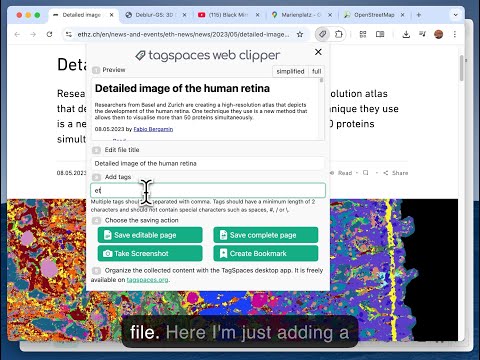
🧩 TagSpaces Web Clipper — Clip, Tag & Own Your Web Content Capture any webpage and save it directly to your device — no cloud, no account, no tracking. TagSpaces Web Clipper is a privacy-first web scraper that puts you in full control of what you save and how you save it. 🔒 100% Private — No Registration Required No sign-up. No servers. No data collection. Everything is saved locally on your computer. Your clippings belong to you. ⭐ Key Features 📝 Save as Markdown or HTML — with embedded images, ready for editing or annotating in TagSpaces, Obsidian, Notion, or any app that supports these open formats. 📄 Save as MHTML — preserve the full page layout and formatting exactly as you see it; open in any browser or compatible reader. ✂️ Clip selected content — save only the parts of a page that matter to you. 📸 Full-page screenshots — capture entire pages as PNG images. 🔖 Visual bookmarks — save a URL with a preview image to build a beautiful collection of favorite sites. 📍 GPS & Plus Code extraction — pull location data from map URLs for use in TagSpaces' Mapique geo-view. 🏷️ Tag on save — add tags when clipping to instantly organize your files for easy retrieval later. All saved files are standard, open formats — no lock-in. Use them with TagSpaces, your favorite text editor, or any tool that supports HTML, Markdown, MHTML, PDF, or PNG. 💻 Part of the TagSpaces Ecosystem TagSpaces Web Clipper works seamlessly with the TagSpaces desktop app — a free, offline-first personal knowledge management tool and file manager. TagSpaces lets you organize any file on your device using tags, colors, and metadata, without ever sending your data to a server. With TagSpaces you can: 🗂️ Tag and color-code any file type — documents, images, notes, web clippings 📝 Create and edit notes in Markdown or rich text, stored as plain files you own 🌍 Visualize geo-tagged content on an interactive map with the built-in Mapique view 🔍 Search and browse your entire local file collection with powerful filters 📁 Work across folders, drives, and connected locations — all offline TagSpaces is open source and available free for Windows, macOS, and Linux, with optional Pro features for power users. 👉 Start clipping — install the extension and take back control of your web content.
3.9 out of 536 ratings
Details
- Version4.1.6
- UpdatedApril 14, 2026
- Size270KiB
- Languages26 languages
- DeveloperTagSpaces GmbHWebsite
Heideweg 27 Baldham 85598 DEEmail
contactus@tagspaces.orgPhone
+49 177 2350967 - TraderThis developer has identified itself as a trader per the definition from the European Union and committed to only offer products or services that comply with EU laws.
- D-U-N-S313527182
Privacy

This developer declares that your data is
- Not being sold to third parties, outside of the approved use cases
- Not being used or transferred for purposes that are unrelated to the item's core functionality
- Not being used or transferred to determine creditworthiness or for lending purposes
Support
For help with questions, suggestions, or problems, please open this page on your desktop browser