Item logo image for #TagChoose - Bookmark Manager with client-side AI

#TagChoose - Bookmark Manager with client-side AI

tagchoose.site
Featured
3.7(

6 ratings

)
Item media 4 (screenshot) for #TagChoose - Bookmark Manager with client-side AI
Item media 5 (screenshot) for #TagChoose - Bookmark Manager with client-side AI
Item media 1 (screenshot) for #TagChoose - Bookmark Manager with client-side AI
Item media 2 (screenshot) for #TagChoose - Bookmark Manager with client-side AI
Item media 3 (screenshot) for #TagChoose - Bookmark Manager with client-side AI
Item media 4 (screenshot) for #TagChoose - Bookmark Manager with client-side AI
Item media 5 (screenshot) for #TagChoose - Bookmark Manager with client-side AI
Item media 1 (screenshot) for #TagChoose - Bookmark Manager with client-side AI
Item media 2 (screenshot) for #TagChoose - Bookmark Manager with client-side AI
Item media 1 (screenshot) for #TagChoose - Bookmark Manager with client-side AI
Item media 2 (screenshot) for #TagChoose - Bookmark Manager with client-side AI
Item media 3 (screenshot) for #TagChoose - Bookmark Manager with client-side AI
Item media 4 (screenshot) for #TagChoose - Bookmark Manager with client-side AI
Item media 5 (screenshot) for #TagChoose - Bookmark Manager with client-side AI

Overview

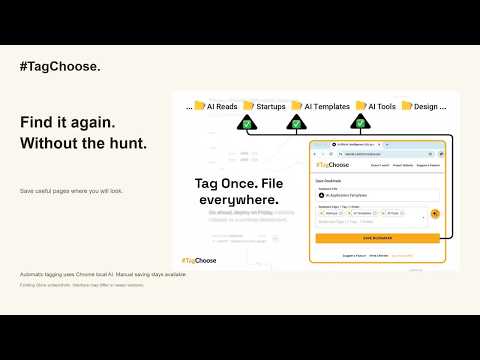
#TagChoose categorizes your bookmarks with client-side AI using Gemini Nano LLM within your browser.

📄 Check system requirements: https://developer.chrome.com/docs/extensions/ai/prompt-api ------------ I built #TagChoose to solve my own problem: bookmark-saving anxiety. When I needed a link I’d saved weeks ago, it was often faster to re-Google it than dig through dozens of folders. I tried being more thoughtful about where to save things — but that just slowed me down. So I built a better way: an AI-powered auto-categorizer that saves bookmarks into multiple relevant folders, instantly. ------------ 💡 What It Does #TagChoose is a privacy-first Chrome extension that uses Google’s on-device AI to tag and organize your bookmarks — without ever sending data to the cloud. 📌 Save the current tab with a shortcut 📌 Edit the bookmark title (default is the page title) 📌 Pick from AI-generated tags — or select your own from a dropdown list of folders 📌 Bookmarks are saved into folders matching your chosen tags 📌 Each bookmark can live in multiple places at once 📌 It’s like smart folders, powered by local AI. ------------ 🔑 Key Features 📌 AI-Generated Tags – Suggested instantly by Gemini Nano, running fully on your device 📌 Folders = Tags – Tags map to folders in your bookmarks bar 📌 Multi-Folder Saving – One bookmark can appear in several folders at once 📌 Title Editing – Change the bookmark title before saving 📌 Manual Tag Control – Override or refine suggestions via dropdown list of existing folders 📌 Offline-Ready – Works without internet 📌 Keyboard-First UX – Open with Ctrl+Shift+Y (Mac: ⌘+Shift+Y) and navigate by keyboard. You can adjust the shortcut by visiting chrome://extensions/shortcuts. ‼️ Manual Folder Setup – Bookmark folders must be created in advance ------------ 🔐 Private by Design 📌 On-device only – No cloud processing 📌 Zero data sent out – Your browsing and tags stay local ------------ 👥 Best For 📌 Researchers overwhelmed with saved links 📌 Professionals organising tools, docs, and code 📌 Productivity-focused users who want smarter, faster bookmarking ------------ 🙌 Support & Feedback If #TagChoose helps you, please leave a positive review to support its development. Got ideas or feature requests? Suggest them here: 👉 https://tagchoose.featurebase.app/ ----UPDATES---- v1.1.0: • Re-engineered AI model download experience with real-time progress tracking • Introduced tooltip system for better accessibility and user guidance • Enhanced AI service with additional training examples for better bookmark categorization v1.0.0: • Completely rebuilt AI system for better performance and reliability • Added progress tracking when downloading AI models • Improved error messages and user feedback • Enhanced bookmark categorization accuracy • Better handling of different AI availability states • Smoother experience when AI features are loading • Fixed issues with AI suggestions not appearing • More stable performance across different Chrome versions • Cleaner codebase for future improvements v0.9.2: • Added support for new AI states: downloadable and downloading • Improved footer layout with refined donation button placement • Simplified extension name and updated URLs • Added tooltips for better user feedback • Removed redundant browser update alert

Details

  • Version
    1.1.0
  • Updated
    August 19, 2025
  • Size
    1.37MiB
  • Languages
    English (United States)
  • Developer
    Website
    Email
    saulius.developer@gmail.com
  • Non-trader
    This developer has not identified itself as a trader. For consumers in the European Union, please note that consumer rights do not apply to contracts between you and this developer.

Privacy

The developer has disclosed that it will not collect or use your data.

This developer declares that your data is

  • Not being sold to third parties, outside of the approved use cases
  • Not being used or transferred for purposes that are unrelated to the item's core functionality
  • Not being used or transferred to determine creditworthiness or for lending purposes

Support

Related

TabShow | Point at Tabs in a Side Panel to See Full Pages Without Switching

5.0

Vertical tabs with site icons and titles. Move your mouse over tabs to see a full page preview without switching. Click to switch.

BlankSlate

4.9

BlankSlate is an open-source, lightweight new tab extension designed for users who prefer a clean and minimal browsing experience.

DeepMark - AI Bookmark Manager

1.3

Your AI-powered bookmark manager with auto scene sorting & smart recommendations

News Storyline

5.0

News Storyline

MarkMind

4.8

AI-powered bookmark organization that helps you keep your bookmarks clean and organized using artificial intelligence.

Bookmark Genie - Organize with AI

2.0

An AI-powered tool that organizes, categorizes, and manages your bookmarks for a clutter-free browsing experience.

Faro

5.0

Save pages with highlighted taglines - Bookmark manager ⨯ web highlighter

Team Bookmarks

5.0

Conquer Bookmark Chaos: Boost Team Efficiency. Spend less time searching for information and more time getting things done.

Markwise - Save, Organize & Find Anything Online

3.7

Save anything from the web—links and videos with timestamps—and find it instantly with AI. Your searchable knowledge base.

Bookmark AI Assistant

2.3

An AI-powered Chrome extension that intelligently organizes your bookmarks based on your existing folder structure.

Tanuki Utilities

5.0

Provide useful utilities for GitLab users.

AI Bookmark Manager: Auto Sort & Organize

4.2

No more manual bookmark sorting – let AI do it for you!

TabShow | Point at Tabs in a Side Panel to See Full Pages Without Switching

5.0

Vertical tabs with site icons and titles. Move your mouse over tabs to see a full page preview without switching. Click to switch.

BlankSlate

4.9

BlankSlate is an open-source, lightweight new tab extension designed for users who prefer a clean and minimal browsing experience.

DeepMark - AI Bookmark Manager

1.3

Your AI-powered bookmark manager with auto scene sorting & smart recommendations

News Storyline

5.0

News Storyline

MarkMind

4.8

AI-powered bookmark organization that helps you keep your bookmarks clean and organized using artificial intelligence.

Bookmark Genie - Organize with AI

2.0

An AI-powered tool that organizes, categorizes, and manages your bookmarks for a clutter-free browsing experience.

Faro

5.0

Save pages with highlighted taglines - Bookmark manager ⨯ web highlighter

Team Bookmarks

5.0

Conquer Bookmark Chaos: Boost Team Efficiency. Spend less time searching for information and more time getting things done.

Google apps