

TackNote Lite: Sticky Notes for Web Pages

Overview
Sticky notes that stay on the web page they belong to. Private: your notes never leave your computer.
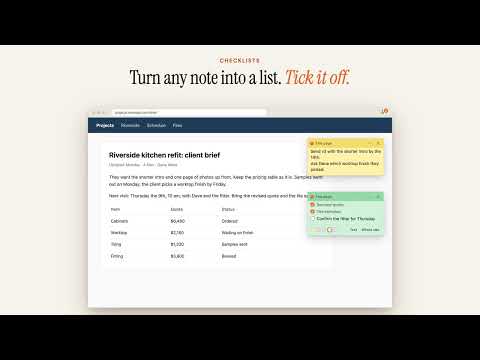
Sticky notes that stay on the page they belong to. Tack a note to any web page, or to a whole site. Leave the page and the note steps aside. Come back and it is waiting, right where you left it. Your reminder sits on the pull request, the client brief or the email it is about, not in another tab. HOW IT WORKS • One shortcut: press Option+Shift+N on a Mac, or Alt+Shift+K on Windows and Linux. Or right-click any page and choose Tack a note to this page, which is the way on a Chromebook. The board always shows the shortcut your Chrome is using, and you can change it. • This page, every version of it, or the whole site: pin a note to one exact page, to a page whatever options are in its address (handy on shop and product pages), or to every page on a site. • On screen or on the page: a note can stay where you put it on screen, or stick to its spot in the page and scroll with it. • Your size: drag a note's corner to make it wider, and choose small, medium or large text. • Web apps too: in web email and other single-page apps, each message or view gets its own note. • Checklists and colours: turn any note into a checklist and tick it off. Five colours, one click each. • The board: click the TackNote Lite icon to see every note, grouped by site. Search every word, and click a note to jump straight back to its page. • Backups: save all your notes to a file and restore them on another computer. The board reminds you when it has been a while. PRIVATE BY DESIGN • No account, no analytics, no servers. TackNote Lite never sends your notes, or anything else, anywhere. • The page can't read your notes. Each note is drawn in its own protected frame, so the website you are on cannot see what you type, and its keyboard shortcuts don't fire while you write. • You choose where it runs. TackNote Lite has no access to any site when you install it. Chrome asks once for each site, or you can allow every site with one question. • Your notes are stored in Chrome on your computer and nowhere else. Unlock keys are checked on your computer, offline. • Does not run in Incognito mode. PRICING Free for your first 25 notes, for life. Unlock unlimited notes once for $4.99, with no subscription. Notes you already have always keep working. TackNote Lite is a separate, lighter app for your browser. For notes on every app, file and folder on your computer, see TackNote for Mac and Windows at tacknote.app.
0 out of 5No ratings
Details
- Version1.0.5
- UpdatedOctober 17, 2026
- FeaturesOffers in-app purchases
- Offered byKeepers Code, LLC
- Size68.7KiB
- LanguagesEnglish
- DeveloperKeepers Code, LLC
2730 S Gatewood Ln Boise, ID 83709-8577 USEmail
support@tacknote.appPhone
+1 208-779-0112 - TraderThis developer has identified itself as a trader per the definition from the European Union and committed to only offer products or services that comply with EU laws.
- D-U-N-S149901812
Privacy

This developer declares that your data is
- Not being sold to third parties, outside of the approved use cases
- Not being used or transferred for purposes that are unrelated to the item's core functionality
- Not being used or transferred to determine creditworthiness or for lending purposes
Support
For help with questions, suggestions, or problems, visit the developer's support site