


概要
Automatic Google Calendar time tracking and productivity insights
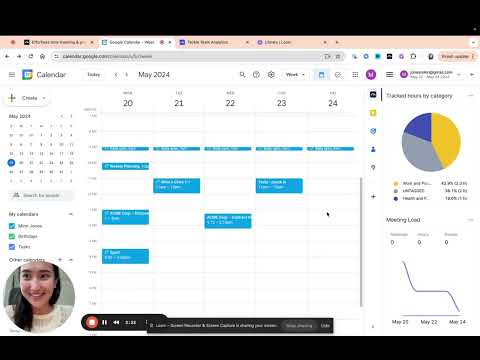
⭐ Tackle - The #1 Google Calendar Time Tracker ⭐ Effortlessly track time directly on your Google Calendar. Leverage AI and automation to tag and categorize events, and export your calendar data to Google Sheets seamlessly. 🔹 Overview Tackle is the ultimate solution for tracking time and getting productivity insights with Google Calendar. Seamlessly integrate to track events and activities, generate customized reports, and gain insights into your time without extra manual work. 🔑 Key Features 📅 Google Calendar Time Tracking: Easily track your time directly from Google Calendar. 🏷️ Custom Tags and Categories: Use AI-powered tagging to organize events into categories like Personal, Work, Projects, and Clients. 📊 Automated Reports: Generate tailored reports with just a few clicks. 📤 Data Export: Export your calendar data to Google Sheets or Excel for further analysis. ✨ Benefits 📈 Insightful Dashboards: Visualize your time allocation across different activities. 👥 Team Performance Tracking: Organize calendars by teams to gain insights into performance and areas needing improvement. 🔄 Intuitive Workflow Builder: Automate repetitive time-tracking tasks. 🤝 Meeting Health Analytics: Measure and improve meeting effectiveness with AI-driven insights. 🔧 Setup Instructions ➤ Install the Tackle add-on or Tackle Chrome Extension and open Google Calendar. ➤ Sign up via Tackle’s sidebar and complete onboarding. ➤ Create custom tags and properties from the sidebar menu. ➤ Select events and add tags in Google Calendar. ➤ Change the date range to analyze specific periods. ➤ Export calendar data to Google Sheets or Excel from the Tackle app. ❓ Why Choose Tackle? 🌟 Effortless Time Tracking: Automatic tracking with deep calendar integration. ⚙️ Flexible Solutions: Customize workflows and reports to fit your team’s needs. 🔒 Comprehensive Security: SOC 2 Type 2 certification ensures enterprise-grade security. 💡 Signup and Pricing: * Freemium Plan: Free forever plan with essential features. * Paid Plans: Affordable options for advanced features. ---------------------------------------------------------------------------------------------------- 📧 Contact Us: If you have any issues or questions, reach out to us at support@timetackle.com
5 点満点で 4.425 件の評価
詳細
プライバシー

このデベロッパーは、お客様のデータについて以下を宣言しています
- 承認されている以外の用途で第三者に販売しないこと
- アイテムの中心機能と関係のない目的で使用または転送しないこと
- 信用力を判断する目的または融資目的で使用または転送しないこと
サポート
質問や提案、問題がある場合は、パソコンのブラウザでこのページを開いてください