

TabVault – Session Manager

Overview
Save, search and restore browser sessions instantly. Local-first, no account needed.
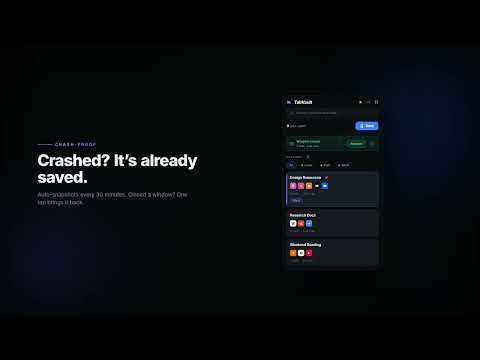
TabVault is a tab manager and session saver for Chrome. Save every open tab in one click, search across all your sessions instantly, and restore any window — even after a crash or accidental close. No account. No servers. Nothing ever leaves your browser. If you have ever lost hours of research because Chrome crashed, closed the wrong window, or restarted your computer, TabVault is built for you. ── 𝗦𝗔𝗩𝗘 & 𝗥𝗘𝗦𝗧𝗢𝗥𝗘 𝗕𝗥𝗢𝗪𝗦𝗘𝗥 𝗦𝗘𝗦𝗦𝗜𝗢𝗡𝗦 ────────────────────────────────────── Save all open tabs in the current Chrome window as a named session in one click — or press Ctrl+Shift+S without even opening the popup. Restore later in the same window, or open everything in a brand-new one. Your tabs come back exactly as you left them. TabVault is not a bookmark manager. Sessions remember your full context: every tab, every URL, every title — restored instantly with a single click. ── 𝗜𝗡𝗦𝗧𝗔𝗡𝗧 𝗙𝗨𝗟𝗟-𝗧𝗘𝗫𝗧 𝗦𝗘𝗔𝗥𝗖𝗛 𝗔𝗖𝗥𝗢𝗦𝗦 𝗔𝗟𝗟 𝗧𝗔𝗕𝗦 ────────────────────────── Type and find. TabVault searches every session name, tab title and URL as you type — no filters to set up, no folders to dig through. Search "figma redesign", "Q4 report", or just a domain name and the right session appears in under a second. ── 𝗔𝗨𝗧𝗢𝗠𝗔𝗧𝗜𝗖 𝗖𝗥𝗔𝗦𝗛 𝗥𝗘𝗖𝗢𝗩𝗘𝗥𝗬 — 𝗡𝗘𝗩𝗘𝗥 𝗟𝗢𝗦𝗘 𝗧𝗔𝗕𝗦 𝗔𝗚𝗔𝗜𝗡 ───────────────── TabVault silently auto-saves a snapshot of your open tabs every 30 minutes in the background. Chrome crash, power cut, accidental restart — your last session is always waiting. No setup required. It runs automatically the moment you install. ── 𝗪𝗜𝗡𝗗𝗢𝗪-𝗖𝗟𝗢𝗦𝗘 𝗥𝗘𝗖𝗢𝗩𝗘𝗥𝗬 ─────────────────────────────────────────────── Closed a Chrome window by accident? TabVault catches it before it disappears. A recovery banner appears the next time you open the extension — tap Restore and your tabs are back, exactly as they were. ── 𝗧𝗔𝗚𝗦, 𝗙𝗜𝗟𝗧𝗘𝗥𝗦 𝗔𝗡𝗗 𝗣𝗜𝗡𝗦 ────────────────────────────────────────────── Colour-code sessions with custom tags like Work, Research, Design or Code. Filter your session list by tag in one tap. Pin critical sessions to the top so they are always one click away. TabVault replaces the mess of dozens of bookmark folders with a fast, visual, tagged session library. ── 𝗙𝗨𝗟𝗟 𝗗𝗔𝗦𝗛𝗕𝗢𝗔𝗥𝗗 ──────────────────────────────────────────────────────── Open the full-screen dashboard for a card-grid overview of every saved session. Search, filter, rename, duplicate, pin, share and delete — all from one clean interface without touching the popup. ── 𝗦𝗛𝗔𝗥𝗘 𝗦𝗘𝗦𝗦𝗜𝗢𝗡𝗦 𝗪𝗜𝗧𝗛 𝗔 𝗖𝗢𝗗𝗘 ──────────────────────────────────────────── Generate a short share code for any session and send it to a colleague or paste it on another device. They enter the code and your exact set of tabs opens instantly — no account, no cloud login, no email required. ── 𝗞𝗘𝗬𝗕𝗢𝗔𝗥𝗗 𝗦𝗛𝗢𝗥𝗧𝗖𝗨𝗧 & 𝗥𝗜𝗚𝗛𝗧-𝗖𝗟𝗜𝗖𝗞 𝗦𝗔𝗩𝗘 ────────────────────────────── Ctrl+Shift+S (Command+Shift+S on Mac) saves the current window silently from any page. Right-click any page and choose Save Session for a mouse-friendly alternative. Every action is available without opening the popup. ── 𝗕𝗘𝗔𝗨𝗧𝗜𝗙𝗨𝗟 𝗗𝗔𝗥𝗞 𝗠𝗢𝗗𝗘 ────────────────────────────────────────────────── TabVault is built dark-first with a clean navy and indigo design that looks sharp on any screen. Prefer light mode? Toggle it in one click from the header. ── 𝟭𝟬𝟬% 𝗟𝗢𝗖𝗔𝗟 — 𝗭𝗘𝗥𝗢 𝗧𝗥𝗔𝗖𝗞𝗜𝗡𝗚, 𝗭𝗘𝗥𝗢 𝗦𝗘𝗥𝗩𝗘𝗥𝗦 ──────────────────────────── TabVault stores everything inside Chrome's own local storage on your device. Your sessions never touch an external server. No account sign-up. No email address. No subscription fee. No analytics. No tracking of any kind. Your browsing data belongs to you — not us. ── 𝗪𝗛𝗢 𝗜𝗦 𝗧𝗔𝗕𝗩𝗔𝗨𝗟𝗧 𝗙𝗢𝗥? ────────────────────────────────────────────────── Researchers working across multiple topic windows simultaneously Developers switching between local, staging and production environments Students managing coursework tabs, reference articles and assignment windows Designers keeping Figma, inspiration boards and client sites open together Writers juggling multiple drafts, source material and reference tabs Remote workers running separate windows for different clients or projects Anyone who has ever lost their tabs and wished they could get them back ── 𝗛𝗢𝗪 𝗧𝗔𝗕𝗩𝗔𝗨𝗟𝗧 𝗖𝗢𝗠𝗣𝗔𝗥𝗘𝗦 ───────────────────────────────────────────────── Unlike OneTab or tab suspend tools, TabVault saves your sessions without closing your current tabs. Restore into a new window while keeping what you have open now. Unlike bookmark folders, sessions are fully searchable, tagged and restorable in one click — not a list of links you have to open one by one. ── 𝗖𝗢𝗠𝗣𝗟𝗘𝗧𝗘𝗟𝗬 𝗙𝗥𝗘𝗘 ────────────────────────────────────────────────────── Every feature in TabVault is free from day one. No trial period. No premium plan. No feature gates. Install and use everything immediately. ── 𝗣𝗘𝗥𝗠𝗜𝗦𝗦𝗜𝗢𝗡𝗦 𝗘𝗫𝗣𝗟𝗔𝗜𝗡𝗘𝗗 ────────────────────────────────────────────── TabVault requests only what it needs: Tabs — reads tab URLs and titles when you save a session Storage — saves sessions locally on your device using Chrome's built-in storage Windows — detects window closures for the recovery banner feature Alarms — schedule the 30-minute auto-save snapshot in the background Context Menus — add the right-click Save Session option to any page Tab Groups — preserves Chrome tab group names when saving a session No browsing history is logged. No data is transmitted. No third-party services are used. Install TabVault and stop losing your tabs. Made with ❤️ by ravikirankallepally.
0 out of 5No ratings
Details
- Version1.2.0
- UpdatedJune 24, 2026
- Offered byravikirankallepally
- Size41.33KiB
- LanguagesEnglish (United States)
- Developer
Email
ravikirankallepally@gmail.com - Non-traderThis developer has not identified itself as a trader. For consumers in the European Union, please note that consumer rights do not apply to contracts between you and this developer.
Privacy

This developer declares that your data is
- Not being sold to third parties, outside of the approved use cases
- Not being used or transferred for purposes that are unrelated to the item's core functionality
- Not being used or transferred to determine creditworthiness or for lending purposes