

Tabster - Tab and Group Manager

Overview
macOS Finder-style tab manager
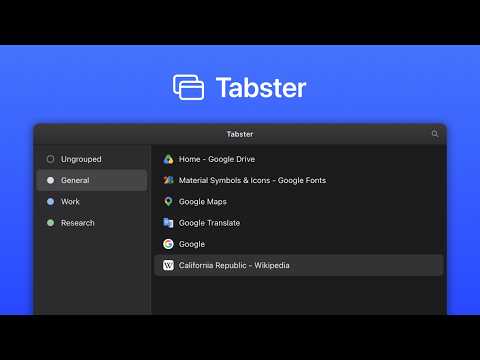
A tab manager for Chrome that works like the macOS Finder. Search, cut and unload your tabs and groups from one keyboard shortcut. If you usually have dozens of tabs open across several groups, Tabster gives you a quick, keyboard-friendly way to find and organize them without leaving the page you're on. Press Cmd/Ctrl+E and a Finder/File Explorer-style overlay opens over your current tab. A familiar two-pane layout Your groups live in the sidebar, and the tabs inside the selected group fill the main list. Click to select, double-click to jump, right-click for everything else. Find any tab fast Press Cmd/Ctrl+F and start typing. Search filters your tabs as you go, so you're not hunting through a crowded tab strip. Organize by dragging Drag tabs between groups to rearrange your workspace, one at a time or several at once. You can also use keyboard shortcuts to cut, copy and paste – just like moving files. Name your groups Give groups names like "Work," "Research," or "Shopping". The names stick for as long as they're open. Free up memory by unloading tabs Unload tabs or groups you're not using to reclaim memory, and load them back when you need them again. Helpful when a session gets heavy. Save and load tab strips Right-click the sidebar to save your open tabs and groups as a file you can reload anytime. Fits right in Tabster automatically follows your light or dark theme, so it looks at home next to the rest of your browser. Built for the keyboard - Cmd/Ctrl+E — Toggle Tabster - Cmd/Ctrl+F — Search tabs - Cmd/Ctrl+A — Select all - Cmd/Ctrl+C / X / V — Copy / cut / paste tabs - Cmd/Ctrl+U — Unload tabs - Shift + Cmd/Ctrl+U — Load tabs - Cmd/Ctrl+G — Group tabs - Up / Down Arrows — Navigate (Shift to extend selection) - Enter — Jump to tab - Backspace — Close tabs - Esc — Step back or close You can also select ranges of tabs, then close, move, or unload them all at once. Your data stays yours Tabster doesn't collect your browsing data or send it anywhere. Everything stays on your device.
5 out of 53 ratings
Details
- Version1.0.3
- UpdatedSeptember 13, 2026
- Size244KiB
- LanguagesEnglish (United States)
- DeveloperWebsite
Email
bar@berryscript.com - Non-traderThis developer has not identified itself as a trader. For consumers in the European Union, please note that consumer rights do not apply to contracts between you and this developer.
Privacy

This developer declares that your data is
- Not being sold to third parties, outside of the approved use cases
- Not being used or transferred for purposes that are unrelated to the item's core functionality
- Not being used or transferred to determine creditworthiness or for lending purposes
Support
For help with questions, suggestions, or problems, visit the developer's support site