

TabStash
2 ratings
)
Overview
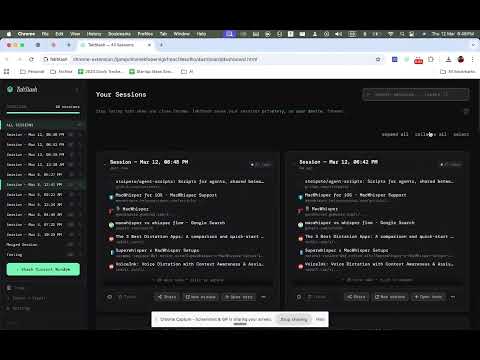
Save and restore browser sessions. Tabs load lazily — only when you click them.
Too many tabs killing your Chrome? TabStash saves your open tabs into organized collections, frees up to 95% of Chrome's memory, and lets you restore everything instantly. One click. Zero lost tabs. Zero clutter. ⚡ Save All Tabs & Reclaim Chrome's Memory Stop letting open tabs slow your browser to a crawl. With one click, TabStash saves every open tab into a named collection and closes them — freeing memory without losing your work. Restore individual tabs or entire sessions whenever you need them. - Save all open tabs into organized collections - Close tabs instantly to free up to 95% of Chrome memory - Restore individual tabs or full sessions in one click - Manage hundreds of tabs without slowing down your browser 🎨 A Modern Tab Organizer Built for Real Workflows Most tab managers look like they were built in 2013. TabStash is different — clean, fast, and designed for how people actually work today. An interface that gets out of your way so you can get back to work. ⌨️ Keyboard Shortcuts for Power Users Never break your flow. Manage tabs without touching your mouse. Stash all open tabs: Mac: Cmd + Shift + S Windows: Ctrl + Shift + S Open the TabStash dashboard: Mac: Option + Shift + S Windows: Alt + Shift + S 🔗 Share Tab Collections — Free, No Paywall Turn any saved session into a shareable link and send it in seconds. Most tab managers charge for this. TabStash doesn't. Perfect for: - Founders sharing research decks - Teams collaborating on projects - Developers sharing documentation sets - Students sharing study resources 🔎 Find Any Saved Tab Instantly Search across all your saved sessions — whether you saved them yesterday or six months ago. No digging. No guessing. 💾 Backup & Move Your Sessions Export your entire tab library as a JSON file. Restore it anytime, or move it to a new computer. Your collections are always portable and protected. Export all saved sessions as a backup. Restore collections from any previous backup. Move your tab history to a new device. We also support importing and exporting URLs from other existing Tab Managers. Your data is yours! 🔒 Privacy-First. Always. TabStash was built with privacy as a non-negotiable. - All tab data is stored locally in your browser - Nothing is transmitted unless you choose to share a collection - No tracking. No analytics. No hidden data collection. Your tabs are yours. Full stop. 💡 TabStash Is Built For anyone with 30+ tabs open right now ✅ Everything TabStash Does: ✔ Save tabs instantly with one click ✔ Organize tabs into named collections ✔ Free up Chrome memory (up to 95%) ✔ Restore individual tabs or full sessions ✔ Search across all saved tabs ✔ Share tab collections via link — free ✔ Backup and restore sessions as JSON ✔ Keyboard shortcuts for power users ✔ Local storage, no tracking, total privacy Install TabStash — the tab manager and session saver Chrome actually needed.
5 out of 52 ratings
Details
- Version1.0.0
- UpdatedMarch 16, 2026
- Offered bysudshekharapps
- Size92.38KiB
- LanguagesEnglish (United States)
- DeveloperTechHarbour LLP
Eden Au Lac Apartment Indiranagar Bengaluru, Karnataka 560038 INEmail
sudshekharapps@gmail.com - Non-traderThis developer has not identified itself as a trader. For consumers in the European Union, please note that consumer rights do not apply to contracts between you and this developer.
Privacy

This developer declares that your data is
- Not being sold to third parties, outside of the approved use cases
- Not being used or transferred for purposes that are unrelated to the item's core functionality
- Not being used or transferred to determine creditworthiness or for lending purposes
Support
For help with questions, suggestions, or problems, please open this page on your desktop browser