


Overview
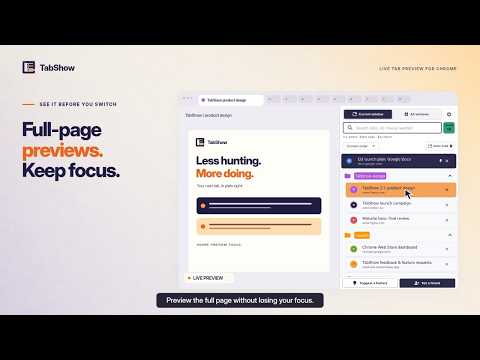
Search or point at open tabs to preview the live page, then switch or snap back without losing your place.
Stop clicking through Chrome tabs just to find the right one. TabShow is a lightweight tab manager built around one fast idea: see the page before you switch. It puts your open tabs in Chrome's side panel, where you can search, preview, and open the tab you need without losing your place. SEE THE PAGE BEFORE YOU SWITCH Point at a tab in your current window and its live page appears in the main browser area. Found the right one? Click to keep it. Not the one? Move away and TabShow returns you to the page you were using. FIND A TAB FAST Start typing as soon as the panel opens. Search by page title, URL, or domain. Use Arrow Up and Arrow Down to select a result, Enter to open it, or Escape to return to your original tab and close the panel. Keyboard selection stays switch-free until you press Enter. Live preview remains available on hover. FIND TABS ACROSS WINDOWS IN ONE CHROME PROFILE Stay focused on the current window or search all open windows in the same Chrome profile from one compact list. Other Chrome profiles stay separate. Tabs from another window switch only when you click, so a casual hover never pulls you away unexpectedly. BUILT FOR REAL TAB CHAOS • Sort by Chrome order, recent use, recent addition, domain, or tab group. • See tab groups, pinned tabs, audio, muted, sleeping, and duplicate indicators. • Close tabs directly from the side panel. • Keep the real open-tab and window totals visible while search filters the list. • Choose light, dark, or system appearance with readable selected and preview colors. KNOW YOUR TAB CHAOS SCORE See a local score based on tab volume, window sprawl, duplicates, long-neglected tabs, and tabs outside groups. Check the trend over time and get one practical suggestion for calming the current session. The score and its history stay in your browser. PRIVATE BY DESIGN • No account or sign-in. • No TabShow backend. • No advertising or extension analytics. • No host permissions. • No access to webpage contents. • Tab information and settings stay in your browser. TabShow uses Chrome permissions only to show the side panel, list the tab details Chrome provides, display existing tab groups, and switch or close tabs when you ask it to. Find the right tab without switching away. TabShow is free to use. Supporting its development through Buy Me a Coffee is entirely optional. WHAT'S NEW IN 2.3 TabShow 2.3 makes the All windows scope clearer: it includes windows in the same Chrome profile, while other profiles stay separate. The refreshed update page links to a short voiced demo of full-page previews, search, and keyboard navigation. Every feature remains free, with no new permissions. Changelog: https://tab.show/changelog Privacy: https://tab.show/privacy Feedback: https://narsheek.featurebase.app/
5 out of 55 ratings
Details
- Version2.3.0
- UpdatedSeptember 10, 2026
- Size199KiB
- LanguagesEnglish (United States)
- DeveloperWebsite
Email
sauliusthedev@gmail.com - Non-traderThis developer has not identified itself as a trader. For consumers in the European Union, please note that consumer rights do not apply to contracts between you and this developer.
Privacy

This developer declares that your data is
- Not being sold to third parties, outside of the approved use cases
- Not being used or transferred for purposes that are unrelated to the item's core functionality
- Not being used or transferred to determine creditworthiness or for lending purposes
Support
For help with questions, suggestions, or problems, please open this page on your desktop browser