

TabShow | Point at Tabs in a Side Panel to See Full Pages Without Switching

Overview
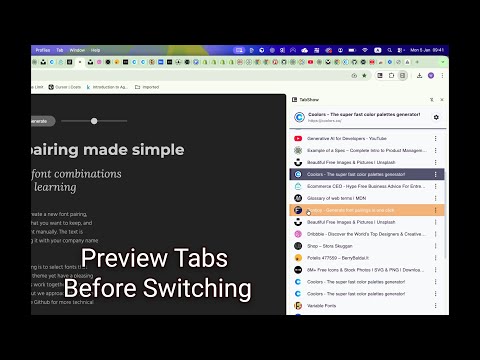
Vertical tabs with site icons and titles. Move your mouse over tabs to see a full page preview without switching. Click to switch.
Move your mouse over any tab in the vertical list within the side panel - that tab becomes the preview tab. You’ll instantly see the real, live page in your main browser window - not a small website icon, but a full page preview. Either click to switch to the new tab or move your mouse away to snap back to the original tab. TabShow is a one-purpose extension that helps tab hoarders stay organized and focused, whether you have ADHD or just too many tabs. 1️⃣ Open the side panel by clicking TabShow icon or via keyboard shortcut. You can open it either by clicking the TabShow icon in your browser’s top bar or by using the shortcut Shift + Ctrl + X on Windows (Shift + Cmd + X on Mac), which you can customize anytime at chrome://extensions/shortcuts. 2️⃣ See your tabs in a clear vertical list with website icons and titles. Once opened, the side panel shows all your open tabs in a vertical layout with website icons and titles. The current tab - the one you’re viewing - is highlighted in your primary color both in the list and at the top of the panel. 3️⃣ Hover any tab in a side panel to see full-page preview. Move your mouse over any tab in the list - that tab becomes the preview tab, changing to secondary color so it’s easy to tell apart. You’ll instantly see the real, live page in your main browser window - not a small website icon, but a full-page preview. 4️⃣ Move mouse away and return to the current or click to switch to a new tab. You can either move your mouse away from the side panel (or close it) to snap back to your current tab, or click a tab in the vertical list to switch for real — the preview will then become your new current tab. ---PRIVACY NOTE--- TabShow operates entirely on your local machine. It does not have a backend and does not collect, save, or transmit any of your browsing data. The extension only requests the minimal permissions required for its core functionality of managing tabs in the side panel. Crucially, it does not request host permissions, meaning it cannot access or read the content of any websites you visit, ensuring your browsing activity remains private. ---UPDATES--- --1.0.0🍾-- -- Added a hover delay control with a loading hint and placed it in the Settings panel, so you can increase the delay to avoid accidental previews when you brush past the sidebar and find the option quickly. Thanks @rickgordon for this idea in the Feature Suggestion Board at https://narsheek.featurebase.app/ 🙏! -- Added a new “Try Settings” button and replaced “Tell a Friend” with “Rate Extension,” linking directly to the review page. --0.9.1-- -- Updated extension icon for better visibility and clarity. -- Updated Chrome Web Store listing page. --0.9.0-- -- 💣💣 Settings Panel: Added a settings panel where you can switch between different color themes. Access it through the settings icon in the top-right corner of the side panel (Thanks Ausra 🙏). -- Default Color Update: Updated the default color scheme to "Charcoal Violet + Amber" for a more natural and professional appearance. -- Tell a Friend Button: Added a convenient "Tell a Friend 😊" button that copies the Chrome Web Store link. Please test it out by telling a friend about Tab.Show! 🙏 -- Fixed an issue where the tab list wasn't updating to show the correct favicons and page titles when you navigated to new webpages - now it always displays the current, accurate information for each tab. --0.8.1-- -- Yet Another Name Change! Extension is now called TabShow (yes, again!) because it's catchier and I actually managed to snag the tab.show domain - turns out .show is a real top-level domain! 🎉 -- Feature Request Button: Added a convenient Suggest a Feature link in the bottom-right corner to easily share your ideas and feedback. -- Better Tab Information: Hover over any tab in the list to see the full website address in a helpful tooltip. --0.8.0-- -- Tab Groups Redesigned: Tab groups now look and work exactly like they do in your browser's tab bar, with proper nesting, colors, and expand/collapse functionality (Thanks Paulius 🙏). -- Enhanced User Interface: Tab items now show a pointer cursor when you hover over them, making it clearer that they're clickable (Thanks Dmitry 🙏). -- Smoother Hover Experience: Fixed issues with rapid hovering that could cause tabs to switch unexpectedly, making the preview feature more reliable. --0.7.1-- -- Renamed extension from Narsheek to TabGlance - a more catchy name that clearly communicates the core functionality. -- Drastically improved tab list performance - now works smoothly even with 200+ tabs open. --0.7.0-- -- Smarter Previews: TabGlance now intelligently distinguishes between hover-previews and manual tab switches, making the original tab logic more robust and reliable. -- Significant performance upgrades to make tab loading and list rendering even faster. -- Added a "What's New" page to keep you informed about the latest updates after every release. -- A new Welcome Page for first-time users to help them get started with the core features and shortcuts. --0.6.0-- -- Close Tabs Directly: You can now close tabs directly from the side panel list, streamlining your workflow. -- Default Keyboard Shortcut: The side panel can now be toggled with Command+Shift+X (Mac) or Ctrl+Shift+X (Windows). -- Tab Group Display: Your existing tab groups are now visually represented in the side panel for better organization. -- Resolved several minor bugs related to edge cases in tab management. --0.5.0-- -- Initial Release: Welcome to TabGlance! The core hover-to-preview functionality is here to change the way you manage tabs.
5 out of 53 ratings
Details
- Version1.0.0
- UpdatedJanuary 20, 2026
- Size167KiB
- LanguagesEnglish (United States)
- DeveloperWebsite
Email
saulius.developer@gmail.com - Non-traderThis developer has not identified itself as a trader. For consumers in the European Union, please note that consumer rights do not apply to contracts between you and this developer.
Privacy

This developer declares that your data is
- Not being sold to third parties, outside of the approved use cases
- Not being used or transferred for purposes that are unrelated to the item's core functionality
- Not being used or transferred to determine creditworthiness or for lending purposes
Support
For help with questions, suggestions, or problems, please open this page on your desktop browser