

TabShare - Share tab groups as link
4.2(
8 ratings
)ExtensionTools1,000 users

Overview
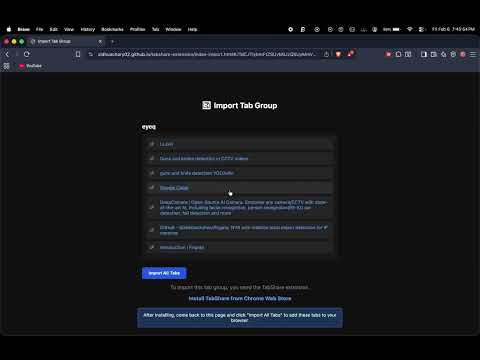
TabShare is a lightweight extension that lets you share a browser tab group as a link and restore it later.
TabShare lets you share your Chrome tab groups using a simple link. Export all tabs in a group, send the link, and import them instantly on another browser or device. Perfect for research, team collaboration, and switching devices without losing tabs.
4.2 out of 58 ratings
Details
- Version1.3.1
- UpdatedFebruary 13, 2026
- Offered bysiddhuachary2005
- Size227KiB
- LanguagesEnglish
- DeveloperSiddhu Sudarshan Achary
Mhada colony, Sion Koliwada Mumbai, Maharashtra 400037 INEmail
siddhuachary2005@gmail.comPhone
+91 72083 87440 - TraderThis developer has identified itself as a trader per the definition from the European Union and committed to only offer products or services that comply with EU laws.
Privacy

Manage extensions and learn how they're being used in your organization
TabShare - Share tab groups as link has disclosed the following information regarding the collection and usage of your data. More detailed information can be found in the developer's privacy policy.
TabShare - Share tab groups as link handles the following:
Web history
This developer declares that your data is
- Not being sold to third parties, outside of the approved use cases
- Not being used or transferred for purposes that are unrelated to the item's core functionality
- Not being used or transferred to determine creditworthiness or for lending purposes
Support
For help with questions, suggestions, or problems, please open this page on your desktop browser