

TabSaver
2 ratings
)
Overview
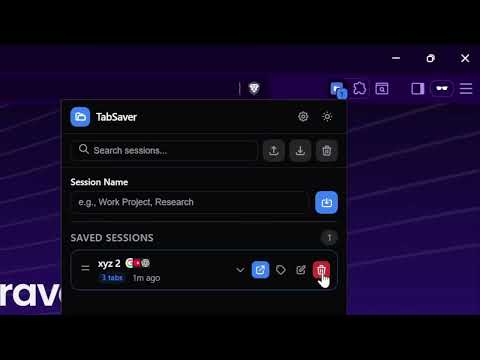
Save and restore browser tab sessions with ease. Features include export/import, search, tags, auto-save, and more.
TabSaver 2.1.0 TabSaver is a premium, developer-focused Chrome extension designed to make browser session management effortless and beautiful. Built with a modern aesthetic and powerful utilities, it helps you save, search, and restore your tab sessions with ease. ✨ Key Features: 1. Visual Layouts: Every session includes a visual thumbnail of your active tab, making it easier to identify your work at a glance. 2. Live Sync & Auto-Save: Two independent background engines. One for creating periodic backups to ensure you never lose progress, and another for automatically syncing your workspace to specific sessions as you browse. 3. Manual "Add Tabs": Update any session instantly by adding your current open tabs with a single click. 4. One-Click Cleanup: A dedicated utility to instantly find and close duplicate tabs across all your open browser windows to save RAM. 5. Tab Groups Support: Full preservation of your Chrome Tab Groups, including custom titles and colors. 6. Smart Search & Tags: Organize your sessions with customizable tags (Work, Personal, Research, etc.) and find them instantly with real-time search. 7. Developer-Focused UI: A clean, optimized interface featuring dark mode support, smooth micro-animations, and fast keyboard shortcuts (Ctrl+Shift+S). 8. Maximum Portability: Move your data freely with built-in JSON export and import functionality. 9. Storage Monitoring: Keep track of your local storage usage with real-time monitoring and visual warnings before you hit Chrome limits. ⌨️ Keyboard Shortcuts: Ctrl + Shift + S (or Cmd + Shift + S on Mac): Save current session immediately Ctrl + Shift + T (or Cmd + Shift + T on Mac): Open the TabSaver popup Ctrl + F: Quick focus search bar (within the popup) Created with a focus on performance, privacy, and productivity.
5 out of 52 ratings
Details
- Version2.1.1
- UpdatedMarch 21, 2026
- Offered bySamonwita Sarker
- Size42.97KiB
- LanguagesEnglish
- Developer
Email
sarker.samonwita@gmail.com - Non-traderThis developer has not identified itself as a trader. For consumers in the European Union, please note that consumer rights do not apply to contracts between you and this developer.
Privacy

TabSaver has disclosed the following information regarding the collection and usage of your data. More detailed information can be found in the developer's privacy policy.
TabSaver handles the following:
This developer declares that your data is
- Not being sold to third parties, outside of the approved use cases
- Not being used or transferred for purposes that are unrelated to the item's core functionality
- Not being used or transferred to determine creditworthiness or for lending purposes
Support
For help with questions, suggestions, or problems, please open this page on your desktop browser