

TabSave
3 ratings
)
Overview
Save every window, tab and group as a session, keep a version history and restore it anytime. No account, no cloud.
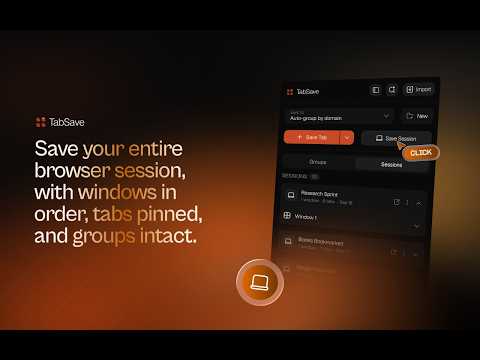
TabSave saves your whole browser session — every window, tab and tab group — and keeps a version history while you work. Close everything, then come back to exactly where you were, or to any point before. No account. No sign-in. No cloud. Your sessions stay on your device. ━━━━━━━━━━━━━━━━━━━━ SAVE YOUR WHOLE SESSION • One click captures every open window: tab order, pinned tabs and tab groups • Reopen a session in the current window or a new one, exactly as it was • Open just one window from a session, or a single tab • Name your sessions and rename them anytime REWIND WITH VERSION HISTORY • TabSave keeps versions of your session as you work: automatically every 15 minutes when something changed, or whenever you click Save Version • Open any earlier version, or restore it with one click • Each session keeps its 10 most recent versions BACK UP AND MOVE SESSIONS • Export a session as JSON, CSV or Markdown, and import it back as a session • Import sessions and tabs from other tab managers • Duplicates are flagged before importing: skip, replace or keep both ━━━━━━━━━━━━━━━━━━━━ SAVE TABS AND GROUPS TOO • Save the current tab, or Shift/Cmd-click several tabs and save them at once • Save every tab in the window, or right-click any page to save it • Auto-group tabs by website, or save them into groups you name • Saved groups appear as real Chrome tab groups, each with its own colour • Select several groups at once to open, export or delete them FIND ANYTHING • Search across everything you've saved: sessions, groups and tabs • Press / to start searching WORK YOUR WAY • Use the popup from the toolbar, or open TabSave in Chrome's side panel so it stays open while you browse ━━━━━━━━━━━━━━━━━━━━ PRIVATE BY DEFAULT Everything you save is stored locally in Chrome on your device. TabSave has no account, no servers and no analytics, and it never sends your sessions or tabs anywhere. TabSave is free. Website and support: https://tab-save-chrome-extension.vercel.app
5 out of 53 ratings
Details
- Version1.1.0
- UpdatedOctober 9, 2026
- Offered byTabSave
- Size176KiB
- LanguagesEnglish
- DeveloperAdetunji Olafisoye
N0 1 Ola Ifa Street, Gbaga, Ikorodu, Lagos. Ikorodu, Lagos 102222 NGEmail
olafisoyeadetunji03@gmail.comPhone
+234 903 848 1126 - TraderThis developer has identified itself as a trader per the definition from the European Union and committed to only offer products or services that comply with EU laws.
Privacy

TabSave has disclosed the following information regarding the collection and usage of your data. More detailed information can be found in the developer's privacy policy.
TabSave handles the following:
This developer declares that your data is
- Not being sold to third parties, outside of the approved use cases
- Not being used or transferred for purposes that are unrelated to the item's core functionality
- Not being used or transferred to determine creditworthiness or for lending purposes
Support
For help with questions, suggestions, or problems, please open this page on your desktop browser