

Tab(s) – Memory and Productivity Manager

Overview
Save tabs into folders that auto-delete after 7 days — keeping your browser clean, fast, and focused.
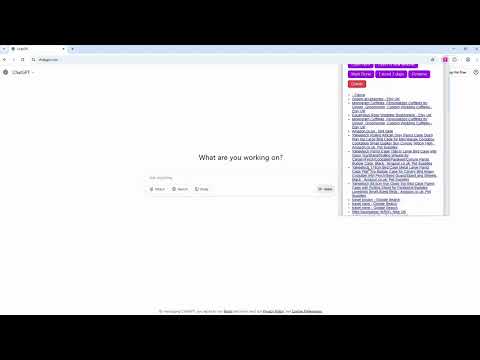
🧠 Tab(s): The Productivity Tool That Deletes Your Clutter — Not Just Saves It Too many tabs open? Your computer slows down. Your focus disappears. And you keep telling yourself, “I’ll check these later.” — but later never comes. That’s where Tab(s) comes in. It’s not just another tab manager. It’s a decluttering tool for your browser and your brain — a smarter way to save and automatically delete old tabs so you stay focused, fast, and free from tab chaos. ⚡ Why Tab(s) Exists Every open tab eats memory, slows down your computer, and drains your focus. Bookmarks pile up endlessly, and other tab managers only move the mess — they don’t solve it. Tab(s) changes that. It helps you save your open tabs into a folder, close them instantly to free up system memory, and then — if you don’t revisit them — it auto-deletes them after 7 days. That’s right: old tabs vanish automatically. No guilt, no buildup, no hoarding. 💀 Because Clutter Kills Productivity - A hundred open tabs means a hundred mental reminders. - Your brain never truly rests — it keeps track of everything “you’ll read later.” - That constant mental noise drains your energy and focus. Tab(s) ends that cycle. You save it → it closes → your mind clears → and if you never need it again, it’s gone. It’s digital minimalism, built into your browser. 💻 How It Works 1. Save your open tabs into a folder with one click. 2. Tabs close instantly, freeing up memory and making your browser run faster. 3. Your saved folder appears in the Tab(s) dashboard — organized, timestamped, and ready to reopen later. 4. After a few days, if you haven’t used it, Tab(s) automatically deletes the folder. The result? A faster computer, a clearer workspace, and a calmer you. 🚀 Key Benefits 🔥 Auto-Deletion = True Declutter Unlike every other tab manager, Tab(s) doesn’t keep everything forever. It deletes what you don’t return to — so you never have to clean up manually. Old ideas fade away naturally, leaving only what matters. ⚙️ Free Your Computer’s Memory Browsers eat RAM like candy. Every tab you leave open consumes system resources and slows everything down. Tab(s) saves and closes them, keeping your browser — and your computer — running smooth and fast. 💡 Free Your Mind Open tabs aren’t just digital clutter. They’re mental clutter. Each one represents a thought, a reminder, or a task waiting to be done. Tab(s) removes those distractions, helping you focus on one thing at a time. 🛒 Tame Random Shopping Ideas Browsing for gifts, gadgets, groceries, or weekend plans? Save them into a “Shopping” folder, let Tab(s) close the tabs instantly, and get back to work. Later, reopen them when you actually have time. If you forget — great. They probably weren’t that important. 🧩 Features at a Glance - 🗂️ Save All or Selected Tabs Save every open tab, or just specific ones (like all tabs to the right). Organize by project, idea, or purpose in seconds. - 💤 Auto-Deletes Old Folders Automatically remove folders after a few days of inactivity. Keeps your browser and mind clean without any manual cleanup. - 🚫 Closes Tabs to Free Memory Instantly close saved tabs to reduce browser load, free RAM, and make your computer run faster. - 🔁 Reopen Folders Anytime Restore an entire session or reopen just one folder when you’re ready — all from your simple tab(s) dashboard. - ✏️ Rename or Mark Folders as Done Keep everything organized and track which ideas or projects you’ve completed. - 🔒 Privacy First — 100% Local Storage No cloud, no tracking, no third-party access. Your saved data never leaves your browser. -⚡ Lightweight and Fast tab(s) runs quietly in the background, keeping your experience smooth and resource-efficient. -🌐 Use One Account on Multiple Browsers Your subscription works across different Chrome-based browsers (like Chrome, Brave, Edge, and Arc). This makes it easy to separate work, research, and personal use — without cross-browser sync. For example, use tab(s) on Chrome for work tabs and on Brave for personal projects, all under the same account. 💬 Real-World Scenarios 🧑💻 Stay Focused at Work You’re deep into a project when a random idea strikes — “Oh, I should look up new shoes” or “Check that new AI tool.” Normally, you’d open a dozen new tabs and lose your focus. With Tab(s), you just save them into a “Later” folder. They close instantly. You stay focused. 🎓 For Students & Researchers Collect sources for an essay, save them into a folder, and clear your workspace to focus on writing. Come back when it’s time to cite. If you never do — Tab(s) will auto-delete the clutter for you. 🛍️ For Shoppers Plan your gift lists, groceries, or travel ideas. Tab(s) saves everything neatly — and deletes the old ideas after a few days so your browser never gets bloated. 🧠 For Thinkers Your brain has enough to manage. Let Tab(s) manage the tabs — and automatically clean up what you no longer need. 🔒 Privacy You Can Trust Tab(s) is completely local. -Your folders and saved tabs stay on your device only. -No data tracking. -No cloud sync. -No analytics. You stay in full control of your data and privacy. ⚙️ Why Auto-Delete Matters Most tab managers help you “save everything forever.” That’s not helpful — that’s digital hoarding. You end up with thousands of saved tabs you’ll never touch again. Tab(s) breaks that pattern by auto-deleting folders that you never revisit. This simple feature keeps your browser — and your life — organized by default. No cleanup required. No guilt. No clutter. 💭 It’s Not Just About Tabs — It’s About Focus Every open tab is a micro-distraction. Every saved folder is a decision postponed. Tab(s) gives you freedom from both. You get: - More focus - Faster computer performance - Less mental fatigue - Fewer distractions That’s what productivity really means. 🧠 Minimalist Design. Maximum Impact. Tab(s) is intentionally simple. It doesn’t drown you in options or complex UIs. Just save, close, focus — and let auto-deletion do the rest. Clean design. Fast performance. Real results. 🏁 How to Use 1. Click the Tab(s) icon in your toolbar. 2. Choose “Save All Tabs and close window” or “Save this and tabs to the right” or “Save this and tabs to the left". 3. Name your folder (e.g., “Work Research,” “Gift Ideas”). 4. Watch your browser instantly declutter. 5. Reopen later if you need — or let Tab(s) auto-delete what you don’t. That’s it. No clutter, no noise, no wasted time. 🔋 Performance + Productivity Tab(s) doesn’t just make you feel organized — it literally makes your computer faster: - Closes heavy background tabs - Reduces Chrome’s memory use - Improves battery life on laptops - Keeps your sessions lightweight and responsive You’ll feel the difference instantly. ⚡ Tab(s) — Save It. Close It. Forget It. Your computer runs faster. Your browser stays lighter. Your mind feels calmer. That’s the power of auto-deletion. That’s Tab(s) — the tab manager that helps you let go.
0 out of 5No ratings
Details
- Version1.0.2
- UpdatedNovember 25, 2025
- Offered byTab(s)
- Size83.08KiB
- LanguagesEnglish
- Developer
Email
tabs-productivity@protonmail.com - Non-traderThis developer has not identified itself as a trader. For consumers in the European Union, please note that consumer rights do not apply to contracts between you and this developer.
Privacy

This developer declares that your data is
- Not being sold to third parties, outside of the approved use cases
- Not being used or transferred for purposes that are unrelated to the item's core functionality
- Not being used or transferred to determine creditworthiness or for lending purposes