

Tabs Outliner

Обзор
The Next Generation Session Manager; A Really Working Too Many Open Tabs Solution; And Your Browsing Notebook.
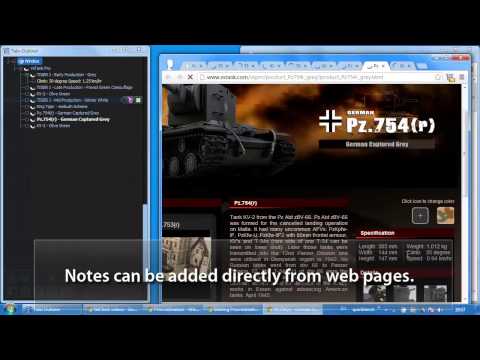
Tabs Outliner is a powerful fusion of a tab manager, a session manager, and a tree-like personal information organizer. It features built-in tools designed to drastically reduce your open tab count by allowing you to easily annotate and "close-save" windows and tabs within their original context. Most importantly, it allows you to interact with these saved tabs practically in the same way as with open ones, freeing up valuable system resources. A Lifesaver for Cognitive Overload & ADHD Beyond just managing links, Tabs Outliner acts as a secondary brain. For people with Attention Deficit Hyperactivity Disorder (ADHD), or anyone who frequently experiences information overload, this extension is a game-changer. It drastically reduces mental load by allowing you to visually organize and safely tuck away your workflow without the anxiety of losing your train of thought. You can clear your screen to focus on the task at hand, knowing everything else is perfectly preserved exactly as you left it. It also provides one of the most reliable ways to recover from crashed sessions — an unfortunate reality for power users who naturally accumulate hundreds of open tabs. = FEATURES AND CAPABILITIES = ☀ Complete Overview - Get a bird's-eye view of all your open and saved tabs and windows, complete with your custom-added notes and marks. ☀ Flexible Tree Structure fully editable by Drag-and-Drop - Organize everything in a fully editable hierarchical tree into logical hierarchies and delimited groups. Unlike other tools, every node can be a parent to any other node, and all items can be freely reordered to specify priority or importance. This works not just with saved links, but with your currently open tabs and windows! ☀ One-Click Close & Save - Preserve any tab or window "in place" within its original context in the Tree with a single click. Saved items can be freely mixed with open ones. Because the Tabs Outliner window is designed to be kept active for observing your workspace, saved items never fall out of focus (a common issue with tools that banish tabs to separate lists). This makes the actual act of closing tabs to free up resources feel safe and mentally effortless. ☀ Innovative Tabs Outlining & Organizing - Annotate windows and tabs, add comments, summarize main ideas, or create to-do lists. Text notes can be dragged and dropped directly from web pages into the Tree. ☀ Tree-Style Tab Relations - Inspired by the famous Firefox extension, this feature automatically relates newly opened tabs to the tab they were opened from. This builds a strong, visual context for all your items and perfectly maps out your browsing trail. ☀ Intelligent Crash Recovery Done Right - No more panic after a browser crash or sudden system restart. Forget the default Chrome "all or nothing" choice—where you either lose all your tabs or reopen all the mess there was before crash and freezing your PC trying to load them all at once. Tabs Outliner lets you reopen only the windows or individual tabs you need NOW. Everything else remains safely saved in the exact context it was in before the crash, consuming zero resources until you are ready for it. ☀ Tabs List Exporter - Easily export and share an annotated list of your tabs via Google Docs, Word, Evernote, email, or messengers. Entire window hierarchies can be exported with a simple Drag & Drop, or you can save your entire tree as an HTML file (Ctrl+S in the main window). ☀ One-Click Procrastination Stopper - Instantly close-save all open tabs and windows while preserving their full structure and context. Regain system performance and mental clarity in seconds, and return to your work with a clean slate. = PAID FEATURES = Everything mentioned above is absolutely free to use. However, to support the ongoing development of the project, there are additional pro features available for a small, one-time payment. (Free users will only see an unobtrusive reminder about these features once every few weeks). ☀ Keyboard Shortcuts & Clipboard Support - Unlocks a whole new level of speed and efficiency for power users to navigate, edit, and manipulate the tree. ☀ Frequent Local Backups - Access automatic local backups saved every few minutes—perfect for restoring accidental deletions or reviewing recent changes. ☀ Automatic Daily Google Drive Backups - Not only this secure your data this also enables possibilities to access your tree remotely from some other computers Note: These paid features are completely optional, and the core application is highly effective without them. The tree constantly saves all changes locally, and manual backups or data exports can be done at any time for free.
4,4 из 53,3 тыс. оценки
Подробности
- Версия1.4.167
- Обновлено8 апреля 2026 г.
- Размер1.46MiB
- ЯзыкиEnglish
- РазработчикСайт
Электронная почта
omnray@gmail.com - Не продавецРазработчик не указал для себя статус продавца. Просим клиентов из Европейского союза обратить внимание, что на сделки между вами и этим разработчиком не распространяются законы о защите прав потребителей.
Конфиденциальность

Этот разработчик утверждает, что ваши данные:
- Не продаются третьим лицам, за исключением разрешенных вариантов использования
- Не используются и не передаются в целях, не связанных с работой основных функций продукта
- Не используются и не передаются для определения платежеспособности или в целях кредитования
Поддержка
Чтобы сообщить об ошибках в работе продукта, задать вопрос или поделиться идеями, откройте эту страницу в браузере для компьютера.