

Tabs Desk

Visão geral
Área de trabalho visual e painel de produtividade. Pesquise, agrupe e organize suas guias com facilidade.
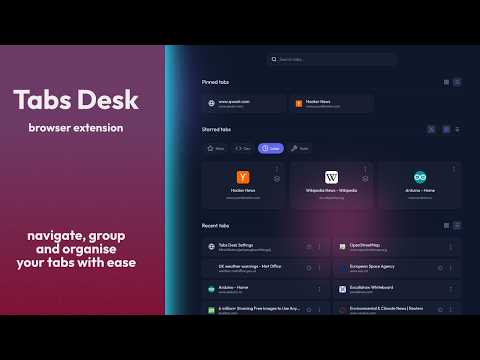
Reclaim your focus and transform your browsing experience. Tabs Desk is the ultimate visual workspace and productivity dashboard designed to help you find what you need, when you need it. ➡️ Getting Started: - Use the default shortcut "Alt + Shift + 1" (or "Cmd + Shift + 1" on Mac) to open your dashboard. - Or open "Manage Extensions" > "Keyboard shortcuts" to set your own custom combination (e.g. "Cmd + 1"). - Once open, press "H" to familiarise yourself with the main keyboard shortcuts. 🚀 Key Features: - Visual Dashboard: Get a bird's-eye view of your active workspace and recent tabs in a clean, elegant layout. - Quick Search: Instantly filter your tabs to find that one specific page in seconds. No more hunting. - Tabs Grouping: Categorise your tabs by project, activity type, or goal. Keep your focus sharp and your workflows separated. - Effortless Organisation: View your open tabs automatically grouped by site. Quickly spot and close the ones you no longer need to declutter your browser instantly. - Make it yours: Customise your dashboard with your favourite font. Pick a unique theme and icon for each group to make them stand out. 🧠 Why Tabs Desk Works: Standard tab bars are cramped and chaotic. Tabs Desk organises your workflow into three logical streams: - Pinned Tabs: Your essential, "always-on" tools stay anchored at the top for instant access. - Starred Groups: The heart of your productivity. Categorise tabs into persistent groups that remain even after you close them, acting as living bookmark folders. - Recent Tabs: Quickly see and jump back into your most recently used tabs, even across multiple windows. ⚡ Power User Perks: - Keyboard-First Design: Navigate your entire dashboard, switch groups, and search using intuitive shortcuts designed for one-hand operation. Perfect for minimising hand travel and staying in the flow. - Sibling Tab Management: Easily identify and manage multiple open tabs from the same domain to reduce duplication. - Privacy Matters: Your data stays with you. Tabs Desk operates entirely locally with no external tracking or data collection. - Seamless Portability: Take your workspace with you. Effortlessly move your settings and starred tabs to a different browser or device using the Backup & Restore feature. 100% free - 0 data collected - 0 tracking
0 de 5Nenhuma nota
Detalhes
- Versão1.0.1
- Atualização22 de fevereiro de 2026
- Oferecido porderks.me.uk
- Tamanho191KiB
- Idiomas5 idiomas
- Desenvolvedor
E-mail
dev@derks.me.uk - Não negocianteEsse desenvolvedor não se identificou como comerciante. Caso você seja da União Europeia, observe que os direitos do consumidor não se aplicam a contratos firmados entre você e esse desenvolvedor.
Privacidade

O desenvolvedor declara que seus dados
- Não são vendidos a terceiros, exceto nos casos de uso aprovados
- Não são usados ou transferidos para fins não relacionados à função principal do item
- Não são usados ou transferidos para informações de crédito ou empréstimo