

Tabs Desk: Tab Manager & Workspace Organizer
1 rating
)
Overview
A visual workspace and productivity dashboard that helps you organize your tabs, stay focused, and quickly find what you need.
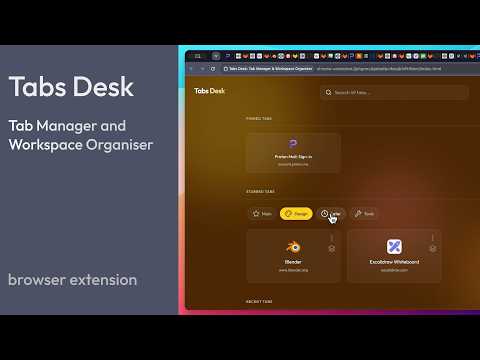
Tired of tab overload? Transform your browser into a beautifully organised, high-productivity environment with Tabs Desk — a powerful visual tab manager. Built from the ground up for speed and clarity, Tabs Desk helps you find what you need, exactly when you need it. ➡️ Getting Started: - Use the default shortcut "Alt + Shift + 1" (or "Cmd + Shift + 1" on Mac) to open your dashboard. - Or open "Manage Extensions" > "Keyboard shortcuts" to set your own custom combination (e.g. "Cmd + 1"). - Once open, press "H" to learn the main keyboard shortcuts. 🚀 Key Features: - Visual Dashboard: Get a bird's-eye view of your active workspace and recent tabs in a clean, elegant layout. - Quick Search: Instantly filter your tabs to find that one specific page in seconds. No more hunting. - Tab Grouping: Categorise your tabs by project, activity type, or goal. Keep your focus sharp and your workflows separated. - Quick Mode: Focus on a selected group of tabs and navigate only within them — ideal for the tabs you use most. - Effortless Organisation: View your open tabs automatically grouped by site. Quickly spot and close the ones you no longer need to declutter your browser instantly. - Customisation: Choose your favourite font, and assign unique themes and icons to each group to make them stand out. - Multi-Language Support: Use Tabs Desk in your preferred language with support for English, Italian, and Portuguese (more coming soon). 🧠 Why Tabs Desk Works: Standard tab bars are cramped and chaotic. Tabs Desk organises your workflow into three clear layers: - Pinned Tabs: Your essential, "always-on" tools stay anchored at the top for instant access. - Starred Groups: The heart of your productivity. Categorise tabs into persistent groups that remain even after you close them, acting as living bookmark folders. - Recent Tabs: Quickly see and jump back into your most recently used tabs, even across multiple windows. ⚡ Power User Perks: - Keyboard-First Design: Navigate your entire dashboard, switch groups, and search using intuitive shortcuts designed for one-hand operation. Perfect for minimising hand travel and staying in the flow. - Sibling Tab Management: Easily identify and manage multiple open tabs from the same domain to reduce duplication. - Seamless Portability: Take your workspace with you. Effortlessly move your settings and starred tabs to a different browser or device using the Backup & Restore feature. 🔒 Privacy by Design Your privacy is our priority. Tabs Desk runs entirely locally: - No data collection. - No tracking or analytics. - No external servers or cloud storage — your data never leaves your browser. - Manual backups.
5 out of 51 rating
Details
- Version1.2.3
- UpdatedJune 7, 2026
- Offered byderks.me.uk
- Size169KiB
- Languages5 languages
- Developer
Email
dev@derks.me.uk - Non-traderThis developer has not identified itself as a trader. For consumers in the European Union, please note that consumer rights do not apply to contracts between you and this developer.
Privacy

This developer declares that your data is
- Not being sold to third parties, outside of the approved use cases
- Not being used or transferred for purposes that are unrelated to the item's core functionality
- Not being used or transferred to determine creditworthiness or for lending purposes