

TabRail: Searchable Side-Panel Tab Strip

Overview
A readable vertical tab list in Chrome's side panel. Search, reorder, group colors and keyboard navigation for heavy tab users.
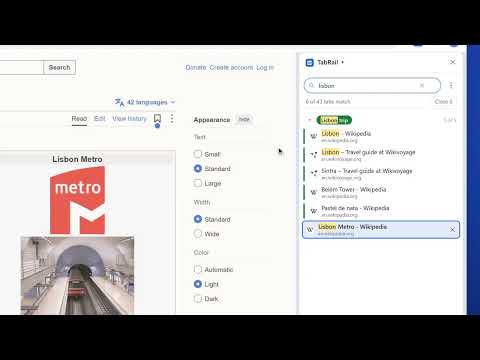
Got 40 tabs open and a tab strip full of favicon slivers you can't read? TabRail puts every tab in this window into a clean, scrollable vertical list in Chrome's side panel, with the full title and site visible for each one. Find any tab in a second. Start typing and the list filters as you go, matching titles and addresses and highlighting the words it found. Press Enter to jump to the tab, or close every match at once with one button. TabRail works with how you already use Chrome. Tab groups appear with their real colors and names, and you can collapse or expand them from the panel. Pinned tabs stay at the top. Tabs playing audio show a speaker you can click to mute, and sleeping tabs are dimmed so you can see what's using memory. FEATURES - Live vertical list of every tab in the current window, updated instantly as you open, close, move or group tabs - Search titles and URLs with highlighted matches, and close all results in one click (with confirmation) - Keyboard first: / or Ctrl+F to search, arrow keys to move, Enter to switch, Delete to close, Esc to clear - Drag and drop to reorder tabs, move whole groups, or drop a tab onto a group header to add it - Tab group headers with Chrome's group colors; click to collapse or expand - Right-click menu: reload, duplicate, pin, mute, group, move to a new window, copy link, close tabs below or close others - One click to close duplicate tabs or put background tabs to sleep and free memory - Middle-click to close, just like the regular tab strip - Light, dark or system theme, plus comfortable and compact density - Open the panel from the toolbar button or with Alt+Shift+E PRIVATE BY DESIGN TabRail has no account, no servers, no analytics and no tracking. Your tab list is read locally to draw the panel and is never stored or sent anywhere. Favicons come from Chrome's own local cache, so the panel doesn't contact the sites you have open. The only thing saved is your display preferences, kept in Chrome's sync storage. Good for researchers, developers, students, support agents and anyone else who keeps dozens of tabs open.
0 out of 5No ratings
Details
- Version1.0.3
- UpdatedNovember 7, 2026
- Offered byNisreen Maher
- Size47.88KiB
- LanguagesEnglish
- Developer
Email
mohelm97@gmail.com - Non-traderThis developer has not identified itself as a trader. For consumers in the European Union, please note that consumer rights do not apply to contracts between you and this developer.
Privacy

This developer declares that your data is
- Not being sold to third parties, outside of the approved use cases
- Not being used or transferred for purposes that are unrelated to the item's core functionality
- Not being used or transferred to determine creditworthiness or for lending purposes
Support
For help with questions, suggestions, or problems, please open this page on your desktop browser