


Огляд
Magic впорядкує посилання, Lucky допоможе почати. Дошки, групи, нотатки й справи. Локально, без реєстрації.
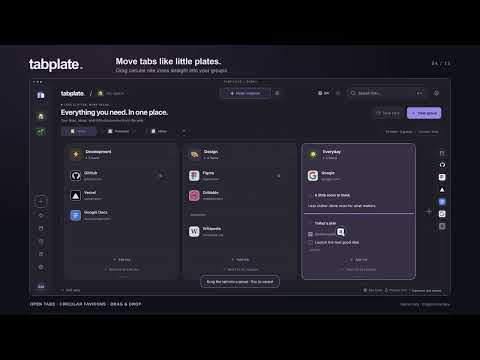
Turn scattered tabs into a space that makes sense, with a little Magic. MAGIC ORGANIZE Let Magic arrange saved links or open tabs into relevant groups on your current board. It plans the structure first, creates groups, and adds named dividers when links belong together within a group. Groups appear in a gentle cascade, then site icons fly into their places. Tune the grouping logic with your own rules, and undo the result when you want to try again. Original browser tabs stay open. FEELING LUCKY? Start with an empty board and let Lucky create a collection from frequently visited sites. No multi-screen setup: grant optional history access, click Lucky and watch the board take shape. Lucky is available only on empty boards and needs at least six eligible sites. Its 90-day last-visit filter uses Chrome's aggregate visit counts and up to 5,000 results; ranking is approximate, not a complete count of visits in that period. MAKE THE SPACE YOURS Keep projects in separate workspaces, boards and areas. Drag circular site icons from the current-window tab drawer into a group. Add notes, to-do lists and dividers. Double-click group or board names to rename them. Search your saved content, keep Favorites across workspaces, customize icons and colors, and switch between light and dark themes. The interface supports English, Ukrainian, German, Spanish, Simplified Chinese and Japanese. Animations respect reduced-motion settings. PRIVATE BY DESIGN Magic works on this device with local grouping rules. It does not send tabs or history to an AI service. No account, advertising, analytics or developer-operated data server. Your workspace stays in this browser profile; there is no automatic cloud sync. History and open-tab access are optional. Website icon downloading is off by default. Browser-cached and bundled icons work without website access. If you enable downloading, icon servers receive normal connection information such as IP addresses; requests omit cookies and referrers. Turning it off cancels outstanding work and removes optional website access. Export a board, a workspace or a full backup. Local snapshots and Trash help recover changes; exported backups remain your responsibility. Help: https://docs.tabplate.com/ Privacy: https://tabplate.com/privacy Support: support@tabplate.com
Деталі
- Версія0.11.27
- Оновлено18 жовтня 2026 р.
- Розробник:Secew LLC
- Розмір220KiB
- МовиКількість мов: 6
- РозробникSecew
Strazheskа st., 5 Kyiv 03126 UAЕлектронна пошта
support@tabplate.comТелефон
+380 97 527 5190 - ПродавецьЦей розробник ідентифікує себе як продавця за визначенням Європейського Союзу й зобов’язується надавати лише продукти або послуги, які відповідають законам ЄС.
- Номер D-U-N-S538376681
Конфіденційність

Розробник продукту (Tabplate: магічний порядок вкладок) надав наведену нижче інформацію про те, як збираються і використовуються ваші дані. Щоб дізнатися більше, перегляньте privacy policy розробника.
Tabplate: магічний порядок вкладок обробляє наведені нижче дані.
Цей розробник заявляє, що ваші дані:
- не продаються третім особам (за винятком дозволених випадків)
- не використовуються й не передаються для цілей, що не пов’язані з основними функціями продукту
- не використовуються й не передаються для визначення кредитоспроможності або в цілях кредитування
Підтримка
Із запитаннями, пропозиціями й проблемами звертайтеся на сайт підтримки розробника.


