

TabOverview: Tab Manager, Save & Restore Tabs, New Tab Page

Overview
Too many tabs? See them all in one grid and find any page fast. No account. Your tabs stay on your computer unless you share them.
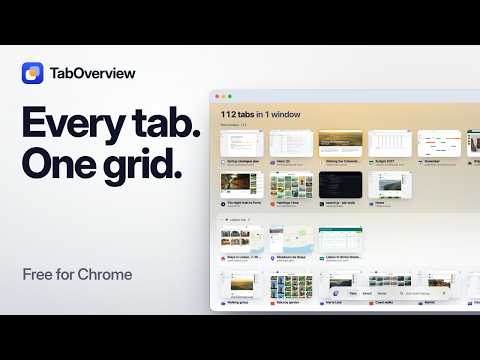
Too many open? One shortcut shows them all. TabOverview is a free tab manager for Chrome that shows everything you have open in one grid, across all your windows and groups. It also turns your new tab page into Home, a moving sky with the real sun, moon and weather where you are. WHAT IT DOES • See everything: every window and group on one screen, with pictures if you turn them on • Sidebar: everything you have open, with groups and workspaces, beside any page, in Chrome's side panel • Find anything: one search across open, saved and closed pages • Side by side: drag one card onto another to pair two pages, or tile up to four • Later: one click puts a page away, or keep named sets as a list, cards or a board • Archive: turn it on, and pages you haven't used for a while tidy themselves away. Search still finds them • Put a window away: bring it back just as it was, groups and all • Rewind: closed a window by mistake? Bring back only the pages that went missing • Sleep: put the rest of a window to sleep and see how much memory came back • Share: send a copy as a link, or work on a set together, with hearts and notes • Copy for AI: copy chosen pages as clean text, ready to paste into any assistant • Home: the live sky with layered clouds, or a painting, your photos or a colour, with your favourites. You can turn it off YOUR PAGES ARE SAFE Every close has Undo, and closed pages stay listed for 30 days. Saved pages are real Chrome bookmarks, so they outlast any tool, this one included. FREE AND PRIVATE Free, with no account and no ads. Your tabs stay on this computer unless you share them. What goes online: Home's real weather is on from the start: while Home is showing, it asks taboverview.com about once an hour for the forecast in your rough area, based on your internet address. Nothing about your pages is sent. Turn it off in Make it yours. When you share, a short link or Work together sends only a locked copy to taboverview.com, so we can't read it. QUESTIONS How do I see all my open tabs at once in Chrome? Press TabOverview's shortcut or click its icon. Everything you have open appears in one grid. Type to find a page. How do I save tabs for later? Press Later on a card, or save several pages as a named set. Later can bring a page back at a time you choose. How do I get back pages I closed by mistake? Press Undo, or open Closed. After a whole window closes, Rewind brings back only what went missing. Do I need an account? No. It's free, with nothing to sign up for. Good to know: to open at once, TabOverview keeps one small pinned page in each window. You can turn that off in Settings. In 20 languages. Made by Global Charity Solutions Kft. in Hungary. Chrome is a trademark of Google LLC.
5 out of 53 ratings
Details
- Version0.1.49
- UpdatedNovember 25, 2026
- Size4.28MiB
- Languages20 languages
- DeveloperGlobal Charity Solutions Kft.Website
Vajda Janos utca 25 Dunakeszi 2120 HUEmail
hello@taboverview.comPhone
+36 30 589 1182 - TraderThis developer has identified itself as a trader per the definition from the European Union and committed to only offer products or services that comply with EU laws.
- D-U-N-S402449728
Privacy

TabOverview: Tab Manager, Save & Restore Tabs, New Tab Page has disclosed the following information regarding the collection and usage of your data. More detailed information can be found in the developer's privacy policy.
TabOverview: Tab Manager, Save & Restore Tabs, New Tab Page handles the following:
This developer declares that your data is
- Not being sold to third parties, outside of the approved use cases
- Not being used or transferred for purposes that are unrelated to the item's core functionality
- Not being used or transferred to determine creditworthiness or for lending purposes
Support
For help with questions, suggestions, or problems, please open this page on your desktop browser