

TabNexus

Overview
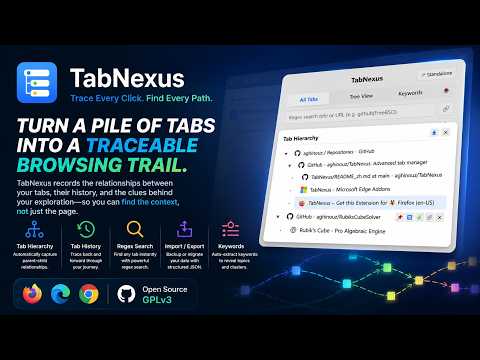
Turn a pile of tabs into a traceable browsing trail.
Once your browser has grown to dozens, hundreds, or even thousands of tabs, the real problem is no longer simply "too many tabs." It becomes: "Where did this page come from?" "What path did I take to find it?" "Will I still be able to find it again days later among hundreds of other pages?" Your browser's tab bar tells you what you have open. Your browser history tells you what you have visited. TabNexus focuses on how you got from one page to another. TabNexus turns scattered tabs into an understandable, searchable, savable, and traceable browsing workspace, helping you recover the path behind your research and exploration. 🌲 1. Understand the Trail: See How Your Pages Are Connected Real-world web exploration is rarely a straight line. It grows through searches, jumps, branches, comparisons, and detours. TabNexus is designed to preserve that process. • Browsing Relationship Tree: Automatically tracks parent-child relationships between tabs. Instead of seeing isolated webpages, you can see the trail of your exploration as a clear structure. Specific branches can also be extracted or exported directly. • Tab-Level Browsing Trail: Every tab keeps track of where it came from. Long-press the browser's Back/Forward controls in the top-left corner to reveal that tab's dedicated navigation trail, without digging through the massive global browsing history. 🔍 2. Find Anything Fast: Precisely Locate Information Across Hundreds of Pages Once you've accumulated hundreds of tabs, you need something more powerful than scanning them one by one. • Automatic Keyword Extraction: No manual organization required. TabNexus automatically extracts keywords to help you understand what your collection of pages is about. • Regex & Multi-Dimensional Search: Perform advanced searches across page titles and URLs using regular expressions, then instantly reorder results by most recent access time. 💾 3. Preserve & Take Control: Turn Browsing Into a Workflow Your browsing work should not be trapped inside your current browser window. TabNexus provides a complete set of tools for managing complex browsing sessions. • Structured Import & Export: Export matching tabs, including their parent-child relationships, as structured JSON backups. When importing, TabNexus loads tabs incrementally in the background to avoid sudden resource spikes caused by creating large numbers of tabs at once. • Restricted Page Protection: Some local files (file:///) and internal browser pages cannot be opened directly due to browser security restrictions. TabNexus automatically creates secure placeholder pages marked [Restricted], ensuring that these pages are not silently lost from your browsing structure. • Standalone Window & Batch Actions: Detach TabNexus into an independent management window, making it especially useful for dual-screen setups. Quickly locate tabs, pin them, copy URLs, or clean up all unpinned items with batch actions. ⭐ 4. Native Compatibility: A More Seamless Browsing Experience TabNexus works with the browser instead of fighting against it. • Seamless Tab Groups Integration: Deeply integrates with native browser Tab Groups. A minimal, arrow-free collapse interaction keeps the interface clean, while collapsed and expanded states stay synchronized with the browser's native Tab Groups in real time. 👥 Built for Complex Browsing TabNexus is designed for people who regularly work with dozens or hundreds of tabs, especially when their workflow looks something like: Search → Explore → Compare → Reference → Branch out → Search again → Retrace It is particularly useful for: • Developers: Move between documentation, GitHub repositories, issues, and codebases while preserving the trail behind your investigation. • Researchers & Students: Keep large collections of references and trace where papers, sources, and supporting information came from. • Content Creators & Curators: Collect large amounts of material and still be able to recover the right source weeks later. • Heavy Information Seekers: People who repeatedly open dozens or even hundreds of pages while investigating a single question. 🛡️ Local-First. Your Data Stays Yours. TabNexus follows a Local-First design philosophy: • Privacy-Focused: Your data stays in your browser by default. Browsing records are not uploaded to remote servers. • Built for Scale: Core algorithms are optimized for workflows involving hundreds or even thousands of tabs, keeping navigation responsive and fluid. • Native Experience: Automatically adapts to both Chinese and English interfaces, as well as system light and dark modes. TabNexus — more than another tab manager. It is a browsing workspace designed to bring structure to the fragments of information you leave behind while exploring the web.
0 out of 5No ratings
Details
- Version1.3.0
- UpdatedAugust 23, 2026
- Size41.99KiB
- Languages2 languages
- Developer
Email
aghinouz@xhzpow.com - Non-traderThis developer has not identified itself as a trader. For consumers in the European Union, please note that consumer rights do not apply to contracts between you and this developer.
Privacy

This developer declares that your data is
- Not being sold to third parties, outside of the approved use cases
- Not being used or transferred for purposes that are unrelated to the item's core functionality
- Not being used or transferred to determine creditworthiness or for lending purposes