

Tabnado – Tab Manager: Search and Organize Your Tabs

Overview
Too many tabs? Find any tab instantly, close duplicates and old tabs safely with undo, and save tabs for later. Free, no account.
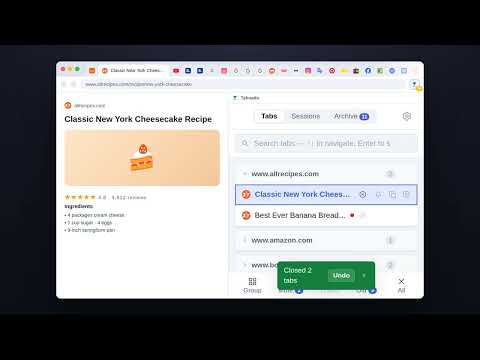
Too many tabs open? Tabnado is a tab manager in Chrome's side panel. Type a few letters and jump to the tab you need. Close duplicate and forgotten tabs without the fear of losing something. Save groups of tabs for later and open them again in one click. Free. No account. No tracking. FIND ANY TAB INSTANTLY • Search all open tabs in every window by title or web address • The best match comes first; press Enter to switch to it • Tabs are grouped by site, with the sites you used most recently at the top CLOSE TABS SAFELY • Close duplicate tabs, tabs you haven't used in days, or everything except the current tab • You always see the list first and can untick anything you want to keep • Changed your mind? Undo brings the tabs back • Every tab you close with Tabnado goes to the Archive, where you can search it and reopen it SAVE TABS FOR LATER • Save the tabs for a trip, a recipe or a project as a named session • Pick exactly which tabs to include; your tabs stay open • Restore them anytime, even after restarting Chrome REMIND ME LATER • Not now, but don't forget it: get a reminder for a tab in 10 minutes, an hour, tomorrow morning or next week • Close the tab until then if you like; the reminder brings it back ALSO INCLUDED • Group tabs by site into Chrome tab groups in one click • Mute every tab that is playing sound • Tab counter on the toolbar icon that turns yellow, then red as tabs pile up • Choose when a tab counts as old (1 to 30 days) and the text size • Available in 17 languages HOW IT WORKS 1. Click the Tabnado icon in the toolbar. The side panel opens. 2. Type to find a tab, or use the buttons at the bottom to clean up. 3. Click Saved at the top of the panel to keep tabs for later.
5 out of 51 rating
Details
- Version2.8.1
- UpdatedNovember 12, 2026
- Size150KiB
- Languages17 languages
- DeveloperWebsite
Email
contact@tabnado.app - Non-traderThis developer has not identified itself as a trader. For consumers in the European Union, please note that consumer rights do not apply to contracts between you and this developer.
Privacy

This developer declares that your data is
- Not being sold to third parties, outside of the approved use cases
- Not being used or transferred for purposes that are unrelated to the item's core functionality
- Not being used or transferred to determine creditworthiness or for lending purposes