

TabMapper: Visual Tab Manager

Overview
Visual tab manager that maps every open tab by topic and by the tab it came from. Close duplicates in one click. 100% on-device.
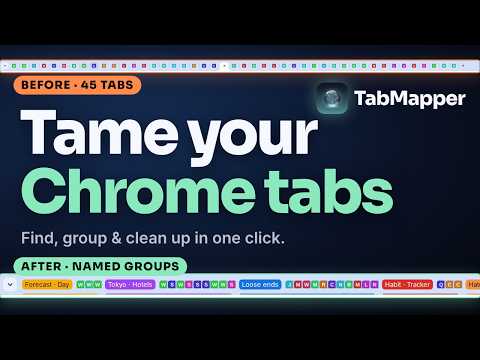
Too many tabs? TabMapper is a visual tab manager that turns every open tab into a living map. Tabs grow out of the tab you opened them from, so a research session reads like a family tree: your search, the articles it led to, the pages those led to. Related tabs are grouped into named topics automatically, and one click clears duplicates, tabs you haven't looked at today, or sleeping tabs (with Undo). Everything runs on your computer. No account, no cloud, no analytics. WHY TABMAPPER IS DIFFERENT Lists hide context. TabMapper shows where each tab came from, so you can see the shape of what you were researching and pick up where you left off. WHAT YOU CAN DO • See where every tab came from: families grow from the page you opened them from • Honest about the tabs you already have: Chrome doesn't remember where those came from, so they show as separate bubbles (TabMapper says so and never guesses). Every tab you open from then on links up for certain • Find tabs fast: titles under each droplet, tab search, and a List panel with every topic and tab. Group the List by topic or by website with one button • Know each tab at a glance: badges for tabs playing sound, pinned, sleeping and duplicated; tabs you haven't looked at in a while slowly fade • Close duplicates in one click, keeping one copy of each page (the one you're using, or the one other tabs came from), with Undo. The ✕ on a page that's open more than once asks: close the extra copies, or only this tab • Clean up the rest just as fast: select everything you haven't viewed today, or all sleeping tabs, and close them together, with Undo • Two ways to look: Families (where each tab came from) or Sites (every tab grouped by website, handy when you work across several web apps) • Group outlines that behave like a living skin: drag a bubble away and its group's border stretches like honey, then lets go • Click the edge of any group outline for Chrome's own group controls (name, colour, collapse, ungroup) plus show only these, move to a new window and close all • Select tabs with Ctrl or Shift, then group them with a name, move them to a new window, pin, mute, reload, put them to sleep, copy their links, or invert the selection • Arrange your real tab bar in one click: bring every site's tabs side by side, or make Chrome tab groups for each site or each topic, or join all your windows into one. Undo puts everything back • Close a tab others came from and its family stays together around a faded placeholder; reopen it in one double-click • See your Chrome tab groups outlined on the map, and tabs that live in another window marked with that window's number • New tab from any bubble: press + on a droplet (or N) and a little bubble sprouts with a box. Search with your browser's own search engine, or pick another popular search site from a short list, or type a web address, and it opens as that tab's child • Ten backgrounds to choose from, led by a 4K default, or add your own picture (or drop one onto the map). Text and lines adjust themselves, light or dark, so everything stays easy to read on any background • Light and dark: follows your browser, or choose one • Simple look by default: still, flat bubbles that stay fast with hundreds of tabs. Switch to the glassy look any time from the header • Remember my map (optional): your map and its family lines come back after Chrome restarts, and you can reopen last session's tabs in one click • A quick list from the toolbar button: jump to any tab, close tabs (with Undo), search, and open the bubbles from a button at the top • Show only a tab's relatives (Shift+F) to see its whole family and nothing else • Line the bubbles up against any side, biggest first, then medium, then smallest, with each tab group kept together • Walk your tabs with the keyboard: ↑ parent, ↓ child, ← → siblings, Space for details, Enter to open (screen readers hear each tab's name) • Click a droplet for its details card; double-click to jump to the tab WHO IT'S FOR Researchers, students, developers reading docs, shoppers comparing options: anyone who ends up with too many tabs. PRIVATE BY DESIGN • TabMapper never sends your tabs or browsing anywhere. No account, no ads, no analytics. • About Chrome's install notice ("Read your browsing history", "Read the icons of the websites you visit"): TabMapper reads your open tabs' titles, addresses and icons on your computer only, to draw the map. It's kept in memory and erased when you close Chrome, unless you choose Remember my map, which keeps only web addresses and family lines on your computer until you turn it off. • TabMapper never reads what's on your pages and never takes pictures of them. It only uses tab titles and addresses. • A background picture you add stays on your computer and is never uploaded. • Anything you type in the New tab box goes only to the search site you pick, when you press Enter, like Chrome's address bar. TabMapper doesn't keep it. Click the TabMapper toolbar button for a quick list of your tabs by topic, with a Bubbles button to open the full map. Press Alt+Shift+D to open the bubbles directly (you can change the shortcut at chrome://extensions/shortcuts). SUPPORT vatan@touman.net
0 out of 5No ratings
Details
- Version1.10.0
- UpdatedOctober 29, 2026
- Offered byTOUMAN LLC
- Size2.14MiB
- LanguagesEnglish
- Developer
Email
vatan@touman.net - Non-traderThis developer has not identified itself as a trader. For consumers in the European Union, please note that consumer rights do not apply to contracts between you and this developer.
Privacy

TabMapper: Visual Tab Manager has disclosed the following information regarding the collection and usage of your data. More detailed information can be found in the developer's privacy policy.
TabMapper: Visual Tab Manager handles the following:
This developer declares that your data is
- Not being sold to third parties, outside of the approved use cases
- Not being used or transferred for purposes that are unrelated to the item's core functionality
- Not being used or transferred to determine creditworthiness or for lending purposes