

TabManager - Visual Tab Board

Overview
Kanban-style tab manager: save tabs, bookmarks and web images into workspaces, categories and groups. Local-only, no account.
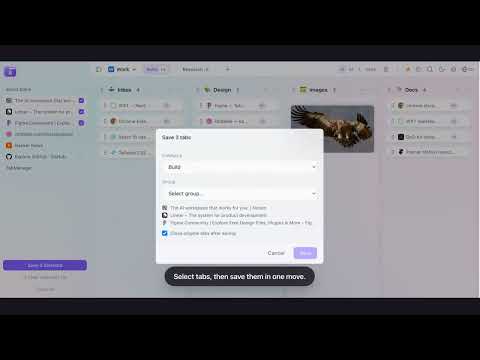
**Your tabs, on a board — not in a 200-tab strip.** TabManager replaces your new tab page with a visual kanban board. Save the tabs you want to keep, drop them into groups, and reopen them whenever you need them. No account, no sync server, no tracking — everything lives in your browser. ### Why people keep it **🗂️ Workspace → Category → Group** Organize by context, not by bookmark folder. One workspace for work, one for study, one for personal life. Drag groups between categories whenever your thinking changes. **🔖 Save tabs in one move** Drag tabs from the sidebar into a group, or right-click any page → “Save to TabManager”. Multi-select with click, Shift-click for ranges, then move or delete them in bulk. **🖼️ Collect images while you browse** Right-click any image → “Save image to TabManager”. For one-click hover buttons, enable site access in Settings (optional, off by default). Preview images in a lightbox, then download them one by one or as a ZIP. **📚 Stack related tabs** Drag a tab onto another to create a stack. Stacks stay collapsed until you need them, so long research sessions don’t turn into a wall of links. **🔍 Search everything (Cmd/Ctrl+K)** Find any saved tab across every workspace, category and group. **🧹 Link check & duplicates** Scan saved links for dead or duplicate URLs, merge same-domain tabs into stacks, and clean up in bulk. **⭐ Pin, sort and theme** Pin favorite groups, sort by 7-day or 30-day click heat, choose a background preset, and switch to dark mode. **💾 Your data, portable** Export to JSON, import on another machine, or import Chrome bookmarks with one click. Everything stays on your device. ### How it works 1. Install and open a new tab — your board is ready. 2. Drag tabs from the sidebar into a group (or right-click → Save to TabManager). 3. Click any saved link to reopen it. Search with Cmd/Ctrl+K. ### Privacy No account. No servers. No analytics. All data is stored locally with `chrome.storage.local`. Site access for the optional image-hover buttons is only requested after you enable it in Settings, and can be revoked at any time. ---
0 out of 5No ratings
Details
- Version1.2.0
- UpdatedNovember 12, 2026
- Size376KiB
- LanguagesEnglish (United States)
- DeveloperWebsite
Email
koosin@gmail.com - Non-traderThis developer has not identified itself as a trader. For consumers in the European Union, please note that consumer rights do not apply to contracts between you and this developer.
Privacy

This developer declares that your data is
- Not being sold to third parties, outside of the approved use cases
- Not being used or transferred for purposes that are unrelated to the item's core functionality
- Not being used or transferred to determine creditworthiness or for lending purposes