

Table Enhancer for GitHub

Overview
An unofficial extension that makes wide tables easier to read in GitHub Markdown file previews.
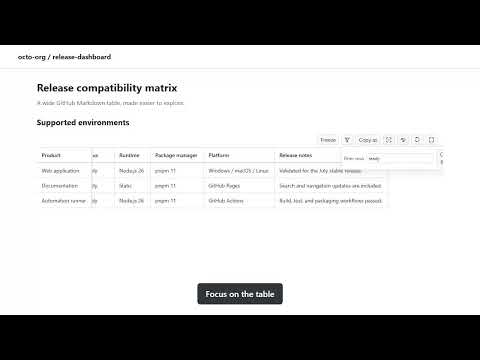
Wide GitHub Markdown tables should not turn review into a scrolling exercise. Table Enhancer for GitHub adds compact controls directly above tables on Markdown file preview pages. Keep your place, find the rows that matter, and copy the result—without editing the source file. Stay oriented - Freeze header rows and leading columns while you scroll. - Save Freeze defaults by repository and heading for the tables you revisit. Find what matters - Filter rows by text or regular expression. - Sort by any column, or hide rows and columns you do not need. Shape the view around your task - Fit, wrap, or resize columns for easier reading. - Open one table in full-window Focus mode when you need more space. Take the useful part with you - Copy the visible view as Markdown, CSV, or TSV. Hidden and filtered content stays out of the copy. - Reset temporary changes whenever you want to return to the original view. Read file metadata - View supported YAML frontmatter in a collapsible Metadata panel, with tags for short lists and expandable nested properties. The extension works only on GitHub Markdown file preview pages (`github.com/.../blob/...`). It does not alter your files or run on issues, pull requests, discussions, or repository landing pages. Freeze defaults are stored locally in Chrome. No user data is collected, transmitted, sold, or shared. Table Enhancer for GitHub is an independent project and is not affiliated with, sponsored by, or endorsed by GitHub.
0 out of 5No ratings
Details
- Version1.5.1
- UpdatedOctober 18, 2026
- Size68.92KiB
- Languages6 languages
- DeveloperWebsite
Email
huruikagi@gmail.com - Non-traderThis developer has not identified itself as a trader. For consumers in the European Union, please note that consumer rights do not apply to contracts between you and this developer.
Privacy

This developer declares that your data is
- Not being sold to third parties, outside of the approved use cases
- Not being used or transferred for purposes that are unrelated to the item's core functionality
- Not being used or transferred to determine creditworthiness or for lending purposes
Support
For help with questions, suggestions, or problems, visit the developer's support site