


概要
ワンクリックでWebページのテーブルをコピーするか、CSV/excelファイルにエクスポートします
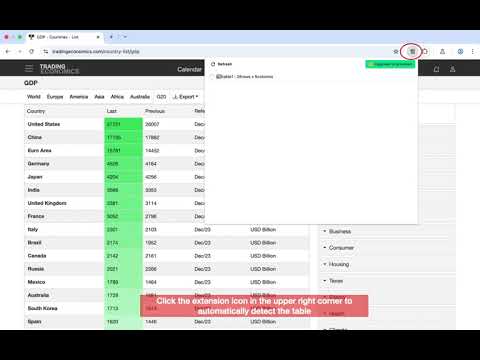
❓ What problem is solved When we see data table(s) in page, we may need copy them or download them to excel or csv files for further analysis. This small plug-in can make our work easier. 🏃 Usage 1. Click the extension icon, it will automatically display tables in the page. 2. Click table list, you should preview the content of the table. 3. Click the buttons to copy to the clipboard, or download it as a local CSV file. 4. You can copy only a certain column of a table. 5. You can select multiple tables, batch copy them. 6. Support exporting csv, excel, markdown files. 📖 Update history v1.0.0 - Support English and Chinese - Optimized design v0.9.6 - Support table column copying. - Fix the problem that the table is not highlighted in some cases. - Adjust the interaction and simplify the design. v0.9.5 - fix bugs when down markdown file v0.9.4 - Support exporting to markdown and excel formats - Support opening the professional version. - Minor optimization: simpler design v0.9.3 - Small optimization: copy, icon, email contact information v0.9.2 - Batch copy v0.9.1 - Better table preview effect. - Optimize table parsing.
5 点満点で 0評価なし
詳細
プライバシー
このデベロッパーは、お客様のデータについて以下を宣言しています
- 承認されている以外の用途で第三者に販売しないこと
- アイテムの中心機能と関係のない目的で使用または転送しないこと
- 信用力を判断する目的または融資目的で使用または転送しないこと
サポート
質問や提案、問題がある場合は、デベロッパーのサポートサイトにアクセスしてください。