

TabLater - Snooze Tabs & Reopen Later
1 rating
)
Overview
Schedule tabs for later, snooze and reopen pages when needed.
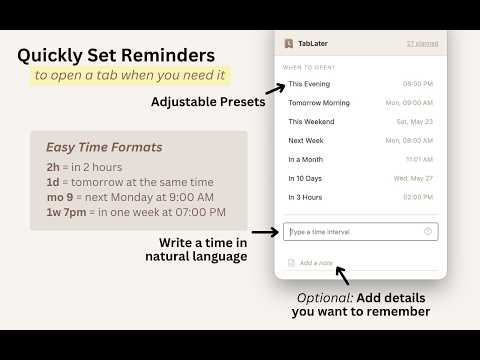
Snooze Chrome tabs with plain English. Type "tomorrow 9am" or "in 2 hours" and TabLater closes the tab now, then reopens it exactly when you need it. Instead of keeping dozens of tabs open, save a page for later with a time, note, or recurring schedule. Use TabLater when a tab is not a permanent bookmark, not useful right now, but still needs to come back. Unlike simple sleep-timer or auto-close extensions that shut tabs for good at night or after a fixed delay, TabLater puts a tab to sleep on your schedule and wakes it back up — nothing is ever lost. Useful for evening browsing, deep work sessions, or just wanting fewer tabs open before bed. 100% Free. No account. No cloud. Everything stays on your device. What you can do with TabLater: - Type natural language like "tomorrow 9am", "in 2 hours", "next Friday", or "every Monday" - Create recurring tab reminders – daily, weekly, or monthly - Add notes so you remember why you saved a page - Snooze with quick presets or a custom time - Manage everything in a dashboard: search, edit, reschedule, reopen, or delete scheduled tabs - Right-click any page or link to snooze it instantly - Use keyboard shortcuts for one-key snoozing - Browse your history and re-snooze pages when needed - Backup, import and export your data as JSON or CSV Perfect for following up on emails, checking renewal dates, returning to half-filled forms, reviewing carts before checkout, reading articles later, revisiting research, or any recurring weekly task. Privacy first: Your scheduled tabs, notes, history, and settings are stored locally in Chrome storage. No account, no sync server, no tracking, no analytics. Install TabLater and stop drowning in open tabs.
5 out of 51 rating
Details
- Version1.0.4
- UpdatedSeptember 17, 2026
- Offered bymonkeyblockapp
- Size202KiB
- Languages10 languages
- Developer
Email
monkeyblockapp@gmail.com - Non-traderThis developer has not identified itself as a trader. For consumers in the European Union, please note that consumer rights do not apply to contracts between you and this developer.
Privacy

TabLater - Snooze Tabs & Reopen Later has disclosed the following information regarding the collection and usage of your data. More detailed information can be found in the developer's privacy policy.
TabLater - Snooze Tabs & Reopen Later handles the following:
This developer declares that your data is
- Not being sold to third parties, outside of the approved use cases
- Not being used or transferred for purposes that are unrelated to the item's core functionality
- Not being used or transferred to determine creditworthiness or for lending purposes
Support
For help with questions, suggestions, or problems, please open this page on your desktop browser