


Overview
Turn your tabs into lightweight lists, free up RAM and restore them in one click. Organize and share them easily.
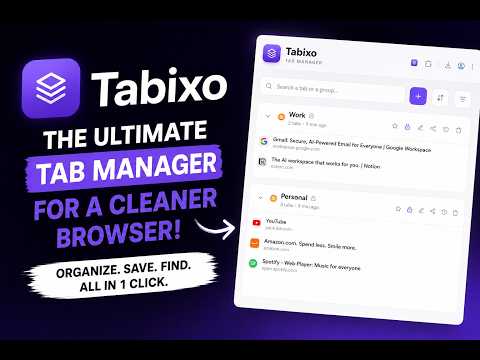
Too many tabs slowing you down? Tabixo brings order to the chaos. Save all your tabs with a single click, close them instantly, and free up memory (RAM) while keeping everything perfectly organized and just one click away. What You Can Do ⚡ One-Click Tab Saving Save every tab from your current window and close them instantly with a single click on the extension icon. ↩️ Instant Restore Reopen an individual tab or restore entire sessions in a new window. Alt+Click (Option+Click on Mac) restores a whole group without removing it from your list. 🛟 Automatic Backups Tabixo automatically keeps up to three backup copies of your data. They're updated in the background and saved right before every potentially risky action. Made a mistake? Restore everything with a single click from the Data menu. No account. No cloud. Your backups stay on your device. 📚 Smart Tab Groups Organize your tabs into groups, rename them, add notes, and customize them with a palette of 18 colors. 📌 Favorites & Protection Pin your most important groups and lock them to prevent accidental deletion. 🔍 Lightning-Fast Search Find any tab or group instantly even by searching the notes you've added. 📊 Sort & Filter Your Workspace Sort by name, creation date, or last updated. Or arrange everything manually with drag and drop. Filter by favorites or locked status. 🖱️ Intuitive Drag & Drop Move tabs between groups or rearrange your groups with ease. 💾 Import & Export Save your entire workspace as a JSON file and restore it anytime. 🌙 Light & Dark Mode Switch between light and dark themes instantly with a single click. Why Tabixo Is Different Most tab managers force you to make a choice: simple but risky, or secure but tied to an account, a subscription, and cloud storage. Tabixo refuses that trade-off. It's fast, lightweight, and incredibly intuitive, while giving you a real safety net—without ever sending your data anywhere. - Clear the clutter without losing anything. - Restore everything instantly whenever you need it. - Work with confidence knowing automatic backups have your back, even if you make a mistake. - Stay focused with a clean, organized workspace. No account. No sync. No tracking. Everything stays 100% local on your device, your tabs and your backups. Available Languages English (US & UK), French, Spanish (Spain & Latin America), Portuguese (Portugal & Brazil), Italian, German, Russian, Hindi, Japanese, Korean, Chinese (Simplified & Traditional) Take back control of your tabs and your focus with Tabixo.
5 out of 51 rating
Details
- Version1.3.0
- UpdatedJuly 16, 2026
- Size122KiB
- Languages15 languages
- DeveloperWebsite
Email
thomas.canwell@gmail.com - Non-traderThis developer has not identified itself as a trader. For consumers in the European Union, please note that consumer rights do not apply to contracts between you and this developer.
Privacy

This developer declares that your data is
- Not being sold to third parties, outside of the approved use cases
- Not being used or transferred for purposes that are unrelated to the item's core functionality
- Not being used or transferred to determine creditworthiness or for lending purposes