

Tabisto: Bookmark Manager, New Tab Dashboard, Workspaces & Sessions

Overview
Visual bookmark manager for your new tab. Organize bookmarks into workspaces, save tab sessions, add notes and reminders.
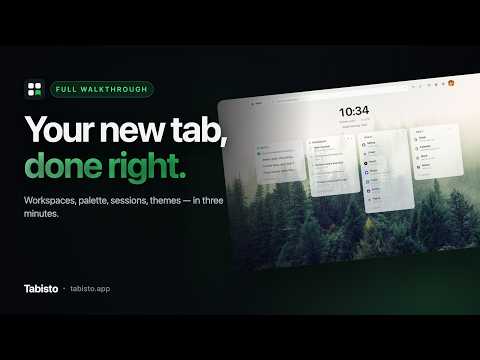
Tabisto is a free visual bookmark manager and new tab extension for Chrome. It replaces your new tab page with an organized grid of your links, so nothing you save gets buried in a folder you forget to open. Most bookmark managers hide on a separate page. Most new tab extensions are just a search bar with a nice wallpaper. Tabisto is a real bookmark organizer sitting on the page you already open dozens of times a day, so there's no new habit to build and no bookmarks bar to dig through. Import your existing Chrome bookmarks in one step, folders and all, and you're set up in under a minute. WHAT YOU GET Workspaces — Keep Personal, Work, Research, and side projects fully separate, each with its own bookmarks, notes, and reminders. Switch in one click. Two workspaces on Free, unlimited on Pro. Command palette (Cmd+K) — Press Cmd+K, or Ctrl+K on Windows, and search everything at once: your saved bookmarks across every workspace, your open tabs, Chrome tab groups, recently closed pages, and browser history. The bookmarks you open most float to the top on their own. Visual bookmarks — Drag and drop links into sections you name and arrange yourself. Favicons load from Chrome's own local cache, so the grid fills in instantly with no per-site network calls. Saved tab sessions — Snapshot a whole window of open tabs, name it, and restore the group later in one click. Turn on auto-save and Tabisto keeps rolling background snapshots, so a browser crash doesn't cost you a tab you can't remember. Chrome tab groups — Save an open tab group as a Tabisto section, or send a section back out as a colored tab group. It survives a browser restart either way. Notes and reminders — A to-do list sits next to your bookmarks. Reminders fire as real Chrome notifications even with the new tab closed, with quick chips for 15 minutes, 1 hour, tonight, or tomorrow. Repeat daily or weekly on Pro. Bookmark health check — One panel finds duplicate bookmarks, surfaces links you saved and haven't opened in six months, and flags dead links that 404. Clean up years of clutter in a couple of minutes. Address bar search — Type "tb" then space in Chrome's address bar to search your saved bookmarks without opening a new tab at all. Cloud sync, free for everyone — Sign in once and your workspaces, bookmarks, notes, and themes follow you to every Chrome install. Sync isn't a Pro feature here, which is unusual for this category. Themes — Light, dark, or automatic. 27 wallpapers, 11 accent colors, 5 grid layouts, and 10 fonts, with sliders to adjust density, blur, and spacing until it looks like yours. Clock, greeting, date, and weather widgets, all optional. Five languages — English, Spanish, French, German, and Chinese, with around 250 translated strings covering onboarding and dates too. MOVING FROM ANOTHER TOOL Exporting from a different bookmark or tab manager? Drop the export file into Tabisto. It reads Netscape HTML bookmark exports, CSV, and JSON, and keeps your folder and collection names as sections. WHO IT'S FOR Anyone with more bookmarks than they can find. Developers juggling repos and docs. Researchers and students with a tab problem. Freelancers who need client work and personal browsing to stop bleeding into each other. FREE PLAN - 2 workspaces, up to 25 bookmarks - 1 saved tab session, 3 reminders - Light, dark, and auto themes with 14 wallpapers and 11 accent colors - Full command palette, notes, and address bar search - Duplicate finder, forgotten bookmark finder, and cloud sync That covers most people comfortably. If you're the kind of person who has 400+ open tabs and three side projects running at once, Pro removes the ceiling. PRO — $3.99/month or $35.88/year, 7-day free trial - Unlimited workspaces, bookmarks, sessions, and reminders - 13 more wallpapers, including 3 animated, plus custom wallpaper uploads - 7 more fonts and custom accent colors - Repeating daily and weekly reminders - Dead link scanning, workspace export/import, and session history with auto-snapshots - Priority support Every core feature already works on Free at Free's size. Pro raises the limits and adds customization, nothing is locked away just to push an upgrade. PRIVACY Tabisto shows no ads and runs no analytics inside the extension. It doesn't talk to any third party besides the optional sync backend you choose to sign into. Favicons come from Chrome's private favicon cache, so there are no per-site lookups that could reveal your browsing. Tabisto asks for no permanent access to any website. Everything is stored on your machine first, and the extension works fully offline with no account required. "Clear all data" in Settings actually does what it says: signs you out, wipes local storage, clears pending reminders, and reloads. FREQUENTLY ASKED Is Tabisto free? Yes. The Free plan covers 2 workspaces, 25 bookmarks, 1 saved session, and 3 reminders, with no account required and no ads. Pro is optional. Do I need an account? No. Tabisto works fully offline from the moment you install it. Signing in only turns on cloud sync. Will this move or delete my Chrome bookmarks? No. Import copies your bookmarks into Tabisto and leaves your Chrome bookmark tree exactly as it was. The bookmarks permission is optional and only requested the moment you click Import. Can I keep my folder structure? Yes. Import reads your folder names and rebuilds them as sections. Does it sync across devices? Yes, on both Free and Pro. Sign in on each browser and your workspaces, notes, reminders, and themes stay in step. Will it slow down my browser? No. Your data lives locally and the page paints in milliseconds. Tabisto only replaces the new tab page. It doesn't run on the other sites you visit. Does it work on Edge, Brave, or Firefox? Yes. Any Chromium browser can install it from the Chrome Web Store, and a separate Firefox build is on Firefox Add-ons. Can I cancel Pro? Anytime, from the billing portal, with a 14-day money-back guarantee on paid charges. LINKS Website: https://tabisto.app Privacy: https://tabisto.app/privacy-policy Terms: https://tabisto.app/terms-of-service Support: support@tabisto.app
5 out of 526 ratings
Details
- Version1.1.3
- UpdatedSeptember 23, 2026
- FeaturesOffers in-app purchases
- Size913KiB
- Languages20 languages
- DeveloperDevDiggers TechnologiesWebsite
548, Sector 12D, Avas Vikas Colony, Bodla Agra, Uttar Pradesh 282007 INEmail
support@tabisto.appPhone
+91 87913 31663 - TraderThis developer has identified itself as a trader per the definition from the European Union and committed to only offer products or services that comply with EU laws.
- D-U-N-S642351370
Privacy

Tabisto: Bookmark Manager, New Tab Dashboard, Workspaces & Sessions has disclosed the following information regarding the collection and usage of your data. More detailed information can be found in the developer's privacy policy.
Tabisto: Bookmark Manager, New Tab Dashboard, Workspaces & Sessions handles the following:
This developer declares that your data is
- Not being sold to third parties, outside of the approved use cases
- Not being used or transferred for purposes that are unrelated to the item's core functionality
- Not being used or transferred to determine creditworthiness or for lending purposes
Support
For help with questions, suggestions, or problems, please open this page on your desktop browser