

tabDelta
8 ratings
)
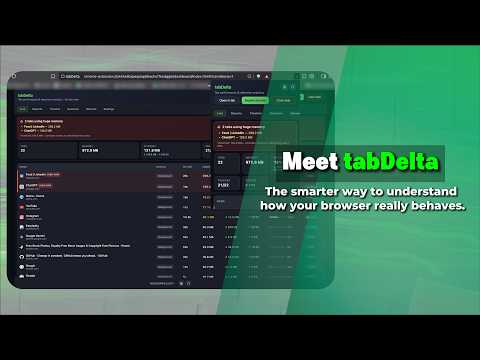
Overview
Personal Performance Profiler — High-fidelity browser telemetry and attention analytics.
tabDelta — Personal Performance Profiler tabDelta is a personal browser performance profiler. It instruments every open tab and answers the question Chrome's built-in Task Manager can't: which of your open tabs are costing you performance — in memory, bandwidth, and attention — and what should you do about each one? ⭐ RESOURCE PRESSURE INTELLIGENCE Each tab gets a composite pressure rating — Low, Medium, High, or Critical — based on its Relative Resource Impact (combining JavaScript heap, DOM complexity, active iframes, and media/graphics pixels) alongside how long it has been in the background and when you last interacted with it. The result is a plain-language action recommendation for every tab: 1. Keep Active — high attention, justified resource use 2. Monitor — moderate use, watch for growth 3. Suspend Recommended — heavy resource footprint, low recent activity 4. Discard Now — idle for an extended period, memory recoverable A complex web app you have been actively using for the last 20 minutes gets a different recommendation from a media-heavy tab that has been sitting in the background since yesterday. tabDelta shows you the full behavioral context before you act — not just a raw number. ⭐ ATTENTION ANALYTICS A passive sampler runs in the top frame of each tab on a 2-second cycle, recording keyboard activity, mouse movement distance, and scroll depth. These signals feed an attention score that classifies each tab as Deep Work, Focus, or Idle. Background tabs always score zero — so you get an accurate record of where your focus actually went, not where your cursor happened to be. Daily, weekly, and monthly reports show your attention breakdown per tab and per domain. No external classification database. No productivity categories imposed by a third party. Just your own interaction data, measured in your own browser. ⭐ NETWORK INTELLIGENCE tabDelta reads HTTP response metadata at the extension layer to estimate per-tab download and upload traffic, broken into 9 categories: Video, Image, API, WebSocket, Script, Stylesheet, Font, Document, and Tracking. You can see which background tabs are burning through your bandwidth, and which domains are sending data from pages you visited. Configurable alerts notify you when a tab crosses a threshold (default: 80 MB download). ⭐ SOFT FREEZE When the pressure score says a tab should be suspended but you don't want to lose its page state, Freeze stops JavaScript timers, animations, and network calls on the tab — without discarding the renderer. Your scroll position, form data, and single-page app state are preserved. Unfreeze restores everything in place, instantly. No full reload. ⭐ TAB LOCKER Lock high-distraction domains behind a master password vault to protect your productive tabs from habitual context-switching. The vault uses PBKDF2-SHA256 with 100,000 iterations and a random salt — the same standard used by leading password managers. ⭐ EXPORT Export your complete performance and attention history as a structured Excel file — 10 data sheets covering raw activity logs, daily/weekly/monthly rollups, per-domain breakdowns, and network statistics. Useful for personal time tracking, freelance billing reference, or a weekly review of where your browser time went. ⭐ PRIVACY Every piece of data tabDelta collects lives exclusively in your browser's local IndexedDB. Nothing is transmitted to any server, ever. URL query strings and hash fragments are stripped before storage. Data is automatically deleted on a 90-day rolling basis. tabDelta has no accounts, no remote endpoints, and no analytics SDKs of any kind. The full source is readable — you can verify all of this yourself. New Features ✨ Added Productivity Mode for creating timed website locks. ⏱️ Lock distracting websites for a specific duration (e.g., 2 hours). 🔒 Introduced Emergency Access using the existing master password. 🧩 Added a new local image-selection challenge to discourage impulsive overrides. 🎯 Users must complete 5 consecutive image challenges before temporary access is granted. 🔄 Any incorrect challenge resets progress, encouraging intentional access decisions. ⏳ Added a 5-second reflection countdown before unlocking. 📊 Enhanced activity tracking to record focus sessions, blocked attempts, overrides, and time spent during temporary access. 🔐 All challenge generation and validation run locally, with no external CAPTCHA services or remote image processing. Improvements Improved focus-session reliability and temporary override flow. Enhanced security around Productivity overrides. Optimized local challenge handling and session validation. General performance improvements and bug fixes. Privacy All Productivity data remains stored locally on the user's device. No browsing content, passwords, or challenge answers are transmitted to external servers.
5 out of 58 ratings
Details
- Version1.4.0
- UpdatedAugust 4, 2026
- Offered byogroprojukti
- Size528KiB
- LanguagesEnglish
- Developer
Email
ogroprojukti@gmail.com - Non-traderThis developer has not identified itself as a trader. For consumers in the European Union, please note that consumer rights do not apply to contracts between you and this developer.
Privacy

tabDelta has disclosed the following information regarding the collection and usage of your data. More detailed information can be found in the developer's privacy policy.
tabDelta handles the following:
This developer declares that your data is
- Not being sold to third parties, outside of the approved use cases
- Not being used or transferred for purposes that are unrelated to the item's core functionality
- Not being used or transferred to determine creditworthiness or for lending purposes
Support
For help with questions, suggestions, or problems, please open this page on your desktop browser