

Tabby — Smart Tab Memory Manager

Overview
Automatically sleeps inactive tabs based on real RAM usage — keeping Chrome fast without relying on fixed timers.
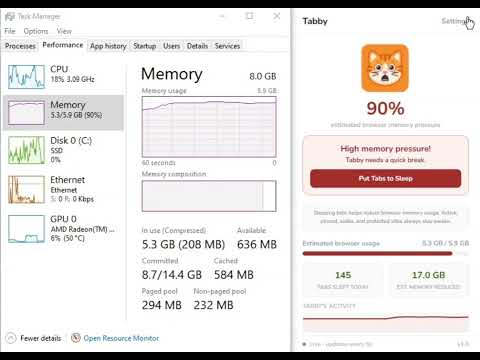
Too many tabs open? Your browser is probably struggling with RAM — and Chrome's built-in fix isn't helping. Tabby automatically sleeps inactive tabs based on real RAM usage — not fixed timers. Unlike Chrome's built-in Memory Saver, Tabby reacts to actual memory pressure and only acts when your browser truly needs it. No setup required. Install once and let Tabby manage your tabs automatically in the background. Why Tabby? Chrome's built-in Memory Saver relies on inactivity timers. This means tabs can be suspended even when your system has plenty of available memory. Tabby takes a different approach. Instead of using fixed timers, Tabby continuously monitors your system's memory usage and only steps in when memory pressure increases. This helps keep your browser responsive while minimizing unnecessary tab sleeping. Why not just use Chrome Memory Saver? Chrome Memory Saver: - Uses fixed inactivity timers - Doesn't react to real RAM pressure - Provides limited visibility into what is happening Tabby: - Reacts to actual memory usage - Sleeps tabs only when needed - Prioritizes least-used tabs first - Provides live memory information and daily statistics ⚡ Performance Features - Auto Tab Sleep — automatically sleeps inactive tabs when memory pressure rises - Smart Tab Scoring — least-used tabs are prioritized first - Live RAM Monitor — see real-time memory pressure at a glance - Manual Sleep Button — instantly free memory when needed 🔒 Protection Features - Protected Sites — popular meeting, email, and productivity tools are automatically kept awake so you never lose a call or a draft - Form Protection — prevents sleeping tabs with unsaved text or active forms - Custom Whitelist — add your own sites and domains to protect 📊 Visibility & Insights - Daily statistics for tabs slept and memory saved - Companion mood reflects current memory pressure - See what Tabby is doing in real time Built For - Students on budget laptops who can't afford to close tabs - Developers running heavy local tools alongside many browser tabs - Remote workers juggling multiple web apps all day - Anyone whose laptop fan goes crazy from Chrome Compatible Browsers Works on Chrome and other Chromium-based browsers. Privacy First Tabby does not collect, sell, or transmit your browsing data. Everything runs locally on your device. Pricing One-time purchase: $4.99 No subscription. No account required. No recurring fees. Install once, activate, and keep your browser running smoothly.
0 out of 5No ratings
Details
- Version1.1.0
- UpdatedJune 15, 2026
- FeaturesOffers in-app purchases
- Size747KiB
- LanguagesEnglish
- Developer
Email
tabbyapp.support@gmail.com - Non-traderThis developer has not identified itself as a trader. For consumers in the European Union, please note that consumer rights do not apply to contracts between you and this developer.
Privacy

This developer declares that your data is
- Not being sold to third parties, outside of the approved use cases
- Not being used or transferred for purposes that are unrelated to the item's core functionality
- Not being used or transferred to determine creditworthiness or for lending purposes
Support
For help with questions, suggestions, or problems, visit the developer's support site