

TabBrew – AI Tab Manager, Organizer & Declutter

Overview
AI tab manager to organize, group & declutter too many tabs. Filter, save & clean up tabs with your AI.
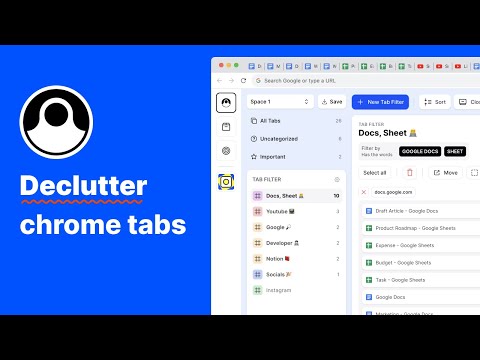
TabBrew — The AI Tab Manager for People With Too Many Tabs 🚀 Drowning in browser tabs? TabBrew is an AI-powered tab manager and tab organizer that groups, filters, and declutters your tabs in seconds — so you can keep working without losing your place. Just describe what you want in plain English, and let Claude, Gemini, or ChatGPT clean up your tabs for you. No more dragging tabs around one by one. Organize Tabs with AI 🤖 This is what makes TabBrew different. Open the Brew panel, snapshot your window, and copy a ready-made prompt into your favorite AI: ✅ "Group these tabs by project" ✅ "Close everything I'm done with" ✅ "Pin my work tabs and bundle the rest" Paste the result back and TabBrew instantly executes it — bulk delete, group, pin, and reorder dozens of tabs in one click. Works with Claude, Gemini, and ChatGPT. Free, no signup required. Replace your new tab page with a clean tab management dashboard built for researchers, developers, students, shoppers, and anyone juggling 50+ open tabs. Why TabBrew ⭐ ✅ Find any tab in under a second ✅ Stay focused with 50, 100, or 200 tabs open ✅ Group related tabs by project, topic, or workflow ✅ Stash tabs for later and restore them anytime ✅ One-click cleanup when tabs spiral out of control Core Features 🌟 🔎 Tab Filter — Type a keyword to instantly filter every open tab, or create custom filters that organize tabs by project, topic, or workflow. 🧲 Super Tab — Turn any tab into a hub and bind related tabs to it as children. Auto-collect new tabs under it and reopen any child later — perfect for keeping a research thread together. 📦 Tab Stash — Stash tabs you don't need right now out of the way, then restore them whenever you want. 📝 Tab Note — Attach quick notes to tabs so you remember why you opened them. 📥 Uncategorized Tabs — Automatically surface tabs that don't belong to any group, so nothing slips through the cracks. 📌 Tab Sidepanel — A vertical tab list that makes scanning, switching, and closing tabs effortless. Built-in Tab Declutter Tools 🧹 • Close duplicate tabs • Merge all windows into one • Discard inactive tabs to free memory • Sort and group tabs by domain • Bulk group, pin, and close tabs Built for Productivity & Focus 🎯 The clean tab sidepanel keeps every tab visible without overwhelming your screen. When clutter creeps in, the AI Brew flow and one-click declutter tools clear it instantly — no manual sorting required. Whether you're researching, coding, planning, or working across multiple projects, TabBrew helps you manage hundreds of tabs without losing your focus. Try TabBrew free. Reclaim your browser. Reclaim your focus. 📩 Support & feedback: tabbrew.app@gmail.com
3.6 out of 517 ratings
Details
- Version4.15.0
- UpdatedJuly 22, 2026
- FeaturesOffers in-app purchases
- Size1018KiB
- LanguagesEnglish (United States)
- Developer-Website
11/6 Moo.5 Soi.12 Sub-District. Khlong 5 Khlong Luang, Pathum Thani 12120 THEmail
vistriter@gmail.com - Non-traderThis developer has not identified itself as a trader. For consumers in the European Union, please note that consumer rights do not apply to contracts between you and this developer.
Privacy

TabBrew – AI Tab Manager, Organizer & Declutter has disclosed the following information regarding the collection and usage of your data. More detailed information can be found in the developer's privacy policy.
TabBrew – AI Tab Manager, Organizer & Declutter handles the following:
This developer declares that your data is
- Not being sold to third parties, outside of the approved use cases
- Not being used or transferred for purposes that are unrelated to the item's core functionality
- Not being used or transferred to determine creditworthiness or for lending purposes
Support
For help with questions, suggestions, or problems, please open this page on your desktop browser