

Tabbiy - Auto Group & Sidebar Tab Manager

Overview
The ultimate sidebar tab manager! Auto-group, customize titles, save, hibernate & switch tabs fast for a clutter-free browser.
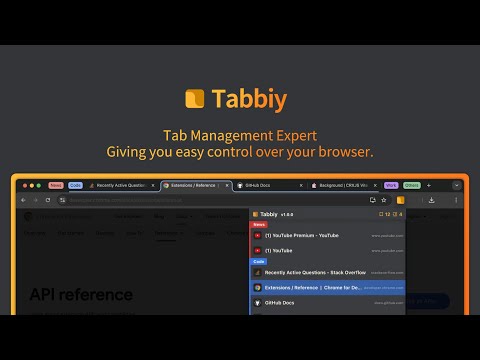
🚀 Tabbiy: The Ultimate Sidebar Tab Manager & Auto-Organizer Tabbiy is an elegant sidebar tab manager designed to end the headache of having too many tabs. By providing a powerful vertical tab list and auto-grouping features, Tabbiy turns your cluttered browser into an organized, high-performance workspace. Whether you want to reduce Chrome memory usage or find a specific page in seconds, Tabbiy is the productivity tool you’ve been looking for. 🌟 Key Benefits ✅ End Tab Clutter: Transform a messy horizontal tab bar into a clean, searchable sidepanel list. ✅ Smart Auto-Grouping: Automatically group tabs by domain or custom rules to keep related tasks together. ✅ Save Memory & CPU: Hibernate tabs or move idle pages to a "Staging List" to drastically boost browser speed. ✅ Custom Tab Titles: Rename any tab to eliminate vague labels and identify your content at a glance. ✅ Fast Switching: Use shortcuts to jump between current and recent tabs instantly, perfect for cross-page comparison. ✅ Pro Data Portability: Export your tab lists and titles in JSON, HTML, CSV, or Markdown (Pro). ┈┈┈┈┈┈┈┈┈┈┈┈┈┈┈┈┈┈┈┈┈┈┈┈┈┈ 📦 Core Features 1️⃣ Sidepanel Management (ALT+D): A dedicated vertical interface for grouping, saving, hibernating, and drag-and-drop reordering. 2️⃣ Auto-Grouping: One click to categorize tabs by domain. Pro unlocks 3 sets of custom rules, fixed colors, and unlimited groups. 3️⃣ Tab Hibernation: Suspend active tabs to free up RAM and quickly resume access whenever you need them again. 4️⃣ Tab Staging (Saving): Move temporarily unused tabs to a staging list to clear your interface while maximizing memory release. 5️⃣ Rename Tabs: Easily edit any tab title directly from the list to clear up vague labels. Your custom titles are saved automatically for quick identification. 6️⃣ Multi-Format Export: Free JSON export; Pro version unlocks CSV, HTML, and Markdown for professional backups. 7️⃣ Quick Switch (ALT+E): A lightning-fast shortcut to toggle between your current page and the last opened one. 8️⃣ Dark & Light Themes: Beautifully designed UI that matches your system theme for a comfortable visual experience. ┈┈┈┈┈┈┈┈┈┈┈┈┈┈┈┈┈┈┈┈┈┈┈┈┈┈ ⁉️ FAQ 💬 How do I disable auto-grouping? 🌲 Simply click the "Auto" button at the bottom of the sidepanel to turn off grouping and clear all current groups. 💬 How can I group tabs more effectively? 🌴 Go to "Settings" -> "Grouping Rules" to define custom patterns, then click "Apply" to see the magic happen. 💬 Does it support collapsing groups? 🌵 Currently, we focus on a "visible at a glance" design to help you find tabs faster without extra clicks. 💬 Can I use individual features without Auto-Grouping? 🍀 Yes! All features—sidepanel, hibernation, saving, and renaming—work independently to fit your specific workflow. 💬 Is Tabbiy free to use? 🌳 Yes! The core features—including the vertical Tab Management, auto-grouping, tab hibernation, and tab saving—are 100% free forever with no ads. Pro version is entirely optional for power users who need advanced automation. ┈┈┈┈┈┈┈┈┈┈┈┈┈┈┈┈┈┈┈┈┈┈┈┈┈┈ 📦 Recent Updates (v2.4.25) ✅ New setting: per-window or unified auto-grouping control. ✅ New setting: auto-group name sorting switch (off by default); tabs within each group are sorted by title (empty titles last). ✅ New onboarding for first-time users. ┈┈┈┈┈┈┈┈┈┈┈┈┈┈┈┈┈┈┈┈┈┈┈┈┈┈ 🍺 Productivity starts with a clean browser. Tired of messy tabs slowing you down? Install Tabbiy today and refresh your browsing experience! 📨 Questions or Feedback? We’d love to hear from you: support@tabbiy.top Crafted with ❤️ by Tyrus Labs.
4.7 out of 549 ratings
Details
- Version2.4.25
- UpdatedOctober 1, 2026
- Size429KiB
- Languages6 languages
- DeveloperWebsite
Email
tyruslockwood@gmail.com - Non-traderThis developer has not identified itself as a trader. For consumers in the European Union, please note that consumer rights do not apply to contracts between you and this developer.
Privacy

This developer declares that your data is
- Not being sold to third parties, outside of the approved use cases
- Not being used or transferred for purposes that are unrelated to the item's core functionality
- Not being used or transferred to determine creditworthiness or for lending purposes
Support
For help with questions, suggestions, or problems, please open this page on your desktop browser