

Tabbiy - Auto Group & Sidebar Tab Manager

Overview
The ultimate sidebar tab manager! Auto-group, customize titles, save, hibernate & switch tabs fast for a clutter-free browser.
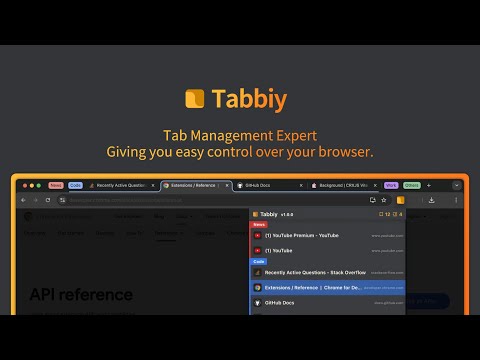
🎯 Why Choose Tabbiy? As the ultimate sidebar tab manager, Tabbiy delivers an elegant sidepanel list to solve the headache of locating tabs amid a cluttered browser. ✅ Auto-group tabs by your unique usage habits or custom rules, turning messy tab bars into organized collections that are easy to find at a glance. ✅ Customize titles for any tab to eliminate vague labels, making it faster than ever to identify your target content. ✅ Save frequently used but temporarily idle tabs to a clean staging list, drastically cutting down memory usage and interface clutter for a clutter-free browser. ✅ Hibernate tabs to free up valuable system resources, and wake them instantly whenever you need them again. ✅ Supports switch tabs fast between current and recently opened pages with a simple shortcut, streamlining cross-page information comparison. ┈┈┈┈┈┈┈┈┈┈┈┈┈┈┈┈┈┈┈┈┈┈┈┈┈┈┈┈┈┈┈┈┈ 📦 Core Features 1️⃣ Sidepanel Management: Open the sidepanel list using the shortcut (ALT+D), where you can perform operations such as grouping, saving, hibernating tabs, and drag-and-drop reordering—all in one intuitive interface. 2️⃣ Auto-Grouping: Click the "Auto" button at the bottom of the list, and the system will auto-group tabs into corresponding groups based on domain names or your custom-set rules, keeping the tab bar neat and organized. (Click again to ungroup all) 3️⃣ Tab Hibernation: Click the "Hibernate" button in the bottom toolbar or list to hibernate tabs and free up memory; when you need to access them again, simply wake them up without reloading from scratch. 4️⃣ Tab Saving: Click the "Save" button in the bottom toolbar or list to save tabs in the staging list, maximizing memory release; when you need to access them again, you can restore them with one click. 5️⃣ Customize Tab Titles: Click the edit icon on any list item to customize titles for your tabs. Modified titles are saved to the staging list automatically, eliminating lengthy and unclear labels for quick target identification. 5️⃣ Switch to "Recent" Tab: Use the shortcut (ALT+E) to switch tabs fast between the current tab and the last opened one, which is especially useful for comparing content between two pages. 7️⃣ Personalized Settings: A comprehensive settings panel covers grouping rules, interface styles, shortcuts, and languages, helping you create a fully tailored tab management experience that fits your workflow. 🌘 Tabbiy features sleek light and dark themes, with a clean and coordinated interface, ensuring a comfortable visual experience in different lighting environments for your clutter-free browser journey. 💡 Detailed tutorials on custom grouping rules and frequently asked questions have been compiled into documents, which you can view in the settings panel. ┈┈┈┈┈┈┈┈┈┈┈┈┈┈┈┈┈┈┈┈┈┈┈┈┈┈┈┈┈┈┈┈┈ ⁉️ FAQ 💬 How do I close groups after enabling auto-grouping? 🌲 Click the "Auto" button at the bottom left of the sidepanel list to disable auto-grouping and cancel all existing groups. 💬 After enabling auto-grouping, there are too many groups. How can I group more effectively? 🌴 Click the "Settings" button at the bottom right of the sidepanel list. Configure custom grouping rules in the "Grouping Rules" section, then click "Apply" to save changes. 💬 Do I have to enable auto-grouping to use the full features? 🌵 No. Auto-grouping is just one core feature. You can use the sidepanel list, tab saving, hibernation, customize titles,and quick switching independently at any time. 💬 Why can’t groups in the sidepanel list be collapsed? 🍀 Group collapsing is not supported. This design ensures all open tabs are visible at a glance, helping you find target tabs faster. ┈┈┈┈┈┈┈┈┈┈┈┈┈┈┈┈┈┈┈┈┈┈┈┈┈┈┈┈┈┈┈┈┈ 🍺 Tired of messy tabs slowing you down? Try Tabbiy now to refresh your browser experience! If you love it, feel free to share suggestions—we’re eager to improve Tabbiy with your input. 📨 For questions or feedback, email us at tyruslockwood@gmail.com. Your opinion matters more than anything! ┈┈┈┈┈┈┈┈┈┈┈┈┈┈┈┈┈┈┈┈┈┈┈┈┈┈┈┈┈┈┈┈┈ 🛠 Changelog 📦 v2.2.0 ✅ Now supports editing tab titles, and adds an "Edited Titles" section in the saved list. ✅ User Feedback: Added a collapsible function button group to address the issue of excessive buttons on list items (configurable in Settings). ✅ Added a "Save Window" option to the browser’s right-click menu. ✅ Fixed: Embedded video on the welcome page not working; replaced with static resources. ✅ Fixed: The "Save Tab" option in the right-click menu not respecting the "Save single tab, close this tab?" setting. ---------------------------------------- 📦 v2.1.25 ✅ Added right-click menu to the sidebar. ✅ Added "Copy Link" feature to the sidebar. ✅ User Feedback: Added URL path depth and query parameter matching rules to custom rule groups. Matching priority: Queries have the highest priority; higher path levels correspond to higher priority. ✅ User Feedback: Added option to keep/close the current window when saving windows (configurable in Settings). ✅ User Feedback: Added support for middle-clicking sidebar tabs, with options to select, sleep/wake, or close (configurable in Settings). ✅ Optimized styles for the toolbar and Settings page. ---------------------------------------- 📦 v2.1.20 ✅ Adjusted the font color in dark mode to enhance readability and overall visual comfort. ✅ Fine-tuned some UI style details. ✅ Fixed: The issue where the background color of list group titles and mouse-hovered rows was not synchronized correctly after switching themes. ✅ Fixed: The problem where the shortcut key for summoning the sidebar became invalid due to frequent triggering. ---------------------------------------- 📦 v2.1.15 ✅ The toolbar has been revamped: Text descriptions have been added to buttons to avoid user confusion; some function buttons have been moved to the search bar, so the search bar no longer supports collapsing. ✅ When clicking a group in the tab bar, the last tab within that group will be focused by default. This feature is optional. ✅ Added monitoring for tab attachment, detachment, and movement from windows, with the list updated synchronously. ✅ Import examples have been added for quick import rules, including format instructions for import rules that were missing in previous versions. ✅ A "How to use" entry has been added to the navigation bar and user center. ✅ Optimizations have been made at the development level; component splitting has been implemented to enhance the extension's performance. ✅ Fixed: For tabs not grouped by rules, a highlight background color will now be displayed when hovering the mouse (previously missing).
4.7 out of 545 ratings
Details
- Version2.2.10
- UpdatedJanuary 30, 2026
- Size334KiB
- Languages6 languages
- DeveloperWebsite
Email
tyruslockwood@gmail.com - Non-traderThis developer has not identified itself as a trader. For consumers in the European Union, please note that consumer rights do not apply to contracts between you and this developer.
Privacy

This developer declares that your data is
- Not being sold to third parties, outside of the approved use cases
- Not being used or transferred for purposes that are unrelated to the item's core functionality
- Not being used or transferred to determine creditworthiness or for lending purposes
Support
For help with questions, suggestions, or problems, please open this page on your desktop browser