


Overview
Rapidly reduce and organize your tabs
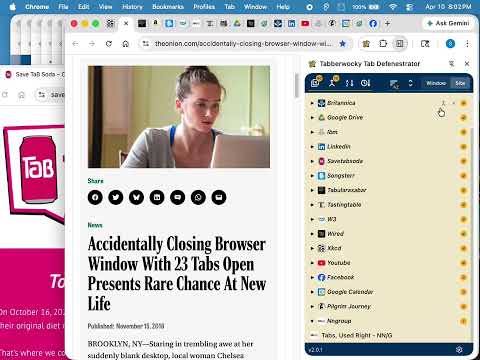
The Tabberwocky Tab Defenestrator will help you quickly remove the tabs you no longer need and organize the rest so you can get on with your day. It resides at the ready in your Chrome side panel, including a real-time list of tabs you can easily browse, organize, and close by tab, site, or window. KEY FEATURES Identify and remove the tabs you no longer need: › Close Duplicates — Count duplicate tabs as they propagate, and remove them in a single, glorious click. › In-line tools — Close individual tabs, sites, or windows at a time. Organize: › Sort Tabs — Reorder tabs in your current window by domain or the time you last accessed them. › Merge Windows — Single click to merge everything from everywhere all at once. Each window's tabs arrive in their original order. Pinned tab states are preserved. › Gather by Site — Single click to pull all associated tabs into a new, dedicated window. Great for when you're not done with tabs tied to a site but don't want them scattered across windows. For a more detailed and interactive overview, see tabberwocky.org/walkthrough 🔒 Privacy (tabberwocky.org/privacy) • All processing stays local on your device • No tracking, analytics, or unexpected handling of data • No access to your tab page content Note: At installation, you'll see a "this can read your browser history" notification. This is because TTD needs real-time access to tab URLs, titles, and ordering to display and organize your tabs. TTD doesn't access your actual browser history — it only knows about tabs that are currently open. Accessibility: Conforms to WCAG 2.2 Level AA (tabberwocky.org/accessibility) Questions and feedback: eric@tabberwocky.org
5 out of 51 rating
Details
- Version2.0.3
- UpdatedJuly 2, 2026
- Size169KiB
- LanguagesEnglish (United States)
- DeveloperWebsite
Email
eric@tabberwocky.org - Non-traderThis developer has not identified itself as a trader. For consumers in the European Union, please note that consumer rights do not apply to contracts between you and this developer.
Privacy

This developer declares that your data is
- Not being sold to third parties, outside of the approved use cases
- Not being used or transferred for purposes that are unrelated to the item's core functionality
- Not being used or transferred to determine creditworthiness or for lending purposes
Support
For help with questions, suggestions, or problems, please open this page on your desktop browser