

TabAutopilot – AI Smart Tab Manager
8 ratings
)
Overview
Smart tab manager & tab organizer: auto group tabs by topic with AI, snooze, hibernate, close duplicates. Private on-device AI.
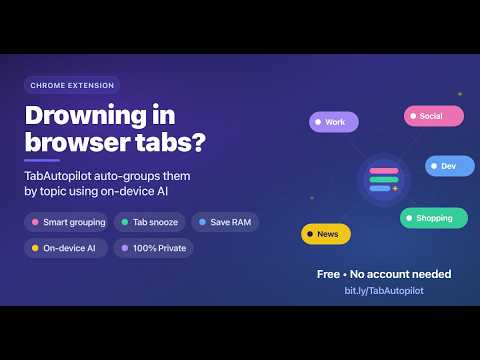
TabAutopilot is an AI-powered tab manager and tab organizer for Chrome that automatically groups tabs by topic, manages tab groups, saves browser sessions, snoozes tabs, hibernates inactive tabs, and finds duplicate tabs — with AI running entirely on your device. Have 20, 50, or 200+ tabs open? TabAutopilot turns tab chaos into organized Chrome tab groups automatically. Group your tabs with one click, let new tabs join the right group as you browse, save complete sessions as workspaces, and quickly find the tab you need. 🔒 PRIVATE, LOCAL AI TAB MANAGEMENT Your tabs stay on your device. • AI grouping runs locally on your computer • No external AI API calls — your tabs are never sent out to be analyzed • No TabAutopilot server, and no account needed to use any feature • No tracking or analytics • Tab data is stored locally • Grouping, snooze and hibernation all work offline • Optional: sign in with Google to back up your profile to a private folder in your own Google Drive. Off by default, and you can sign out or delete every backup at any time. When compatible Chrome AI is available, TabAutopilot can use on-device AI to understand what your tabs are about. On unsupported systems, its local rule engine keeps grouping working without sending your tab data anywhere. 🗂️ AI TAB ORGANIZER & AUTO TAB GROUPING Automatically organize Chrome tabs into meaningful groups based on what each page is about. • Group all open tabs with one click • Automatically organize new tabs as you browse • Group tabs by topic or domain • Create meaningful tab group names • Merge new tabs into existing groups • Understand page titles instead of relying only on domains • Customize grouping rules for your own workflow • Learn from your tab-grouping corrections For example, a localhost page titled "Investment Dashboard" can be recognized as an investment-related tab instead of simply being grouped as Development. Popular categories include: Development, Shopping, News, Social Media, Research, Work, Learning, Finance, Entertainment, Travel, and more. 😴 TAB SUSPENDER — HIBERNATE INACTIVE TABS Reduce Chrome memory usage by hibernating inactive tabs while keeping them visible in your browser. • Automatically hibernate inactive tabs • Choose 15 minutes, 30 minutes, 1 hour, or 2 hours • Click a hibernated tab to restore it instantly • Keep pinned tabs safe • Avoid hibernating tabs playing audio • Control tab hibernation from the side panel • Designed for modern Manifest V3 Chrome TabAutopilot works like a tab suspender, giving you more control over inactive tabs. 🔍 FIND AND CLOSE DUPLICATE TABS Keep your browser clean with duplicate tab detection. • Detect duplicate URLs in real time • Show the duplicate count on the extension icon • Ignore common tracking parameters when matching URLs • Close duplicate tabs with one click • Optionally close duplicates automatically 💾 TAB SESSION MANAGER & WORKSPACES Save your entire Chrome browsing session as a workspace and restore it whenever you need it. Save: • Open tabs • Chrome tab groups • Group names • Group colors • Collapsed group state Create unlimited workspaces for projects, research, study, development, shopping, travel, and everyday browsing. Switch between workspaces and restore your tabs with one click. ⏰ TAB SNOOZE Need a page later but don't want to leave it open? Snooze tabs and let TabAutopilot reopen them automatically. • Snooze individual tabs • Snooze entire tab groups • Choose 1 hour, 3 hours, next Monday, or a custom date and time • Restore snoozed tabs early • Snoozed tabs survive Chrome restarts • Preserve the original tab group when restoring groups 🧹 CLEAR SITE CACHE, COOKIES & SESSION DATA Manage site data directly from a tab. Clear a website's: • Cache • Cookies • Session data • Local browsing history entries A confirmation is shown before clearing site data. Everything happens locally on your device. 🔄 CRASH RECOVERY & AUTO SAVE Chrome crashed or your computer restarted unexpectedly? TabAutopilot automatically saves your session periodically and when important tab changes happen. A recovery option helps restore your previous tabs and tab groups. 📊 TAB ACTIVITY DASHBOARD See how your browser is being used from the Workspaces view. • Memory saved through hibernation • 30-day memory-saving history • Top domains by tab count • Category breakdown • Tab activity levels 🔎 TAB SEARCH & SORT Find open tabs instantly. Search tabs by: • Page title • URL • Domain Sort tabs by title, domain, activity, or original order. Sort groups by name, tab count, or default order. ↩️ UNDO TAB MANAGEMENT ACTIONS Made a mistake? Undo your recent actions with Cmd/Ctrl+Z or the undo notification. Undo support includes: • Closing tabs • Grouping tabs • Ungrouping tabs • Hibernating tabs • Removing duplicates ⌨️ KEYBOARD SHORTCUTS Alt+G — Group tabs automatically Alt+D — Close duplicate tabs Alt+S — Save workspace Cmd/Ctrl+Z — Undo last action 🖱️ CHROME CONTEXT MENU Right-click a page to quickly: • Move a tab to a group • Save a group as a workspace • Hibernate a group • Clear site cookies • Close duplicate tabs 🧠 TAB MANAGER THAT LEARNS YOUR WORKFLOW Enable "Learn grouping from activity" and TabAutopilot can remember your grouping preferences. Move a tab to another group and the extension can learn your preference for future tabs on that domain. Your corrections take priority, and learned rules can be reviewed or deleted from the Rules section. 🎨 CLEAN CHROME SIDE PANEL Manage tabs from a modern side panel with a clean interface, smooth transitions, and light or dark mode. No complicated setup. Install the extension and start organizing your tabs. 🆓 COMPLETELY FREE TAB MANAGER All features are included: • Unlimited tabs • Unlimited workspaces • AI tab grouping • Tab groups • Tab snooze • Tab hibernation • Duplicate detection • Crash recovery • Tab search • Activity dashboard • Custom grouping rules No subscription. No premium tier. No account required. No workspace limits. 👥 BUILT FOR PEOPLE WITH TOO MANY TABS TabAutopilot is useful for: • Researchers managing large research sessions • Students organizing study tabs • Developers working with localhost, documentation, GitHub, and Stack Overflow • Shoppers comparing products across many websites • Professionals managing work and project tabs • Anyone with dozens or hundreds of Chrome tabs WHY USE TABAUTOPILOT? Most people end up running several extensions to keep their tabs under control — one to group them, one to save sessions, one to suspend the ones eating memory, one to clear out duplicates. TabAutopilot does all of that from a single side panel: automatic tab grouping, a session and workspace manager, a tab suspender for inactive tabs, duplicate cleanup, snoozing, and search across every open tab. Instead of manually dragging dozens of tabs into groups, TabAutopilot can organize them automatically while you browse. 🆕 WHAT'S NEW IN VERSION 0.8.7 • Custom categories — create your own categories beyond the built-in ones and assign domains to them • Optional Google Drive backup for your settings, workspaces, categories and rules • Inline workspace renaming • A much smaller install — marketing assets no longer ship inside the extension • Clear a site's cache, cookies, session data, or browsing history directly from its tab REQUIREMENTS Chrome 120 or newer. AI features require Chrome 127+ with compatible hardware. On unsupported systems, TabAutopilot uses its local rule-based grouping engine. TabAutopilot keeps your tabs organized, your browser workspace clean, and your data private.
5 out of 58 ratings
Details
- Version0.8.7
- UpdatedSeptember 18, 2026
- Offered byMamunur Rashid
- Size238KiB
- LanguagesEnglish
- Developer
Email
rfmamun0@gmail.com - Non-traderThis developer has not identified itself as a trader. For consumers in the European Union, please note that consumer rights do not apply to contracts between you and this developer.
Privacy

This developer declares that your data is
- Not being sold to third parties, outside of the approved use cases
- Not being used or transferred for purposes that are unrelated to the item's core functionality
- Not being used or transferred to determine creditworthiness or for lending purposes
Support
For help with questions, suggestions, or problems, visit the developer's support site